Best 5 OpenShift Alternatives For Kubernetes Management & More

OpenShift gives enterprises power, but often at a cost few teams can sustain.
Between the hefty licensing fees and heavy infrastructure demands, many find themselves managing the platform more than their actual workloads.
If that sounds familiar, it might be time for a change.
In this guide, we’ll look at five OpenShift alternatives that let your team manage Kubernetes your way.
| Platform | Best For | Standout Feature | Starting Price | G2 Rating |
|---|---|---|---|---|
| Portainer | Enterprises that want visual Kubernetes management across cloud, edge, and on-prem | Unified dashboard for all container environments | Enterprise plans start from $9,995/year | 4.8/5 (281 reviews) |
| Rancher | Multi-cluster enterprise operations | Centralized governance and access control | $2,400–$3,200 / 2 cores or / 4 vCPUs / year (typical: 16 cores/node) | 4.4/5 (118 reviews) |
| Mirantis Kubernetes Engine (MKE) | Regulated, security-driven enterprises | Dual orchestration (Kubernetes + Swarm) | $1,500–$2,500/node/year | 4.4/5 (281 reviews) |
| Amazon Elastic Kubernetes Service (EKS) | AWS-native Kubernetes users | Deep AWS service integration | $0.10/hour/cluster + AWS resource costs (Standard) $0.60/hour/cluster (Extended) | 4.5/5 (100 reviews) |
| Nutanix Kubernetes Platform (NKP) | Nutanix-centric on-prem and hybrid environments | Integrated Kubernetes lifecycle management within Nutanix ecosystem | Contact for pricing | 3.8/5 (11 reviews) |
1. Portainer: Best Container & Kubernetes Management Platform For Enterprises
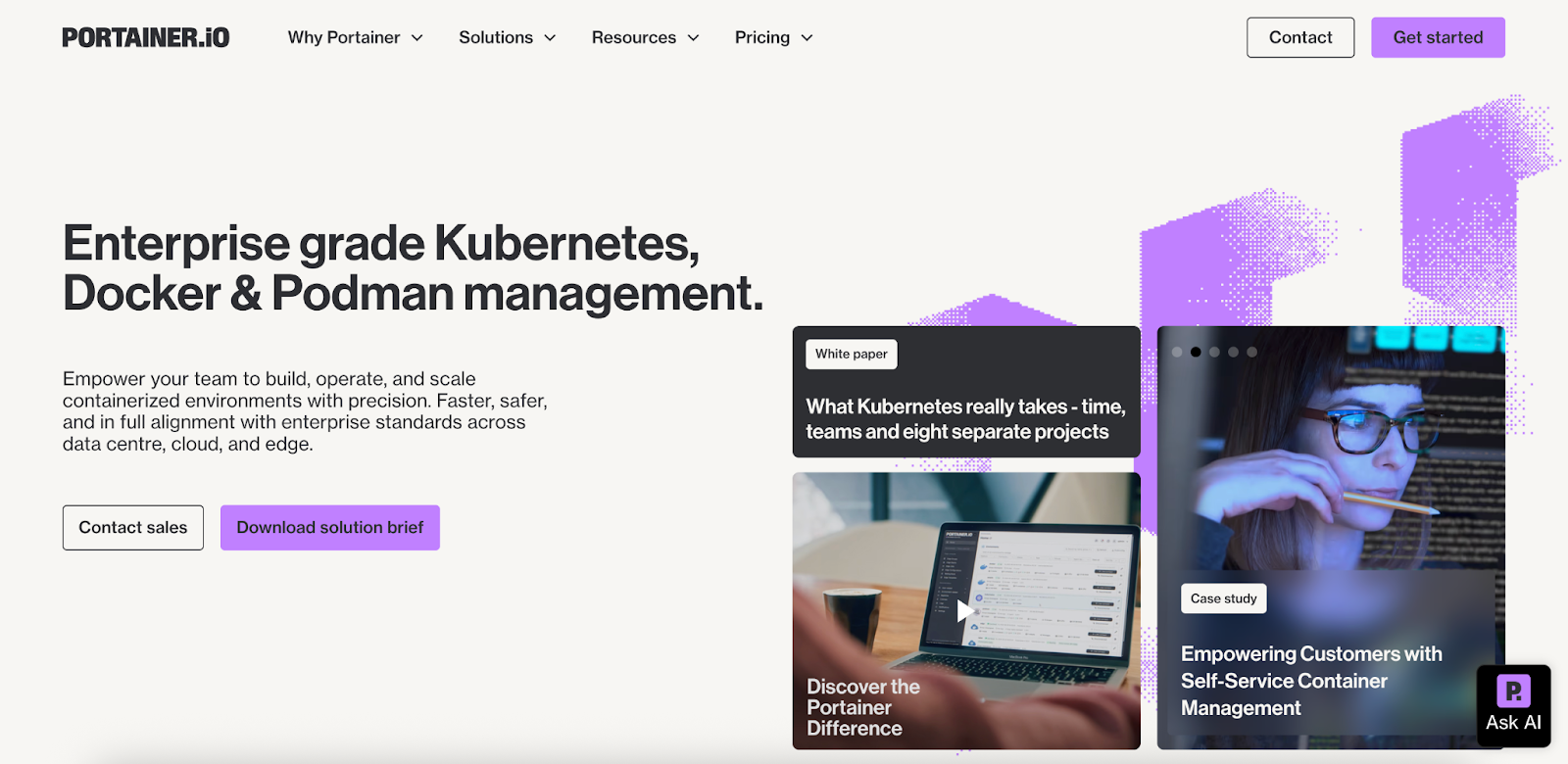
Portainer is a self-hosted Kubernetes orchestrator and management tool that gives enterprises a lightweight and secure way to operate multi-cluster environments. It provides centralized governance with RBAC/SSO, GitOps, and operational tooling, without the heavy stack overhead of full-platform solutions like OpenShift.
Portainer can be deployed alongside existing Kubernetes platforms to unify and simplify operations.
With native support for Docker, Kubernetes, and Podman, Portainer helps platform and DevOps teams run modern infrastructure with less friction and more reliability.
Key features
Portainer brings together the core capabilities engineers rely on to run and govern Kubernetes. Here are some of the features that stand out:
Unified Management Across Any Environment
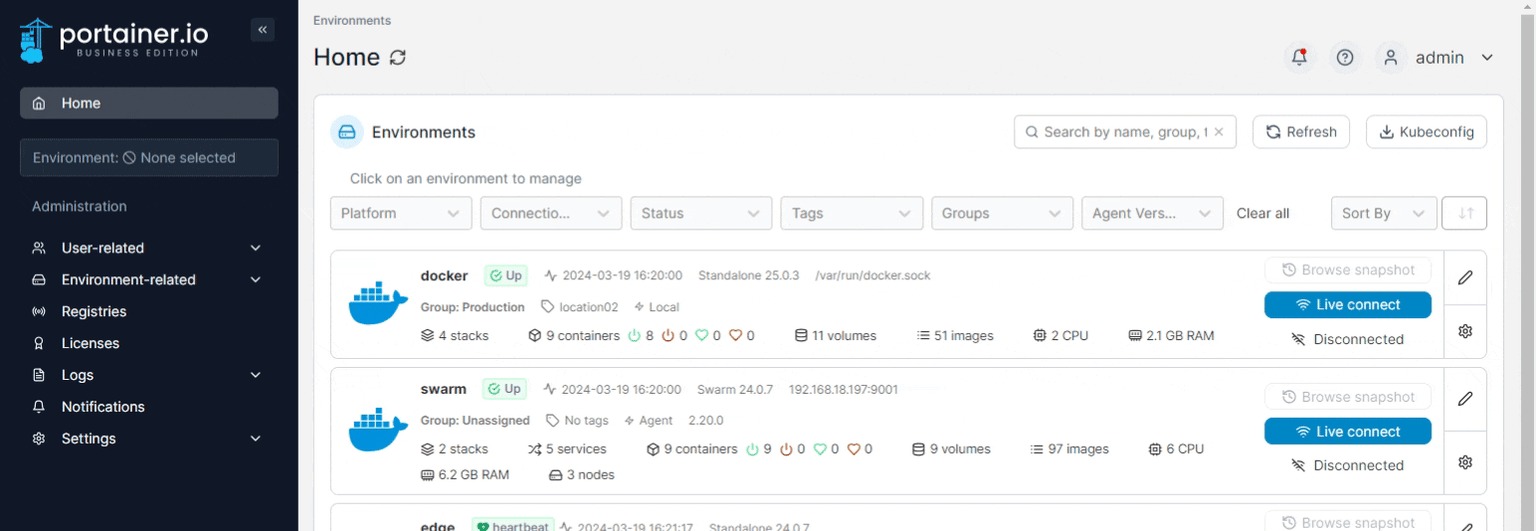
Whether you’re running Docker, Kubernetes, Swarm, Podman, or Azure ACI, Portainer gives you one control plane to manage them all.

You can visualize every environment from a single dashboard, connect new clusters in minutes, and maintain consistent governance across your stack.
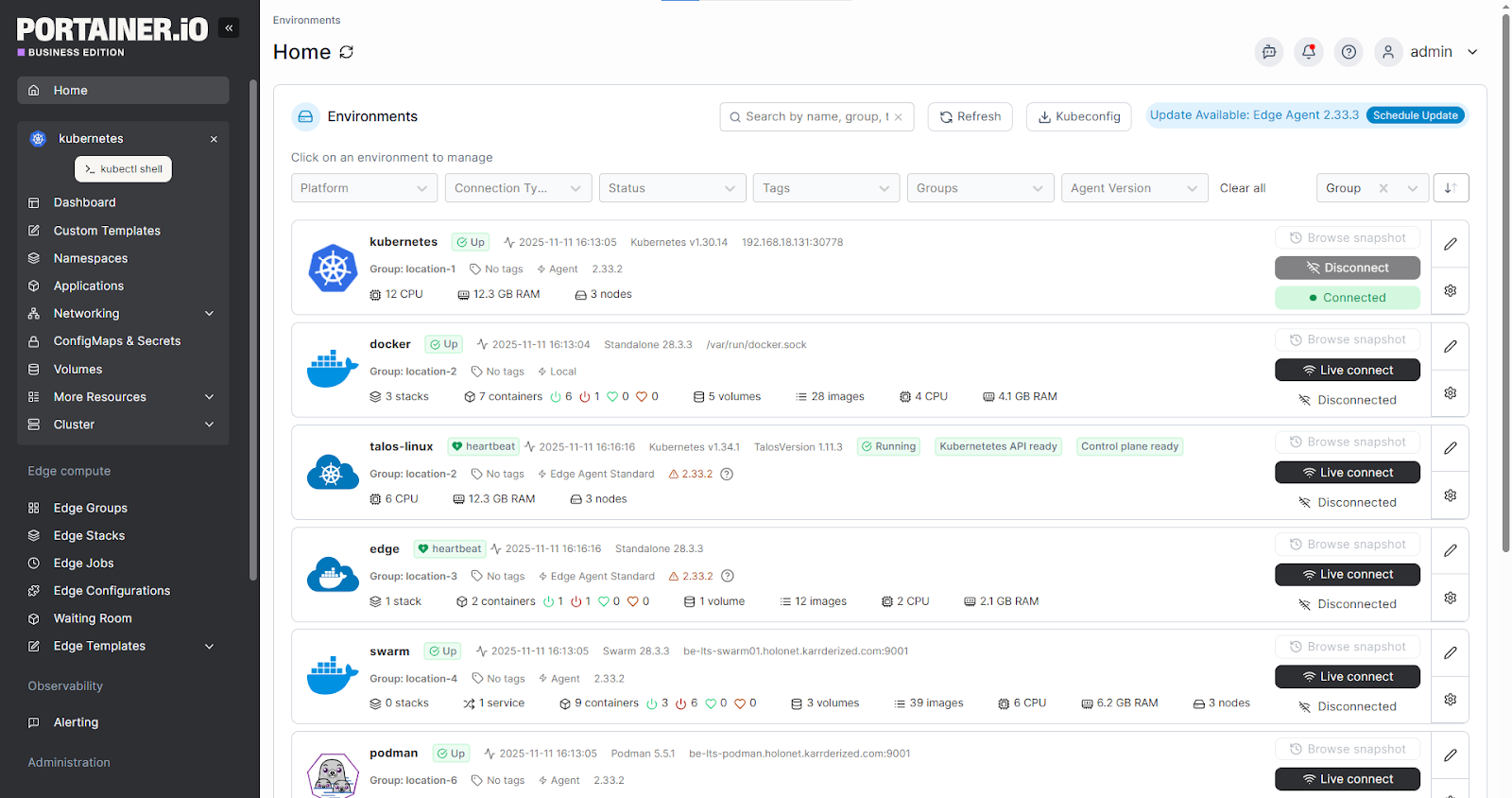
Compared to alternatives, Portainer delivers the same power with less operational drag. This is ideal for teams managing multi-cluster or hybrid deployments.
GitOps and Automated Deployments
With Portainer’s built-in GitOps engine, teams can deploy from source control without juggling separate CI/CD tools.
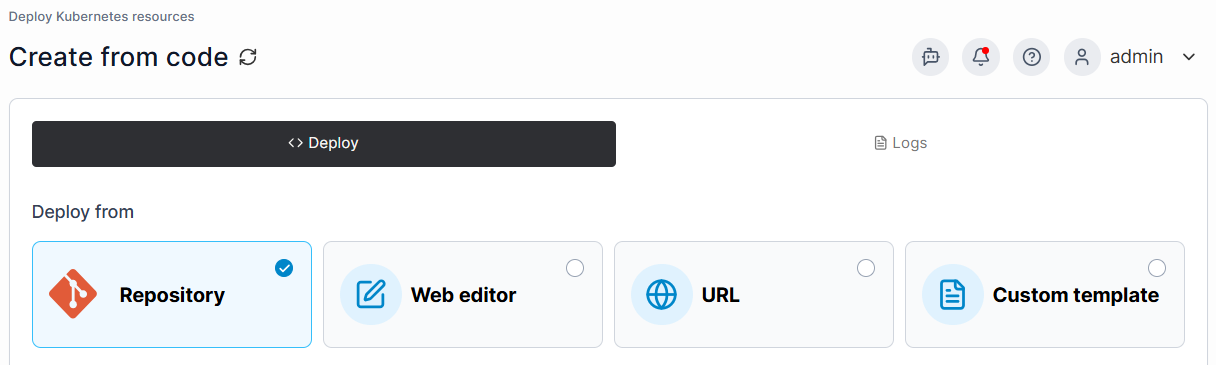
You can sync workloads to Git repos, automate rollouts via webhooks or polling, and manage Helm charts directly through the UI.
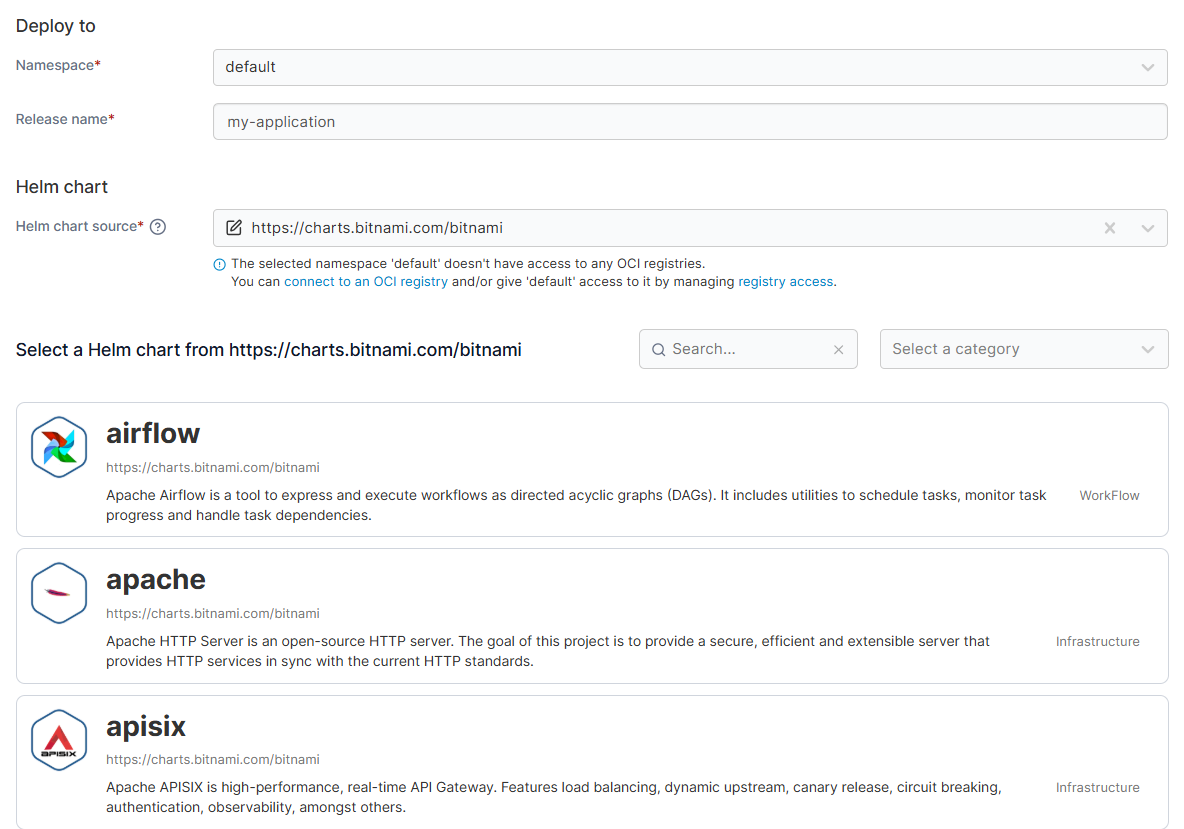
The result is fewer manual interventions, more reliable deployments, and a clearer path to operational consistency, without forcing engineers into steep learning curves.
Secure, Policy-Driven Access Control
Portainer’s role-based access control (RBAC) system provides teams with complete visibility and control over user access across all environments.
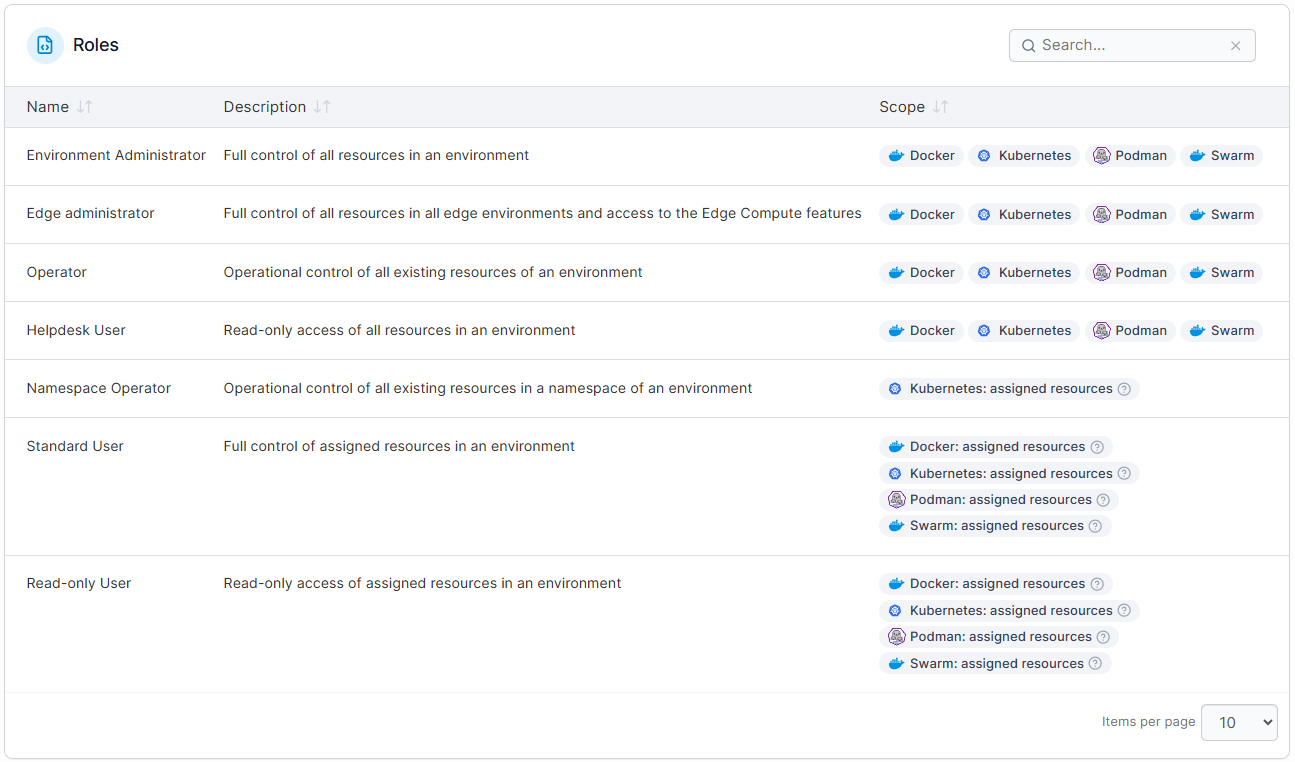
You can assign roles to users and teams that define what they can and cannot do within each environment, so engineers can enforce clear guardrails.
And with dedicated security features such as Security Constraints and detailed authentication and logs, organisations can maintain strong governance and meet internal compliance requirements.
Edge-Optimized Kubernetes Management
Portainer was designed for real-world operations, including remote and industrial environments. Its Edge Agent enables centralized management of clusters and devices, even in low-connectivity or air-gapped setups.
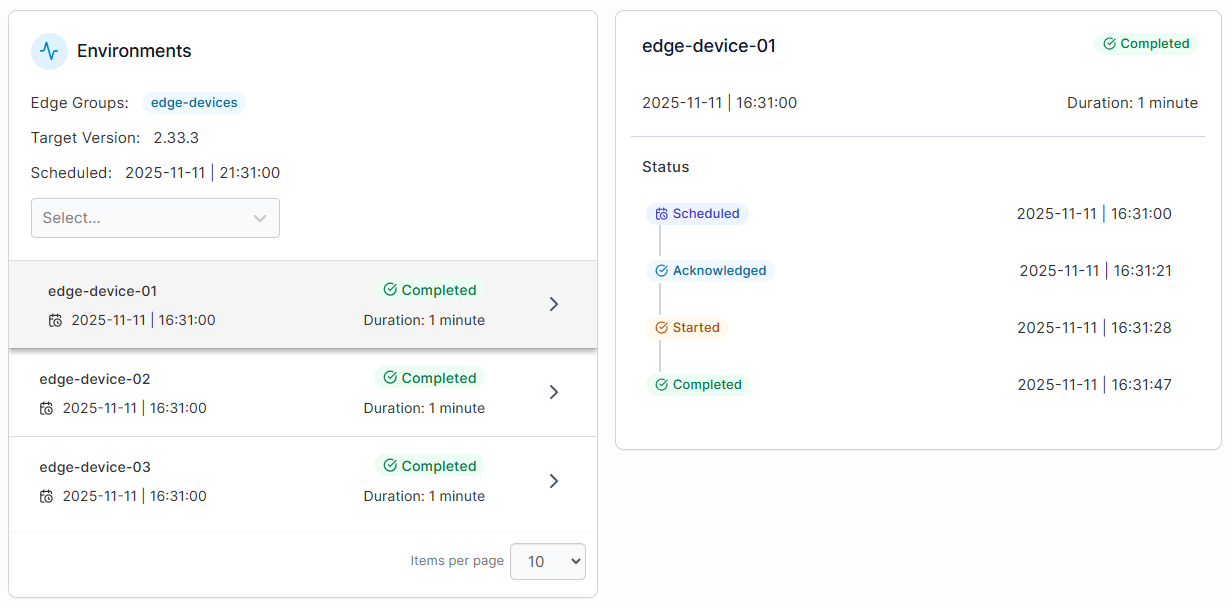
This makes it especially valuable for manufacturing, telco, or logistics teams that need to manage containerized workloads and data at the edge without on-site expertise.
And despite its lightweight footprint, Portainer delivers full Kubernetes management capabilities, from deployments to updates, without the steep learning curve or cost of OpenShift.
Pricing
| Pricing Plan | Cost |
|---|---|
| Enterprise IT | Enterprise pricing from $9,995/year |
| Edge / IIoT | Enterprise pricing from $14,400/year |
For complete plan details and volume-based options, visit Portainer’s Enterprise Pricing page.
Where Portainer shines
- Lower total cost of ownership: Portainer delivers enterprise control at a fraction of OpenShift’s cost (typically 20-50% cheaper with minimal infrastructure overhead).
- Clearer Kubernetes control: Portainer turns Kubernetes management into a visual, predictable experience. Teams can deploy workloads, enforce policies, and monitor clusters without spending hours writing YAML or mastering CLI commands.
- Unified container and edge management: From Docker and Swarm to Podman and edge devices, Portainer centralizes it all in one dashboard.
- Works with your existing stack: Portainer integrates with your current infrastructure, instead of forcing you to replace it.
And beyond the features, the real value of Portainer shows up in how it changes engineers’ day-to-day reality. As Neil Cresswell, CEO & Co-Founder of Portainer, puts it:
“Portainer gives smart platform engineers something far more valuable than another layer of tooling, it gives them back their time. Less operational toil, fewer 2 a.m. alerts, more balance, and frankly, a better quality of life. Because when you strip things down to their essentials, you don’t just reduce engineering overhead… you rediscover what engineering is meant to feel like.”
For a look at how Portainer complements or differs from dedicated CD tools, check out our breakdown of Portainer vs. ArgoCD vs. FluxCD.
Where Portainer falls short
- Limited built-in CI/CD tooling: Portainer’s GitOps engine supports continuous deployment but not full CI/CD pipeline orchestration. Teams needing advanced automation still rely on tools like Argo CD or Jenkins.
To better understand how these methodologies differ and which approach best suits your workflow, you can explore this detailed breakdown of CI CD vs GitOps on our detailed guide.
- Not built for highly customized Kubernetes implementations: Portainer standardizes operations across Kubernetes, Docker, and edge environments. Teams that require bespoke architectures or heavy customization may find it too limited. It’s built for consistent operations, not custom Kubernetes distributions.
Customer reviews
“Portainer makes container management incredibly straightforward. The UI is clean and intuitive, which saves a lot of time compared to manually managing Docker or Kubernetes through CLI. It’s easy to deploy and we use it frequently for day-to-day container tasks. Setting up environments, managing stacks, and monitoring resource usage feels effortless. The role-based access control and team management features are also very handy in a collaborative setup,” says Bharath D.
“Portainer lets me easily and remotely manage almost all aspects of Docker Containers and their supporting infrastructure through a browser-based application, making frequent use simple and effective. Installation is straightforward, and it integrates easily into many environments,” shares Jim B.
“We shaved a good two years off the adoption of containerization because we had Portainer, ” says Jason Plumhoff.
Who Portainer is best for
- Enterprises: Portainer delivers enterprise-grade Kubernetes management at a lower cost than OpenShift or Rancher. See Portainer's platform comparison to weigh deployment expenses and resource requirements before scaling.
- Platform and DevOps teams: Portainer gives teams visibility and control without the burden of complex infrastructure or being tied to a single platform. Its Kubernetes-first design helps engineers standardize deployments, apply guardrails, and manage multi-cluster environments with far less operational friction than full-stack Kubernetes platforms.
- Industrial and edge operators: Ideal for teams managing distributed or offline environments where lightweight deployment matters. Portainer’s Managed Platform Services can also support these environments by providing hands-on guidance for scaling and operating Portainer at the enterprise level.
- IT leaders: For those standardizing container operations across hybrid and multi-cloud environments, Portainer provides centralized governance, visibility, and consistency at every layer.
2. Rancher
Rancher is an enterprise Kubernetes management platform for large-scale, multi-cluster operations. Backed by SUSE, it lets teams deploy, secure, and govern clusters across any environment, providing full visibility and control over distributed infrastructure.
Key features
- Centralized Cluster Management: Rancher provides a single dashboard to deploy, import, and operate multiple Kubernetes clusters. It supports all major distributions, including AKS, EKS, GKE, RKE, and K3s.
- Integrated Monitoring and Workload Insights: Rancher includes Prometheus and Grafana monitoring stack for real-time performance tracking and resource visibility.
- Policy Enforcement and Security Management: Rancher applies consistent security policies across clusters and workloads. Teams can define access rules, network policies, and configuration standards once, then enforce them globally to reduce risk and maintain compliance.
Pricing
Rancher is fully open source and free to use. Enterprise support tiers typically cost $2,400-$3,200/2 cores or /4vCPUS/year (typical: 16 cores/node)
Where Rancher shines
- Open-source flexibility: Since Rancher is fully open-source, teams retain control over their infrastructure choices and can customize deployments without vendor restrictions or licensing costs.
- Enterprise-grade governance: Centralized access control, policy management, and authentication integrations make it ideal for organizations that need to enforce security and compliance across distributed teams.
Where Rancher falls short
- Performance at scale: The UI can feel slower and less responsive when managing very large clusters or workloads.
- Complex setup and maintenance: Rancher’s enterprise-grade flexibility can make initial setup and ongoing management resource-intensive, especially for smaller teams without dedicated platform engineers.
- Cost of enterprise support: While Rancher is open source, organisations still need paid SUSE support for production-grade help, which can become a significant cost for teams that rely heavily on vendor support.
- Steeper learning curve: Its broad feature set requires deeper Kubernetes knowledge, which can slow onboarding for teams new to container orchestration.
If these management complexities are a concern for your team, reviewing a head-to-head breakdown of portainer vs rancher can help you identify a more streamlined alternative.
See Portainer In Action
Customer reviews
“Rancher Desktop actually helped our organisation to move from Docker Desktop to a containerd-based solution. They give better UI and faster in provisioning pods,” says Karthik S.
“Rancher occasionally lags, particularly when a large number of users are utilising it simultaneously. And if you're unfamiliar with it, it can be a little challenging to understand at first,” Karen Y.
Who Rancher is best for
- Enterprises running fleets of clusters: Ideal for managing hundreds or thousands of clusters with strong governance requirements.
- Platform engineering teams: Great for organizations building internal Kubernetes platforms that need centralized control and policy enforcement.
A look at popular Rancher alternatives can help determine the right fit for your Kubernetes strategy.
3. Mirantis Kubernetes Engine (MKE)
Mirantis Kubernetes Engine (formerly Docker Enterprise) is a secure, production-grade platform for managing containerized workloads at scale.
It provides enterprise Kubernetes orchestration along with legacy Swarm support in MKE 3, plus built-in security controls and centralized lifecycle management for regulated or mission-critical environments.
Key features
- Hybrid Multi-Cloud & GPU Support: Mirantis extends beyond container orchestration with unified infrastructure automation and GPU partitioning capabilities. It supports hybrid multi-cloud setups and GPU-powered workloads, making it suitable for AI, ML, and high-performance compute environments.
- Multi-Tenant & Workload Isolation: MKE supports multi-tenant environments with isolated clusters and namespaces. This enables teams to run different workloads securely and independently on shared infrastructure.
- Integrated Security & Policy Controls: From image signing to network isolation and RBAC, MKE enforces enterprise-grade security throughout the container lifecycle. Built-in policy management ensures compliance and reduces risk across hybrid or regulated environments.
Pricing
Mirantis doesn’t publicly list pricing for Mirantis Kubernetes Engine (MKE). But their enterprise plans typically cost $1,500-$2,500/node/year.
Where MKE shines
- Legacy dual orchestrator support: MKE 3 offers both Kubernetes and Swarm, which can help teams running older Swarm workloads transition at their own pace. (MKE 4 is Kubernetes-only.)
- Enterprise-grade reliability: Backed by Mirantis’ professional services, training, and support, MKE is trusted by enterprises running mission-critical workloads that demand uptime and compliance.
Where MKE falls short
- Limited documentation depth: Although MKE covers a wide range of features, its documentation can sometimes feel incomplete, particularly in areas related to advanced or less common use cases. This can make onboarding and troubleshooting slower than expected.
- UI performance and intuitiveness: The interface isn’t as intuitive as newer platforms, and navigating cluster configurations or policies can take longer, especially in large, distributed environments.
- Heavier setup and management overhead: MKE demands more configuration and ongoing maintenance than lightweight platforms like Portainer. Its enterprise-scale features and dual orchestrator design make it more resource-intensive to deploy and manage.
Customer reviews
“Its installation and configuration are quick and easy. Provides great flexibility for managing the cluster,” says Will L.
“The documentation is something I did not like much. The enterprise support portal for Mirantis (MKE and MSR) is not that user-friendly and can be improved,” shares Parth G.
Who MKE is best for
- Regulated industries: Companies in sectors like finance, healthcare, and government that require hardened container runtimes, FIPS-validated encryption, and audit-ready operations.
- DevOps and infrastructure specialists: Experienced teams seeking deep configurability and dual support for both Kubernetes and Swarm orchestration.
To see how a simpler management approach compares, take a look at Portainer vs Mirantis.
4. Amazon Elastic Kubernetes Service (EKS)
Amazon EKS brings Kubernetes management directly into the AWS ecosystem.
It handles all the heavy lifting, such as cluster setup, scaling, and patching, while giving teams full access to AWS’s security, networking, and automation tools.
It also natively integrates with services like IAM, EC2, CloudWatch, and Fargate to help teams run production workloads reliably without maintaining control-plane infrastructure.
Key features
- Managed Kubernetes Control Plane: EKS runs the Kubernetes control plane across multiple AWS Availability Zones for high availability and fault tolerance.
- EKS Anywhere for Hybrid Deployments: Teams can extend Kubernetes management to on-premises or edge environments with EKS Anywhere, using the same APIs and tooling across all setups.
- Enterprise-Grade Security and Compliance: EKS leverages AWS’s identity, encryption, and compliance frameworks, including IAM roles, private networking, and encryption at rest, to meet stringent enterprise requirements.
Pricing
Amazon EKS uses a pay-as-you-go model with no upfront fees. With the standard version, you pay $0.10 per hour for each EKS cluster you run, plus standard rates for AWS compute and storage resources like EC2, Fargate, and EBS. There is also an extended version for $0.60/hour/cluster. EKS Anywhere is licensed separately for on-premises use.
Where Amazon EKS shines
- Production-grade reliability: EKS is battle-tested for mission-critical workloads, running the same hardened Kubernetes infrastructure that powers Amazon’s own services.
- Managed scalability at every layer: Beyond clusters, EKS automatically scales worker nodes, load balancers, and storage through integrations with EC2 Auto Scaling Groups and EBS.
- Long-term ecosystem stability: With full support from AWS, EKS receives frequent updates, enterprise-grade SLAs, and backward-compatible improvements that make it a safe long-term choice for regulated industries.
Where Amazon EKS falls short
- Complex setup for advanced use cases: Getting started is easy through the console, but managing custom networking, permissions, or multi-account clusters can become time-consuming without deep AWS expertise.
- Platform lock-in: EKS is tightly integrated with the AWS ecosystem, so organisations often become dependent on AWS services, pricing structures, and networking models. Moving workloads elsewhere can be difficult and costly.
- Higher operational costs: EKS charges per cluster in addition to the underlying EC2, EBS, and data transfer costs. This layered pricing can add up quickly for teams running multiple clusters.
Customer reviews
“Amazon EKS can be complex to configure, and costs can add up, especially when scaling or using additional services,” says Khushi K.
“The Amazon Elastic Kubernetes service provides the best cluster environments for our containerised applications, great scaling features, and auto pod creation helps for high availability of an application,” shares Chetan P.
Who Amazon EKS is best for
- AWS-first organizations: Teams already using AWS for compute, networking, or storage will benefit most from EKS’s seamless integration and shared security model.
- Enterprises running production Kubernetes at scale: EKS provides the automation and compliance features required for mission-critical workloads.
5. Nutanix Kubernetes Platform (NKP)
NKP gives organisations already running Nutanix a way to add Kubernetes to their existing operational setup.
It’s designed to simplify cluster provisioning, upgrades, and workload management across on-prem, hybrid, and edge environments. But in practice, NKP still behaves like a full Kubernetes platform, which means teams need solid Kubernetes expertise and should expect more day-to-day operational effort than the Nutanix name alone might suggest.
Key features
- Integration with Nutanix Cloud Platform: NKP ties into Nutanix tools like Prism and AHV, so platform teams can provision and manage Kubernetes clusters alongside existing Nutanix infrastructure.
- Hybrid and edge support: Designed to run in on-prem, hybrid, and edge scenarios where Nutanix is already the underlying stack.
Pricing
Nutanix does not publish standalone NKP pricing. It is usually licensed as part of the broader Nutanix Cloud Platform, so teams need to factor in both infrastructure and platform-layer costs.
Where NKP shines
- Strong fit for Nutanix environments: If you already rely on Nutanix for compute and storage, NKP gives you a Kubernetes layer that aligns with your existing tooling and governance model.
Where NKP falls short
- Requires deep Kubernetes expertise: Unlike some other Nutanix tools, NKP still demands solid Kubernetes knowledge. Teams without dedicated platform engineers can struggle with setup and Day-2 operations.
- Non-trivial operational footprint and maturity concerns: Management components, add-ons, and supporting services add overhead. Some early adopters also note rough edges in upgrades and long-term reliability, which increases operational risk.
Customer reviews
“The lack of documentation and support is frustrating,” says Govind J.
“The CLI is not very robust and UI for marathon framework was very buggy,” shares another G2 user.
Who NKP is best for
- Nutanix-centric enterprises: Organisations that have already standardised on Nutanix Cloud Platform and want Kubernetes to sit inside that same ecosystem.
- Kubernetes-mature platform teams: Teams with existing Kubernetes expertise who are comfortable managing a full platform and its Day-2 lifecycle, rather than looking to simplify or reduce overhead.
Reasons to consider an alternative to OpenShift
Some of the key reasons to look for OpenShift alternatives include:
1. Hefty Price Tag
Red Hat OpenShift delivers strong enterprise capabilities, but its high licensing fees, complexity, and infrastructure demands quickly add up.
Portainer, on the other hand, offers comparable Kubernetes management at up to 50% lower cost, with transparent pricing and minimal overhead.
If you’re tied to OpenShift, though, you can still maximize your OpenShift investment with Portainer by using it to streamline multi-cluster visibility and everyday Kubernetes operations.
2. Steep Learning Curve
OpenShift’s interface and configuration process require advanced Kubernetes knowledge. Training and certification often become prerequisites that eventually slow adoption and increase onboarding costs. It also demands deep familiarity with operators, pipelines, policies, and CLI-driven workflows.
Portainer’s interface, on the other hand, shortens the learning curve. Its Kubernetes dashboard presents clusters, workloads, and policies in a structured layout that mirrors how engineers think and work. Every action follows a predictable path, so teams understand what is running, what changed, and where an issue sits.
If you’re evaluating simpler interfaces, this Kubernetes dashboard alternative is worth exploring.
3. Complex Configuration and Tooling
OpenShift’s architecture involves multiple operators, pipelines, and dependencies that make initial setup and configuration more complicated than most teams expect. Managing these components long-term often adds extra operational weight to already-stretched platform teams.
Portainer streamlines Kubernetes operations through a single dashboard that reduces setup friction, strengthens policy control, and brings clarity to daily management tasks. It’s also a strong fit for IT leaders who manage hybrid environments and want a more straightforward approach to Windows container management.
Run Kubernetes More Efficiently with a Modern Container Management Platform
If you’re frustrated with OpenShift’s costs or just plain tired of its operational complexity, Portainer is the better way forward. It gives developers and DevOps teams the control, visibility, and confidence they need, without the overhead or vendor lock-in.
Portainer isn’t always the first name enterprise teams consider, but its governance, visibility, and cross-environment control make it stand out from heavier platforms.
Whether you’re managing hybrid clusters, edge environments, or developer self-service, Portainer helps you run Kubernetes your way.
Explore how Portainer compares with other solutions, or take a closer look through a personalized demo to see how it fits your environment.
FAQs
1. Is Red Hat OpenShift worth the cost, or are people finding better alternatives?
Red Hat OpenShift isn’t worth the cost for most teams. Licensing at $150-$500/core, combined with the infrastructure demands of its full stack, pushes total costs beyond what the platform’s benefits justify, particularly for teams that don’t use the full CI/CD, security, and developer tooling suite. Portainer is an OpenShift alternative that delivers the same core Kubernetes management ground at up to 50% lower cost, works with existing OpenShift clusters if you’re not ready to move, and comes without the Red Hat ecosystem lock-in.
2. What should I figure out about our environment before evaluating OpenShift alternatives?
There are three things worth pinning down. Which OpenShift capabilities you actually use, since some alternatives replace the whole platform while others replace only the management layer. Your team’s willingness to change the underlying Kubernetes distribution, since moving off OpenShift Container Platform is a bigger lift than a management-UI switch. And your compliance obligations, since OpenShift’s built-in FedRAMP, HIPAA, and PCI-DSS controls need equivalents. Portainer covers the management layer without forcing a distribution change and streams audit logs to your existing SIEM.
3. Can I use Portainer alongside OpenShift, or do I have to fully replace it?
Portainer runs alongside OpenShift without forcing a replacement. It connects to and manages any Kubernetes distribution, including OpenShift Container Platform, so the underlying stack keeps running as-is. Teams typically start by adding Portainer alongside OpenShift for multi-cluster visibility, RBAC, and daily operations, which cuts management overhead without a full migration. When teams are ready to move off OpenShift entirely, Portainer manages the target distribution the same way.
4. How hard is it to migrate off OpenShift to a different platform?
Migrating off OpenShift isn’t as straightforward as migrating off a management-only layer like Rancher, since OpenShift is a full Kubernetes distribution with proprietary APIs, operators, and CI/CD tooling. A full migration replaces the distribution itself and reworks anything built on OpenShift-specific APIs. Many teams start with a hybrid approach, adding Portainer for multi-cluster management while OpenShift keeps running underneath, then migrating cluster by cluster to a standard Kubernetes distribution over time. This spreads the effort and cost over multiple quarters.