Share this post
There are now over 21 billion connected IoT devices worldwide, and that number is projected to nearly double by 2030.
But as device counts grow, so does the complexity of actually managing them. It’s a serious operational challenge to keep them provisioned, updated, secure, and running smoothly across hundreds or thousands of locations.
Fleet device management is the discipline of centrally managing distributed devices at scale. When done well, it reduces downtime, strengthens security, and keeps costs predictable. When it’s not, teams end up stuck in reactive mode, chasing firmware issues, juggling disconnected tools, inconsistent configs, and compliance gaps across a growing fleet. For engineers already stretched thin managing distributed infrastructure, that reactive loop can be exhausting.
This guide covers what fleet device management actually is, the core components behind it, and how to build a system that scales without breaking.
What Is Fleet Device Management?
Fleet device management is the process of remotely provisioning, monitoring, updating, and securing a large group of connected devices from a centralized platform. It covers the full device lifecycle, from initial enrollment and configuration all the way through to retirement and decommissioning.
But it’s important to clarify what “fleet” actually means in this context. This isn’t about managing company vehicles or tracking GPS locations. And it goes beyond basic mobile device management (MDM), which typically focuses on phones, tablets, and laptops within a corporate network.
Fleet device management is built for distributed, often headless infrastructure. Think IoT sensors on a factory floor, edge gateways across retail locations, or industrial controllers running in remote energy sites. These are devices without a user sitting in front of them, which means they need to be managed entirely through automation, policies, and remote tooling.
And at its core, it’s more than just keeping devices online. It’s a strategic operational discipline that connects security, compliance, cost control, and uptime into a single system.
The difference between teams that manage fleets well and those that don’t usually comes down to one thing: whether they’re operating proactively with centralized visibility, or reactively, chasing issues device by device.
Core Components of a Fleet Device Management System
A fleet device management system is a set of interconnected capabilities that cover device provisioning, monitoring, OTA updates, security, and lifecycle management. Each component depends on the others, so a gap in any one area creates blind spots across the whole fleet.
Let’s look at each one in a bit more detail.
1. Device Provisioning and Enrollment
Provisioning is where it all starts. This is how new devices get registered, authenticated, and configured before they go into production. This includes assigning credentials, binding the device to the right environment, and pushing initial configurations.
At a small scale, say 10 or 20 devices, manual provisioning is manageable. But once you’re deploying hundreds or thousands of devices across multiple locations, that’s where zero-touch provisioning comes in.
Devices connect and self-configure automatically, without someone having to manually set up each one. It dramatically reduces deployment time, eliminates human error, and makes scaling your fleet practical.
2. Remote Monitoring and Diagnostics
Once devices are in the field, you need real-time visibility into their performance. That means tracking health metrics like CPU usage, memory, connectivity status, battery levels, and uptime across the entire fleet.
The real value here is in proactive diagnostics. Your team can identify failing devices, connectivity drops, or performance degradation before they turn into outages. Without it, the first sign of trouble is usually a support ticket or a customer-facing failure, and by that point, you’re already in damage control mode.
For teams managing containerized workloads at the edge, this visibility matters even more, since a single misconfigured gateway can cause issues to cascade across an entire site.
3. Over-the-Air (OTA) Updates
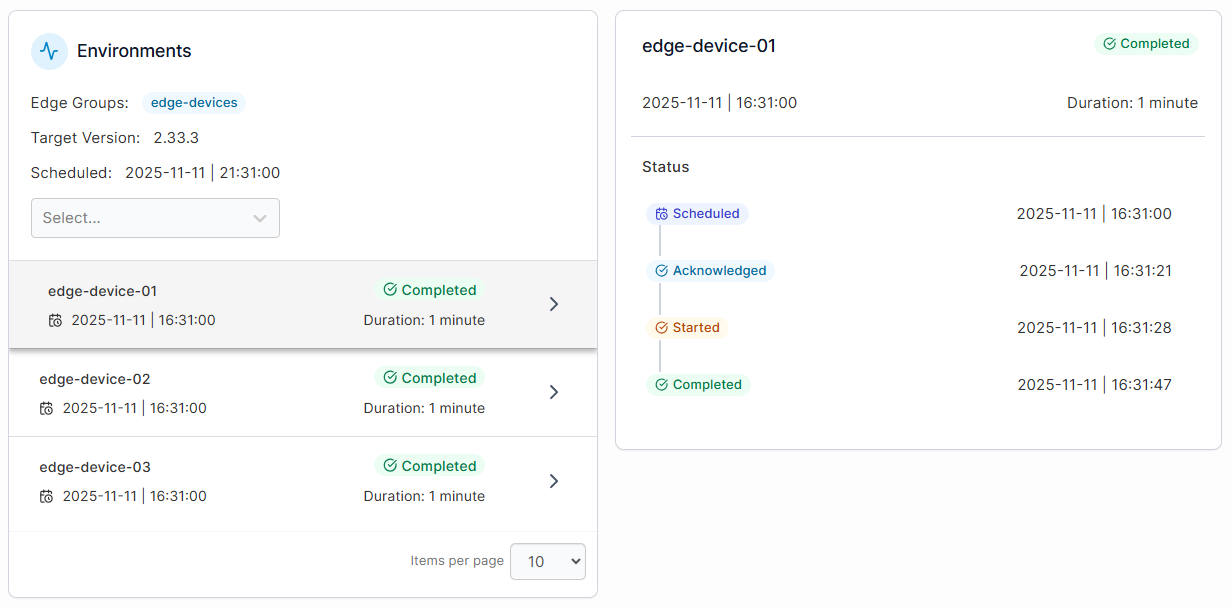
OTA updates are how you remotely push firmware patches, security fixes, configuration changes, and software updates to devices. Without this capability, every update would require physical access to every device, which quickly becomes unmanageable as your fleet grows.
A solid OTA system supports:
- Staged rollouts, so you can test updates on a subset of devices before pushing fleet-wide.
- Automatic rollback in case an update fails, preventing bricked devices across your fleet.
- Delta updates that only send what's changed rather than the full firmware image, saving bandwidth and time.
For teams managing edge and industrial infrastructure, this is one of the most operationally important components in the entire stack.
{{article-cta}}
4. Security and Access Control
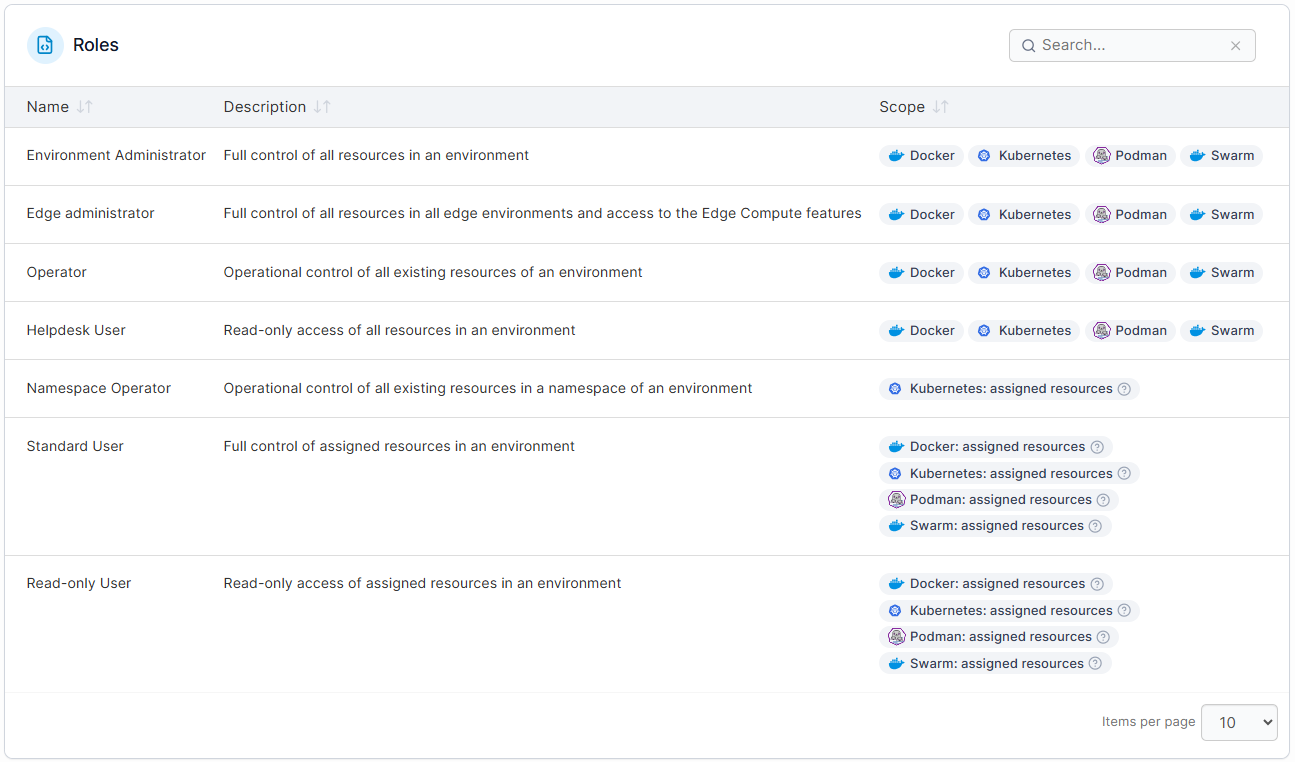
IoT cyberattacks have reached over 100 million incidents in recent years, and every connected device in your fleet is a potential entry point. That means fleet device management must include centralized policy enforcement, role-based access control, certificate management, and encrypted communications across all devices.
Equally important is the ability to remotely revoke access or isolate compromised devices before they affect the rest of the fleet. Teams already using Kubernetes RBAC for their container infrastructure will find that the same principles apply at the device layer.
5. Device Lifecycle Management
Every device has a lifecycle: enrollment, active operation, maintenance, and eventually retirement. Managing this lifecycle centrally means you always know what’s deployed, where it is, what software it’s running, and when it’s due for replacement.
Without lifecycle tracking, fleets accumulate ghost devices (still connected but forgotten), outdated firmware versions, and inconsistent configurations, creating compliance risks.
A strong lifecycle management process ensures clean onboarding, consistent policy enforcement throughout the device’s life, and safe decommissioning when it’s time to retire hardware.
How to Build a Scalable Fleet Device Management System
As fleets grow, the complexity compounds. More devices mean more configurations, more update cycles, more security surfaces, and more things that can go wrong at the same time. A strategy that works for 50 devices will almost certainly break at 500. Here’s how to build a system that’s designed to scale from the start.
Step 1: Define Your Requirements and Device Inventory
Before you evaluate any platform or tool, get clear on what you’re actually managing. This includes documenting your full device inventory:
- Device types
- Operating systems
- Hardware specs
- Locations
- Connectivity methods
- Current software versions
From there, define your operational requirements:
- How many devices are you managing today, and where do you expect that number to be in 12 to 18 months?
- What are your uptime and compliance requirements?
- Do your devices operate in environments with limited or intermittent connectivity?
- What security or regulatory standards do your devices need to meet?
Once you have this baseline, everything else builds on it. Without it, you’re making architectural decisions based on assumptions, which is where multi-cluster management challenges start to surface.
Step 2: Choose a Centralized Management Platform
Now that you’ve defined your requirements, choose a platform that can serve as the single control plane for your entire fleet. This is the most consequential decision in the whole process, because the platform you choose determines how you provision, monitor, update, and secure every device going forward.
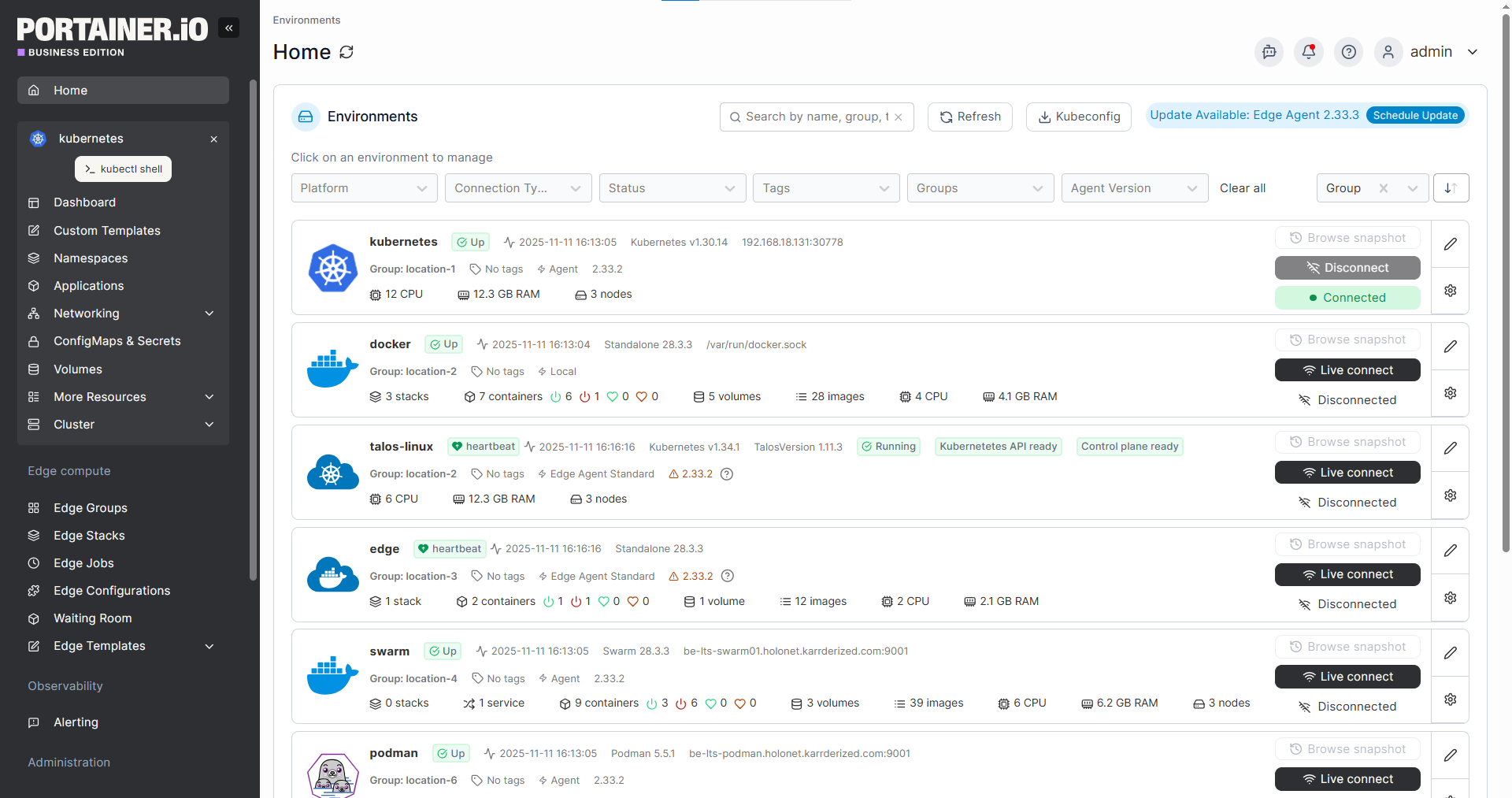
For teams already running containerized workloads, Portainer is built for exactly this. It gives you unified management across edge and IoT environments from a single, lightweight interface, deployed on your own infrastructure with centralized visibility across all locations, whether your devices are on-prem, in the cloud, or at the edge.
And because it’s vendor-agnostic, you’re not locked into any specific cloud provider or proprietary ecosystem as your fleet grows.
Whatever platform you choose, the key criteria are the same: support for your specific device types and operating environments, centralized control across distributed locations, and the flexibility to scale without hitting vendor lock-in down the line.
{{article-cta}}
Step 3: Standardize Your Provisioning Process
With your platform in place, the next step is to standardize the onboarding process for new devices. Every device that enters your fleet should follow the same enrollment workflow: identity verification, credential assignment, configuration push, and group assignment.
At scale, this has to be automated. Manual provisioning introduces inconsistencies and becomes a bottleneck the moment you’re deploying across multiple sites. Zero-touch provisioning is the standard for fleets with more than a few hundred devices.
Standardization here also means defining fleet governance policies upfront: which configurations are enforced globally, which can be customized per site, and who has permission to override them.
Step 4: Implement Continuous Monitoring and Alerting
Once devices are live, you need a system that continuously tracks their health and flags issues before they escalate. This means setting up real-time monitoring for connectivity status, resource usage, software versions, and security posture across the entire fleet.
The key here is actionable alerting. For example, define thresholds that trigger alerts for conditions that actually matter, such as a device going offline, firmware falling behind the current version, or unusual network behavior that could indicate a compromise.
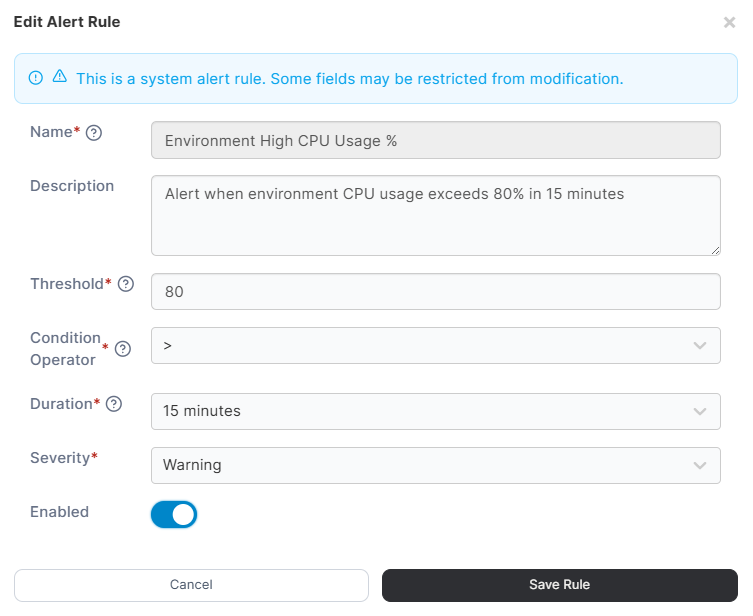
Teams that manage Kubernetes at the edge will recognize this pattern. The same principles of centralized observability and proactive alerting apply whether you’re managing containers or physical devices.
Step 5: Automate Your Update and Patch Pipeline
Manually pushing updates to a growing fleet isn’t sustainable, to say the least. Instead, build an automated pipeline that handles firmware updates, security patches, and configuration changes across your entire fleet with minimal manual intervention.
Your pipeline should support the OTA capabilities (staged rollouts, rollback, delta updates) along with scheduling to avoid disrupting operations during peak hours. And for devices in remote or low-bandwidth environments, keeping update payloads as small as possible is essential for maintaining fast and reliable update cycles.
The goal is to get to a point where updates are a routine, automated process, not a manual project that requires engineering time every cycle.
Step 6: Design for Growth from Day One
The architecture decisions you make now will either support or limit your ability to scale later. That means designing your system with growth in mind:
- Modular platform architecture that can handle new device types as your fleet diversifies.
- Flexible grouping and tagging so you can segment your fleet by location, function, or environment as it expands.
- API-driven integrations so your management platform works with the rest of your stack without custom workarounds.
It also means planning for geographic and network diversity. A fleet that starts in one data center often expands to multiple sites, edge locations, or hybrid environments. Your system needs to accommodate that without requiring a rearchitecture. Building on a solid Kubernetes architecture foundation gives you the flexibility to scale across environments as your fleet grows.
Best Practices for Fleet Device Management at Scale
Building the system is step one. These are the operational habits that keep it running well over time:
- Rotate credentials and certificates on a schedule. Static credentials are one of the most common security gaps in IoT fleets. Set up automated rotation for device certificates, API keys, and access tokens so that compromised credentials expire before they can be exploited. The same Kubernetes security principles apply here: treat every credential as temporary by default.
- Define clear ownership for every layer of the stack. Decide upfront who owns device hardware, connectivity, firmware updates, platform configuration, and incident response. Without clear ownership, the most common failure mode is everyone assuming someone else is watching.
- Segment IoT traffic from your corporate network. Never let fleet devices sit on the same network as your internal systems. Use secure gateways and encrypted channels to keep device traffic isolated, so a compromised sensor can’t become a path into your ERP or admin tools. This also simplifies compliance, since you can apply different retention and access rules to device data without affecting the rest of your infrastructure.
- Test every update on a canary group before fleet-wide rollout. Even with staged rollouts configured, make it a practice to designate a permanent canary group of devices that receives every update first. Monitor that group for 24 to 48 hours before promoting the update. This catches edge cases that don’t show up in lab testing, especially across diverse hardware and connectivity conditions.
- Document and rehearse your incident response plan. Know exactly what happens when a device is compromised, a fleet-wide update fails, or a critical group of devices goes offline. Define escalation paths, container best practices for isolating affected workloads, and communication protocols. A plan that only exists in someone’s head isn’t a plan.
When Is Fleet Device Management Worth the Investment?
Not every organization needs a dedicated fleet device management system on day one. But there are clear signals that you’ve outgrown a manual or basic MDM approach:
- You’re managing more than 100 devices across multiple sites, and there’s no single source of truth for what’s deployed where.
- Troubleshooting a single device issue requires logging into multiple tools or sending someone on-site.
- New device rollouts are slow because every deployment is handled differently, depending on the team or location.
- You’ve lost visibility into how many devices are actually active versus sitting idle or forgotten.
- The cost of unplanned downtime is starting to outweigh the cost of investing in better tooling.
If two or more of those sound familiar, the operational overhead of not having a centralized system is likely costing more than the system itself.
Bring Your Device Fleet Under One Control Plane with Portainer
Most teams managing distributed device fleets end up juggling a patchwork of tools that don’t talk to each other. It works until it doesn’t, and by that point, you’re spending more time managing the tools than managing the fleet.
Portainer is a lightweight, vendor-agnostic management platform that gives enterprise IT and industrial IoT teams a single control plane to provision, monitor, update, and secure containerized workloads across on-prem, cloud, and edge environments.
Portainer offers dedicated IoT and Edge pricing tiers designed for teams managing large distributed device fleets, making enterprise-grade management accessible without enterprise-grade spend.
Schedule a demo to see how Portainer gives your team a single control plane to manage, secure, and scale containerized workloads across your entire infrastructure without the overhead.
FAQs
1. What is the difference between fleet device management and mobile device management (MDM)?
MDM focuses on managing employee devices like phones, tablets, and laptops within a corporate network. Fleet device management is built for distributed, often headless infrastructure such as IoT sensors, edge gateways, and industrial controllers that require full automation and remote tooling.
2. Is fleet device management the same as IoT device management?
Largely, yes. Fleet device management is IoT device management applied at scale. The “fleet” distinction emphasizes managing hundreds or thousands of devices as a unified group, with centralized provisioning, monitoring, updates, and security policies, rather than handling devices individually.
3. How does containerization help with fleet device management?
Containers package applications and their dependencies into portable, consistent units that run the same way on any device or in any environment. This makes it far easier to deploy, update, and roll back software across a large fleet without worrying about device-specific configuration differences.