Kubernetes Architecture: Components & Best Practices (2026)

At enterprise scale, Kubernetes failures rarely come from bad code. They come from unclear architecture, fragile control planes, and operational blind spots.
This guide walks you through the structure, components, and workflows to help you design and operate Kubernetes with confidence.
What is Kubernetes Architecture
Kubernetes architecture defines how a Kubernetes cluster organizes responsibilities so it can store desired state, make decisions, and run workloads reliably.
At the center of this design are two tightly connected layers: the control plane and worker nodes.
The control plane stores cluster state and decides what should run and where. Those decisions flow directly to the worker nodes, which execute them by running containers and reporting their current state. This structure allows Kubernetes to continuously compare the desired state with the actual state and automatically correct drift.
Control Plane
Think of the control plane as an air traffic control tower. Every request passes through it first. It approves changes, keeps the official flight plan for the cluster, and decides where each workload should land. From there, it constantly watches what is actually happening and adjusts instructions to stay aligned with the plan.
When the control plane is unavailable, new workloads cannot be scheduled, and changes remain stuck, even if everything else is still running.
Worker Node
Worker nodes are the aircraft carrying passengers. They execute the instructions they receive, run pods, enforce networking behavior, and report their status. Their job is to operate safely and predictably.
When worker nodes become unhealthy, applications experience delays or outages. When the control plane is unhealthy, the aircraft may keep flying, but no new routes or corrections can be issued.
Core Components of Kubernetes Architecture
Let’s break down the components that make the control plane and worker nodes operate as a single system. If you are troubleshooting issues, designing for production, or learning how Kubernetes works end to end, these are the building blocks you need to understand.
For an actionable framework on diagnosing failures across these layers, you can read our complete guide to Kubernetes troubleshooting.
API Server
The API server is the front door to the cluster. Every change, request, or query flows through it before anything happens.
It validates requests, records intent, and exposes the cluster’s current state. Nothing runs, scales, or updates unless it passes through this layer, which makes it the central coordination point for all activity.
Cluster State Store
The cluster state store holds the source of truth for Kubernetes. It records the state of the cluster at any moment, including workloads, configuration, and relationships. Other components read from and write to this store to understand intent. If this state becomes unavailable, Kubernetes cannot reliably decide what to run or how to recover.
Scheduler
The scheduler decides where new workloads should run. It looks at the desired state and the available capacity across worker nodes, then selects the most appropriate placement. This decision-making step connects intent with execution.
When scheduling pauses, workloads remain pending even if the cluster has enough resources to run them.
Controllers
Controllers act as constant supervisors. They monitor the cluster state and compare it to the expected state.
When something drifts, such as a pod failing or a replica disappearing, controllers trigger corrective action. This loop makes Kubernetes self-correcting rather than reactive only to manual intervention.
Node Agent
The node agent is the link between the control plane and each worker node. It receives instructions, ensures pods run as expected, applies runtime and networking behavior, and reports status back. This feedback closes the loop. Without it, the control plane loses visibility and cannot reliably enforce the desired state.
How Kubernetes Architecture Works (Step-by-Step)
If you want to understand request flow, automation, or why Kubernetes keeps fixing things without being told, follow these steps from intent to execution and back again.
Users Declare Desired State
Everything starts when a user or system declares what should exist. This could be a new application, a scale change, or a configuration update.
The control plane receives this intent and treats it as the source of truth. At this point, nothing runs yet. The cluster simply agrees on what the end state should look like and prepares to work toward it.
💡 Pro tip: This model is why Kubernetes pairs naturally with automation and GitOps workflows. The cluster reacts to declared intent rather than manual actions. See how this works in practice in Portainer’s guide to Kubernetes automation.
Further Reading:Kubernetes, the ultimate enabler of automation
The Cluster Records the Desired State
Next, the control plane stores the desired state so it can be referenced consistently by all parts of the system. This step turns intent into shared knowledge. From now on, Kubernetes has a stable reference point for what should be running, how many copies should exist, and how they should behave. This record enables repeatability, recovery, and safe retries when something goes wrong.
Side note: This factor is the reason why Kubernetes works well with GitOps models, where the declared state lives in version control.
Want to See How Portainer Manages Kubernetes Clusters?
Placement Decisions are Made
With the desired state recorded, the control plane decides where workloads should run. It evaluates available worker nodes and selects suitable placements based on current conditions.
The outcome is a straightforward assignment that connects intent with a specific node, preparing the cluster to move from decision to action.
Result: Workloads move from “defined” to “assigned.”
Worker Nodes Execute the Workload
Once a placement decision has been made, the assigned worker node takes over. The node starts running the workload, applies the required runtime and networking behavior, and brings the application to life.
From the user’s perspective, this is when something finally starts working. From Kubernetes’ perspective, this is only part of the loop, not the end of the process.
Result: The workload runs, and the node begins reporting its status.
Continuous Reconciliation Keeps it true
Kubernetes does not stop after execution. The control plane continuously compares what is running with what you declare. If a workload crashes, disappears, or drifts from the desired state, the cluster reacts and corrects it. This reconciliation loop is what makes Kubernetes resilient by default. The system does not wait for instructions to fix known gaps.
Note: If worker nodes fail, workloads degrade, triggering a correction. If the control plane fails, reconciliation stops, and the cluster can no longer adapt, even if applications keep running.
Further reading:How to Build Your Own Enterprise Kubernetes Platform
Common Kubernetes Architecture Setups (Cloud vs On-Prem vs Hybrid)
Kubernetes architecture follows the same core model everywhere, but who owns and operates each part changes by environment. The control plane and worker nodes still exist in all cases. What differs is responsibility for availability, upgrades, networking, and recovery. The comparison below helps you map architectural choices to real operational tradeoffs.
| Decision Criteria | On-prem Kubernetes | Cloud Kubernetes | Hybrid Kubernetes |
|---|---|---|---|
| Who operates the control plane? | You fully manage it | The cloud provider manages it | Shared responsibility |
| How infrastructure scales | Capacity planned in advance | Scales on demand | A mix of fixed and elastic |
| Networking model | Fully controlled, more complex | Abstracted, easier defaults | Requires careful integration |
| Upgrade and lifecycle control | Complete control, higher effort | Limited control, lower effort | Split control and timing |
| Best fit for | Regulated, air-gapped, predictable workloads | Fast-moving teams and variable demand | Data locality with cloud elasticity |
Further reading: On-Prem is Calling Again: Why De-Clouding is Making A Comeback
7 Kubernetes Architecture Best Practices
Kubernetes architecture succeeds or fails based on how well you separate responsibility, handle failure, and control change. These best practices focus on decisions that shape reliability, security, and operational load over time, not day-to-day commands.
Design the Control Plane to Stay Available Under Failure
Always design the control plane to continue operating when individual components fail. The control plane accepts changes, schedules workloads, and drives reconciliation. When it becomes unavailable, deployments freeze, scaling stops, and recovery actions stall. Even if applications keep running, the cluster loses the ability to adapt.
High availability prevents a single failure from blocking all change. This design increases infrastructure cost and operational effort, but it protects the cluster from total control loss during outages and upgrades.
Treat Worker Nodes as Disposable Execution Units
Nodes run workloads, but they should never become special or irreplaceable. When workloads depend on specific nodes, recovery slows and risk increases.
Disposable nodes simplify upgrades and improve resilience, but they require disciplined workload definitions and resource limits to avoid unstable scheduling.
Portainer makes it easier to spot unhealthy nodes and rebalance workloads across clusters before failures cascade. It identifies unhealthy worker nodes through the Portainer Agent installed on each node, which continuously reports node status, resource usage, and container health back to the central Portainer Server.
Separate Workloads by Trust Level and Ownership
Design the cluster so workloads with different risk profiles do not share the same failure domain. Production systems, internal tools, and experimental workloads should not compete for the exact control boundaries.
Clear separation reduces the blast radius of misconfigurations and improves accountability. This approach increases the workload for policy and access management, but it prevents one team’s mistake from affecting unrelated services.w
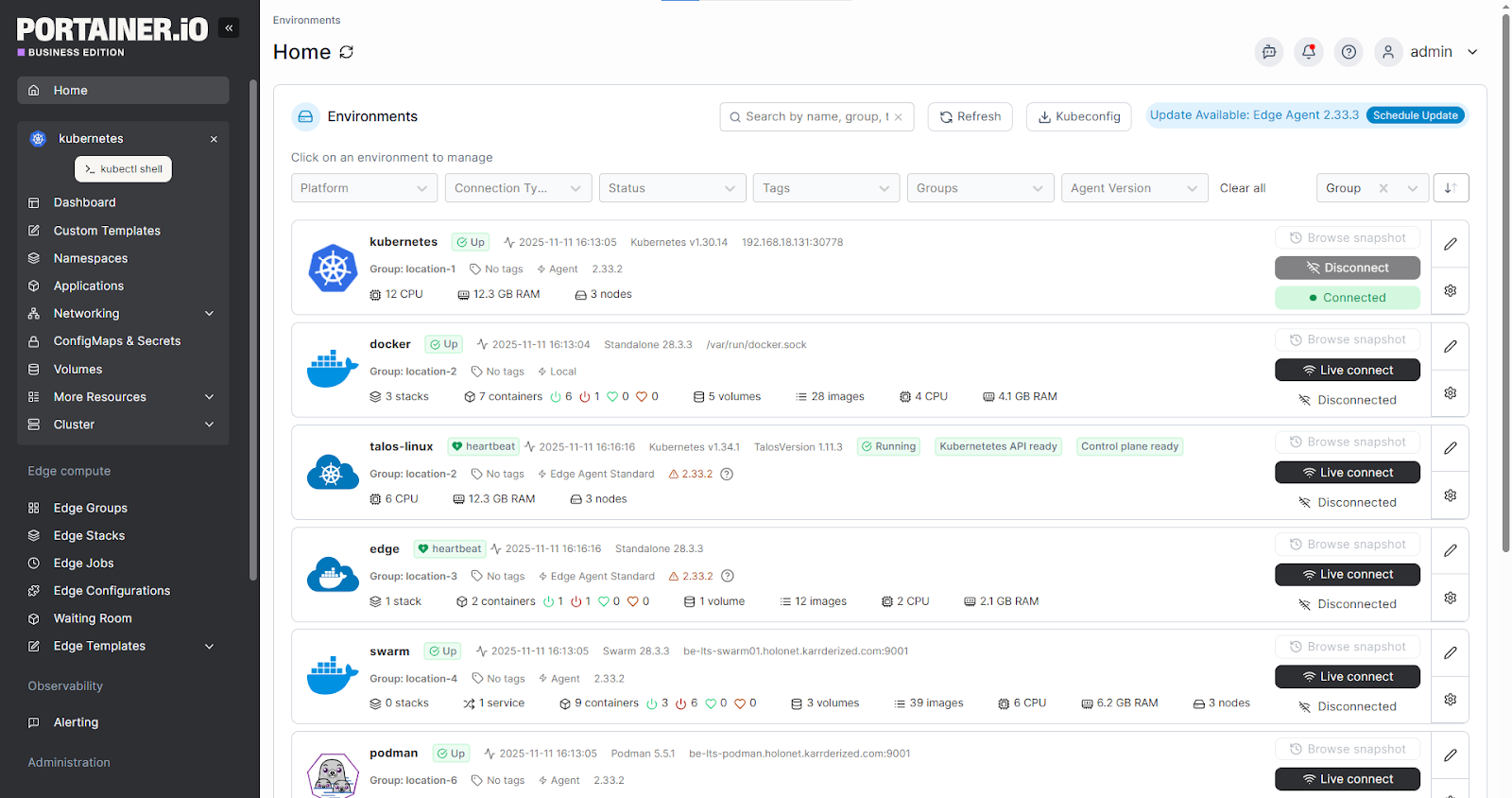
Portainer simplifies multi-tenant access by mapping teams and environments to clear visual boundaries, without granting broad kubeconfig access.
Make Networking a First-Class Architectural Decision
Decide how workloads communicate before production usage begins. Networking affects latency, isolation, troubleshooting, and security posture across the cluster. Poor early decisions create hidden constraints that surface later as outages or performance limits. While early commitment reduces flexibility, it avoids disruptive re-architecture once traffic grows and dependencies multiply.
Portainer gives your team a centralized view of networked workloads across clusters, making it easier to enforce consistent patterns.
Align Storage Architecture With Workload Behavior
Design storage around how applications use data, not around defaults. Stateless workloads recover easily, while stateful systems need predictable durability and recovery paths. Mixing these without intent leads to slow recovery and data risk.
Although a storage-aware architecture adds planning overhead, it prevents performance bottlenecks and fragile recovery processes.
Your team can use Portainer to visualize which workloads rely on persistent storage, reducing accidental disruption during maintenance and upgrades.
Architect for Visibility, not Just Alerting
Design the cluster so operators can see the system state clearly across the control plane and nodes.
Visibility enables safe automation and fast diagnosis. Without it, teams rely on guesswork during incidents. This approach increases operational data volume, but it reduces downtime and stress during failures.
Assume Multi-Cluster is Your Future State
Plan for multiple clusters even if you start with one. Growth, isolation, and compliance often force cluster sprawl. Without early governance, access control and lifecycle management become inconsistent.
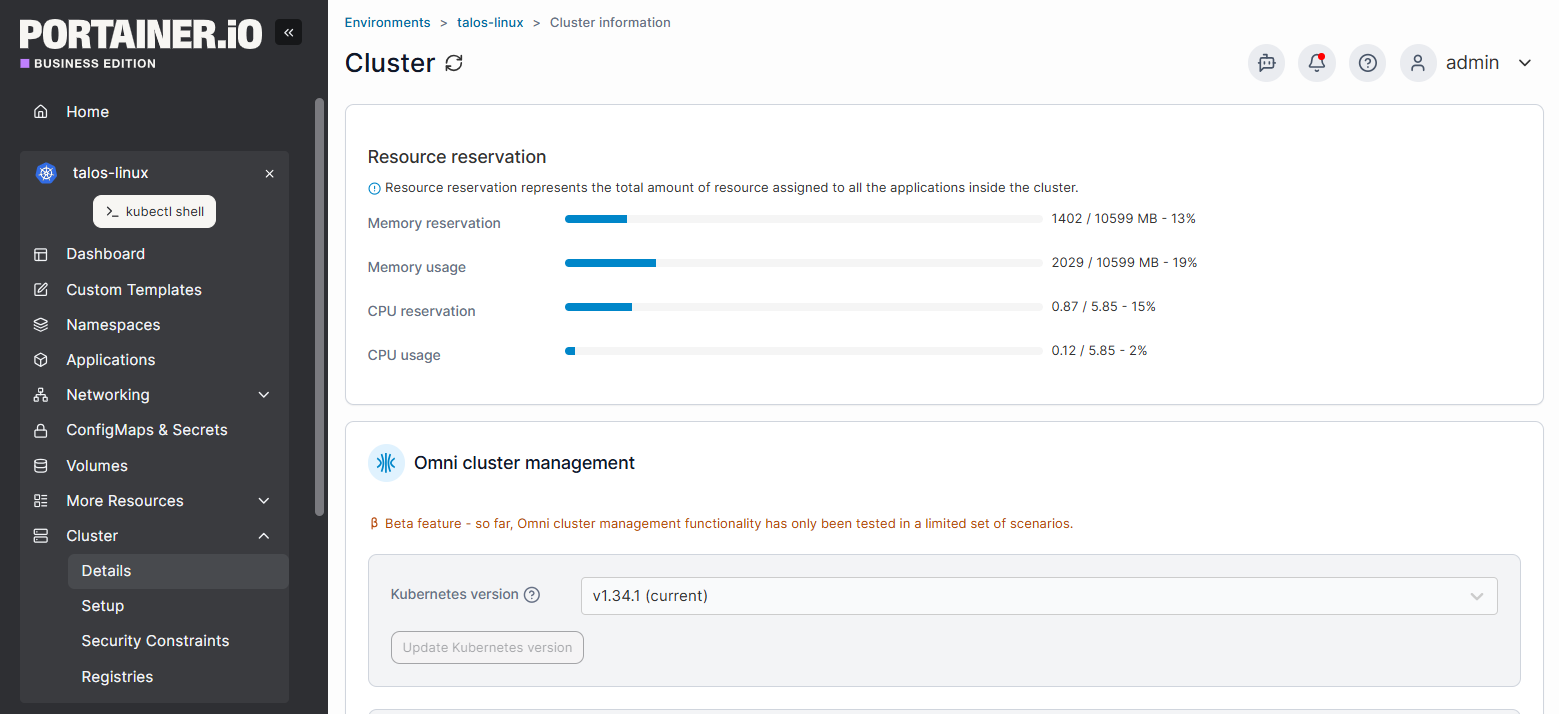
Portainer provides a single management layer across Kubernetes clusters, making multi-cluster operations manageable without rebuilding processes.
Your engineers deserve tools that help them perform, not burn out. Contact our sales team to see how Portainer manages Kubernetes clusters from a single, intuitive dashboard without compromising security.
Build Reliable Kubernetes Systems Without Burning Out With Portainer
As Kubernetes architectures grow, operational load grows with them: more clusters, environments, decisions, and late nights.
Portainer acts as the power tool for your team. It brings order to Kubernetes management chaos, improves system reliability, and gives you control without adding friction. You spend less time fighting the platform and more time building systems that behave predictably.
If you want to operate Kubernetes at scale without the constant headache, book a Portainer demo and see how organized, resilient, human-friendly operations actually feel.