10 Container Security Best Practices for Enterprises in 2026

In a survey of 800 security and IT leaders from enterprise organizations, 59% of the respondents have experienced security incidents in their container environments.
These security breaches can disrupt operations, expose sensitive data, and create costly compliance failures. The rising frequency and impact of such incidents underscore the need to adopt container security best practices to protect your workloads, maintain compliance, and reduce the risk of widespread damage across containerized environments.
This article covers the common container security challenges and enterprise-grade security practices, including how Portainer helps centralize security, enforce network policies, and maintain compliance.
What is Container Security?
Container security is the process and tools used to protect containerized applications and their supporting infrastructure from vulnerabilities, malware, misconfigurations, and unauthorized access. It starts with securing container images before they enter a registry and continues through deployment, runtime, and day-to-day operations.
Containers move fast and scale automatically, which means a single weak image or misconfigured workload can spread quickly across environments. That speed makes container security a crucial factor when building and managing containers.
Importance of Container Security
Container security protects the applications and data within containerized environments from threats, thus ensuring business continuity, mitigating security risks, and maintaining regulatory compliance.
It matters because modern applications rarely run as a single, isolated workload. Containers share hosts, networks, and control planes, which means a security breach in one container architecture component can affect everything around it (more on this aspect later).
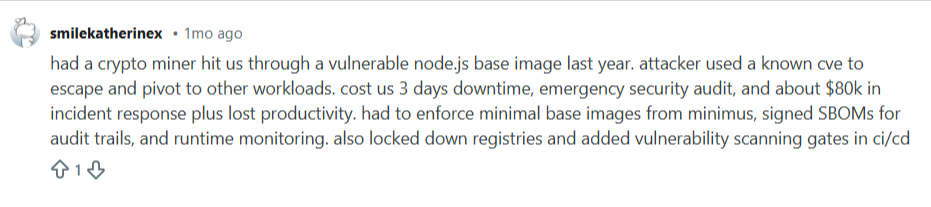
A Redditor shared how a crypto miner attacked their workloads through a vulnerable node.js base image. This security breach cost them thousands of dollars to rectify, plus lost productivity.
Source: Reddit
Consistent container security practices reduce this risk by enforcing isolation, limiting access, and keeping control as complexity grows.
Key Components of Container Architecture to Secure
Effective container security depends on identifying the key components of container architecture and understanding the role each part plays in how risk enters and spreads across your containerized environments.
| Component | What it Controls | Potential Impact if Unsecured |
|---|---|---|
| Container images | Application code and dependencies | Vulnerable images propagate across clusters |
| Container registries | Image storage and distribution | Tampered or untrusted images reach production |
| Control plane | Scheduling, access, and configuration | Cluster-wide compromise and privilege abuse |
| Container runtime | Execution of workloads on nodes | Escalation from container to host |
| Networking and secrets | Service communication and credentials | Data exposure and lateral movement |
Container Images
Container images define what runs in every workload, making them the foundation of container security. Any vulnerability or misconfiguration in an image replicates across every environment to which you deploy it. This means that a single weak image can pose a widespread risk across multiple environments.
On the 1st of April, 2021, Codecov discovered that some attackers had access to extract their customers' continuous integration (CI) environments and modify their Bash Uploader script. Unfortunately, the issue happened due to an error in Codecov's Docker image creation process.
Container Registries
Registries control how images move from build pipelines into production environments. Weak access controls or missing image verification allow untrusted or modified images to be deployed without detection. Over time, this erodes confidence in what is actually running in your clusters. Secured registries help enforce trust and consistency across teams.
Container Control Plane
The container control plane acts like the traffic cop for all your workloads. If it fails, problems spread quickly across your environment.
It schedules containers, manages access, and enforces policies. Weak permissions or exposed APIs let attackers move freely, turning small mistakes into big issues.
Container Runtime
The container runtime is responsible for executing workloads on each node. Misconfigurations at this layer can allow workloads to escape isolation and interact with the host system. That risk increases in shared environments where multiple teams run workloads on the same infrastructure.
Networking and Secrets
Containers rely on internal networking and secrets to communicate with services and external systems. Overly permissive network policies and poorly managed secrets expose sensitive data and enable lateral movement.
Common Challenges in Securing Container Components
Container security rarely fails due to missing tools. It breaks down when speed, scale, and shared ownership introduce gaps across images, platforms, and runtime operations.
Security Gaps Across Teams
Different teams often build, deploy, and operate containers using separate tools and processes, a common form of shadow IT across enterprises. This fragmentation creates a gap whereby no one clearly owns security decisions. As a result, misconfigurations persist, and security controls remain inconsistent across environments.
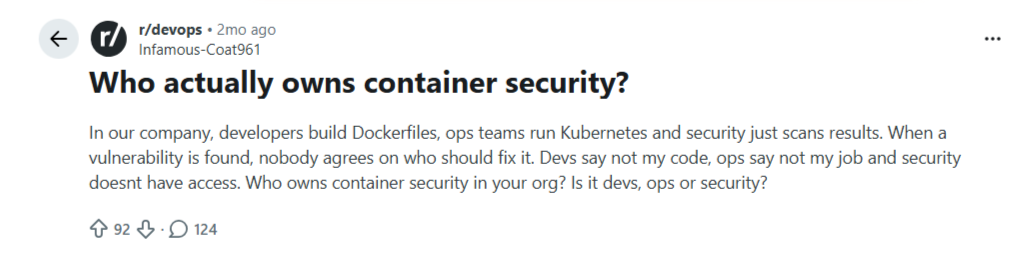
A Redditor shared how no team at his company takes responsibility for container security.
Source: Reddit
The comment section featured different opinions. One person said it's the responsibility of both Dev and Ops.

Another person replied that the developers are responsible for everything.
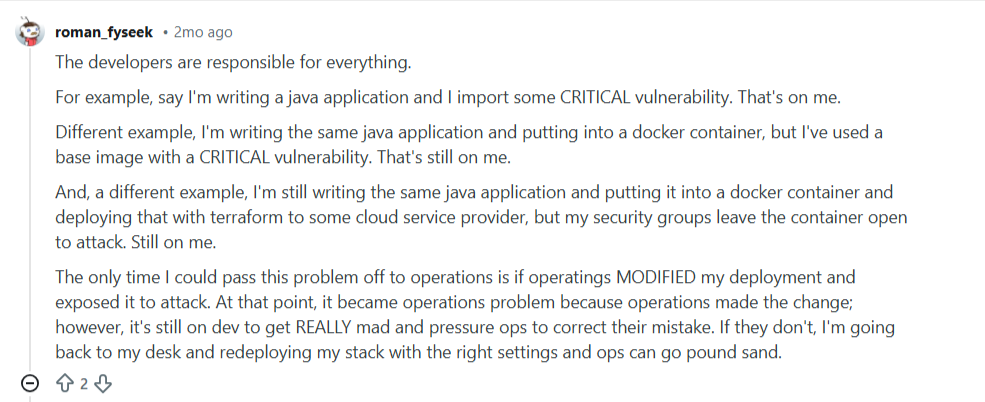
But the truth is that clear ownership and shared standards help close these gaps.
Limited Visibility Across Environments
Containers run across development, testing, and production environments, often on different platforms. Without centralized visibility, teams struggle to understand what is running and where. This lack of insight delays detection and response when issues arise. Centralized management improves awareness and speeds up action.
Misconfigurations at Scale
According to the Verizon DBIR report, misconfigurations are responsible for 13% of container security issues. Small configuration mistakes multiply quickly as workloads scale across clusters and hosts. Teams often discover these issues only after exposure occurs.
Compliance and Regulatory Issues
Enterprises must meet regulatory requirements, such as PCI DSS, HIPAA, GDPR, and SOC 2, as well as industry-specific standards, to ensure visibility, access control, and auditability.
Containers complicate compliance because short-lived workloads, shared infrastructure, and dynamic scaling don't fit well with traditional audit models. Many teams struggle to produce consistent logs, prove who had access, and show that controls remained effective as environments change. This friction makes it harder to satisfy auditors and maintain continuous compliance.
Security Drift Over Time
Containerized environments change constantly as images update, configurations shift, and workloads move across hosts. Security settings that once made sense slowly drift out of alignment with reality. Teams rarely notice this drift until an incident exposes it. Over time, the gap between intended security and actual security continues to grow.
Supply Chain Attacks
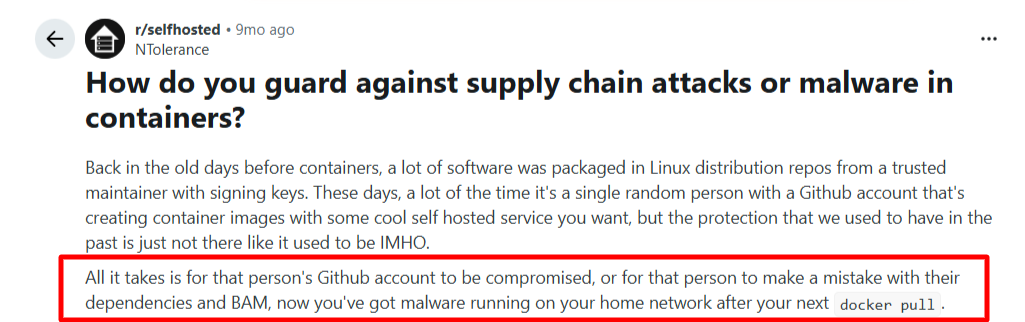
Containerized environments rely heavily on third-party images, open-source libraries, and automated build pipelines. A compromised dependency or malicious image can enter the environment long before deployment. These threats often appear legitimate, making them hard to detect using runtime signals alone. Once introduced, supply chain issues spread quietly across multiple workloads and environments.
Source: Reddit
Best Practices for Container Security
These container security practices focus on preventing risk early, maintaining control at scale, and keeping visibility as environments grow. Pairing them with the right container security tools ensures each layer of your stack is covered.
Secure Container Images Before They Spread
Start security at build time, not after deployment. Container images often move across teams, environments, and platforms, which means any weakness multiplies quickly. Scan images for known security vulnerabilities, remove unused packages, and avoid running unnecessary services.
Most importantly, treat base images as shared infrastructure, not developer shortcuts. When teams standardize on trusted images early, they reduce risk across all environments where those images run.
Implement Role-Based Access Control
In 2018, attackers infiltrated Tesla's cloud infrastructure, specifically targeting its Kubernetes environment, and deployed cryptocurrency-mining software across multiple pods. This security breach happened because the attacker gained access to Tesla's Kubernetes administration console.
The breach led to unauthorized resource consumption, potential exposure of sensitive AWS access keys, and operational disruptions.
Containerized environments introduce multiple users, automation tools, and service accounts, each with different needs. Assign permissions based on roles, not convenience, and review them regularly. Implementing this practice from adoption limits what users can do within the container environment.
Clear ownership reduces accidental exposure and limits the impact of compromised credentials.
Pro tip: Enterprises managing multiple container platforms often struggle with access control. Portainer provides a single interface to manage permissions, environments, and workloads across containerized infrastructure, whether on cloud or on-prem.
Try Out Portainer Today!
Enforce Network Segmentation by Default
Containers communicate easily, which makes open networks the fastest way for an attack to spread. Flat network models allow compromised workloads to discover and access services they should never be able to reach.
Segment traffic so services can only communicate with what they explicitly require. Apply deny-by-default rules and deliberately open paths. As environments scale, segmentation limits blast radius and turns uncontrolled movement into isolated failures.
Monitor Container Runtime Behavior, Not Just Known Vulnerabilities
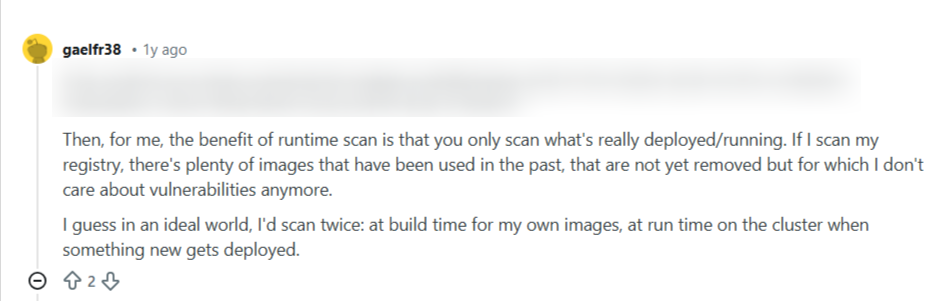
Image scanning catches known issues, but runtime threats often come from unexpected behavior. Containers may open new network connections, spawn unusual processes, or request elevated privileges after deployment.
Monitoring runtime activity reveals what workloads actually do, not what they claim to do. Focus on deviations from normal behavior instead of static signatures. This approach surfaces attacks that bypass traditional preventive controls.
Source: Reddit
Treat Compliance as a Continuous State, Not an Event
Compliance frameworks expect traceability, consistency, and proof. Containerized environments challenge this by constantly changing and leaving little historical footprint.
Continuous tracking of configurations, access changes, and workload activity creates an audit-ready record. This act eliminates the need to reconstruct events after the fact. When compliance runs continuously, teams shift from reacting to audits to maintaining control by design.
Regularly Update and Patch Container Environments
Container environments age faster than traditional systems. Base images, runtimes, host operating systems, and orchestration components all receive frequent security updates. When teams delay patching, they allow known security vulnerabilities to remain exploitable across all workloads that depend on them. This risk compounds as container images get reused and environments scale.
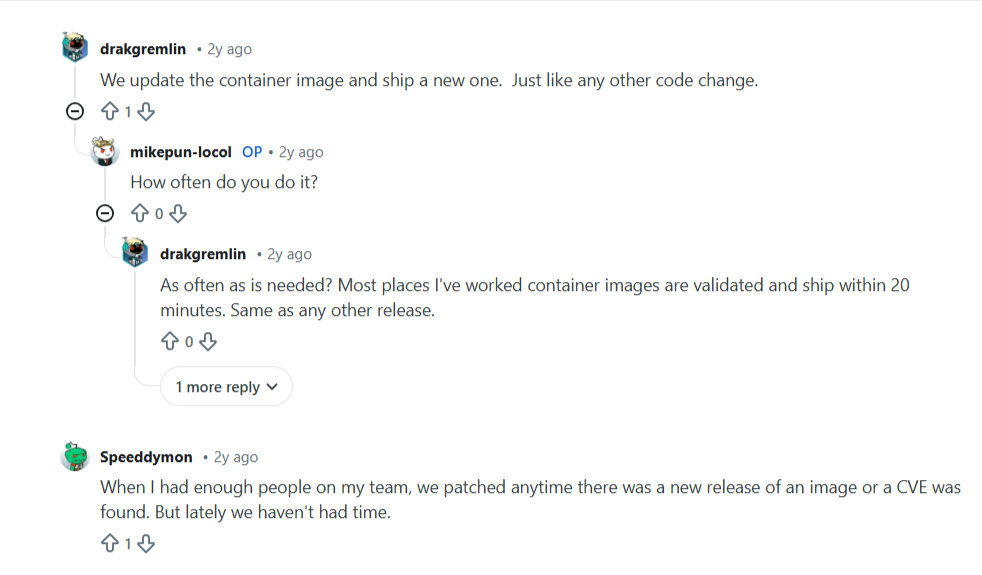
Patching in containerized environments requires coordination, not just speed. You should track which images run where, understand dependency chains, roll out updates without disrupting production workloads, and do so as often as needed.
Redditors also mentioned that they patch whenever there's a new image release and update their container image as often as needed.
Source: Reddit
Ensure Secure Container Orchestration
Container orchestration platforms control how containers are deployed, scaled, and interact. When orchestration security fails, attackers gain influence over far more than a single workload. Excessive permissions, insecure APIs, and weak authentication expose the control layer that governs the entire environment.
Secure orchestration depends on strict access boundaries and predictable behavior. Teams must define clear roles, limit administrative access, and monitor configuration changes closely. Orchestration security keeps control centralized and prevents unauthorized actions from spreading across clusters, nodes, and environments.
Pro tip: Portainer gives you a single view of orchestration activity across all managed environments. You can track configuration changes, workload actions, and access events from one interface.
Limit Container Privileges by Design
Containers often run with more privileges than required. This happens when teams prioritize convenience during development and forget to tighten controls later. Excess privileges allow workloads to access host resources, modify system settings, or interact with other containers in unexpected ways.
Privilege limitation reduces the damage a compromised container can cause. Teams should restrict filesystem access, block unnecessary capabilities, and avoid running containers as root. Least-privilege execution turns exploitation attempts into contained failures instead of systemic threats.
Audit Container Activity and Configuration Changes Continuously
Security incidents often unfold over time rather than in a single event. Without audit trails, teams struggle to understand what changed and who made the change. Continuous auditing captures configuration updates, access actions, and workload behavior as they happen. This record provides accountability and shortens investigation time when issues arise.
Pro tip: Use Portainer to continuously audit container activity and configuration changes. You can see who did what, where, and when, without stitching logs together from multiple tools.
Isolate Workloads Based on Risk and Function
Containerized environments often run very different workloads side by side, from public-facing services to internal tools and sensitive systems. Treating all workloads the same increases risk when a single component is compromised. Isolation reduces this exposure by separating workloads by purpose and risk level.
Namespaces play a key role in enforcing this separation. They allow you to logically group workloads, apply distinct access controls, and limit visibility between environments.

Source: Reddit
How Portainer Ensures Container Security
One of France's leading digital banks, with over 1,500 environments, needed a more efficient way to maintain security across its container environments. Their manual container processes posed growing security concerns, prompting them to seek a better solution.
They evaluated several container management tools and chose Portainer for its balance of security, simplicity, and manageability. Within a short time, the bank transformed from slow, insecure manual deployments to fast, standardized, and secure containerized application delivery. Specifically, Portainer's role-based access controls (RBAC) secured access across over 1,500 environments.
Portainer helps you secure containerized environments by centralizing control, access, and visibility across platforms. Instead of relying on direct access to orchestration platforms, you can interact through a controlled enterprise-grade interface.
Key Portainer container security features include:
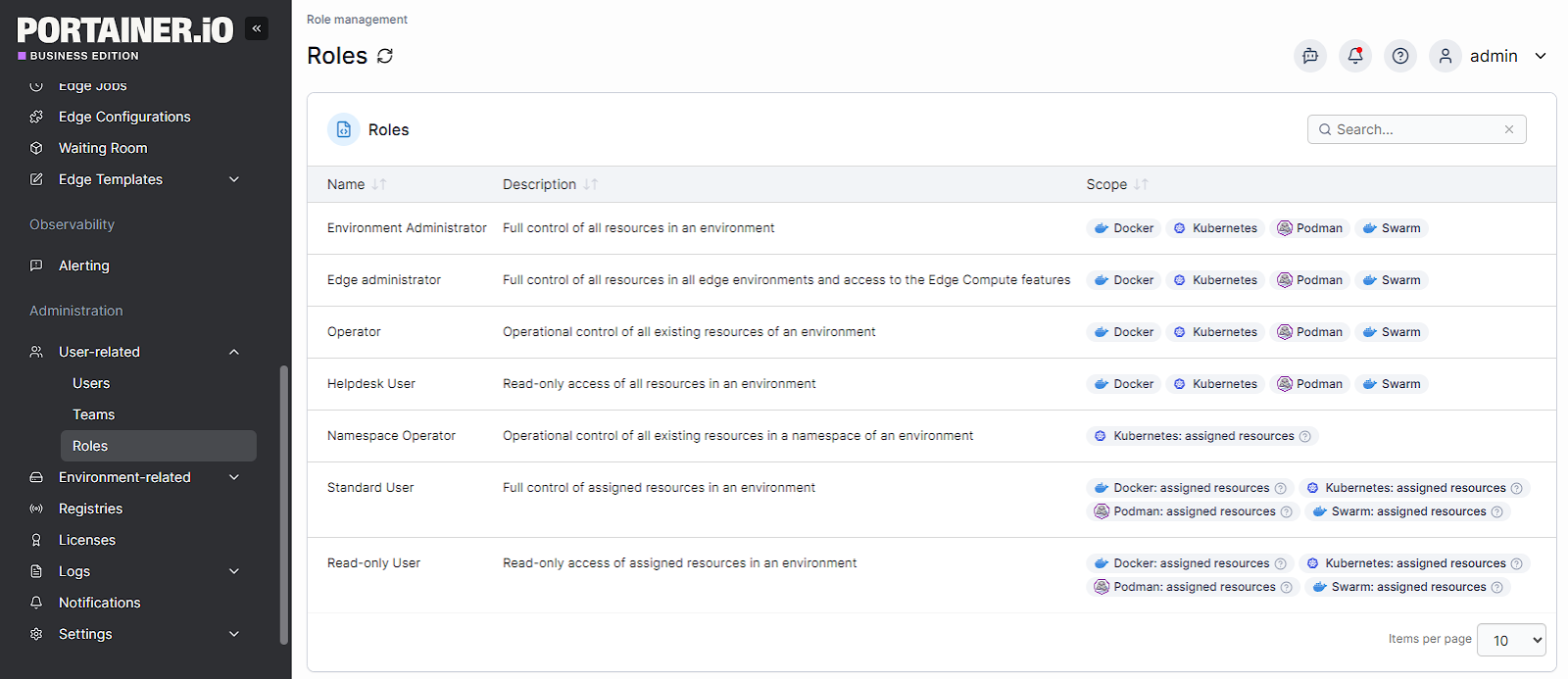
- Role-Based Access Control (RBAC): Define granular permissions for users and teams, ensuring only authorized personnel can manage workloads.
- Identity Management Integration: Connect with LDAP, Active Directory, or OIDC to centralize authentication and streamline access control.
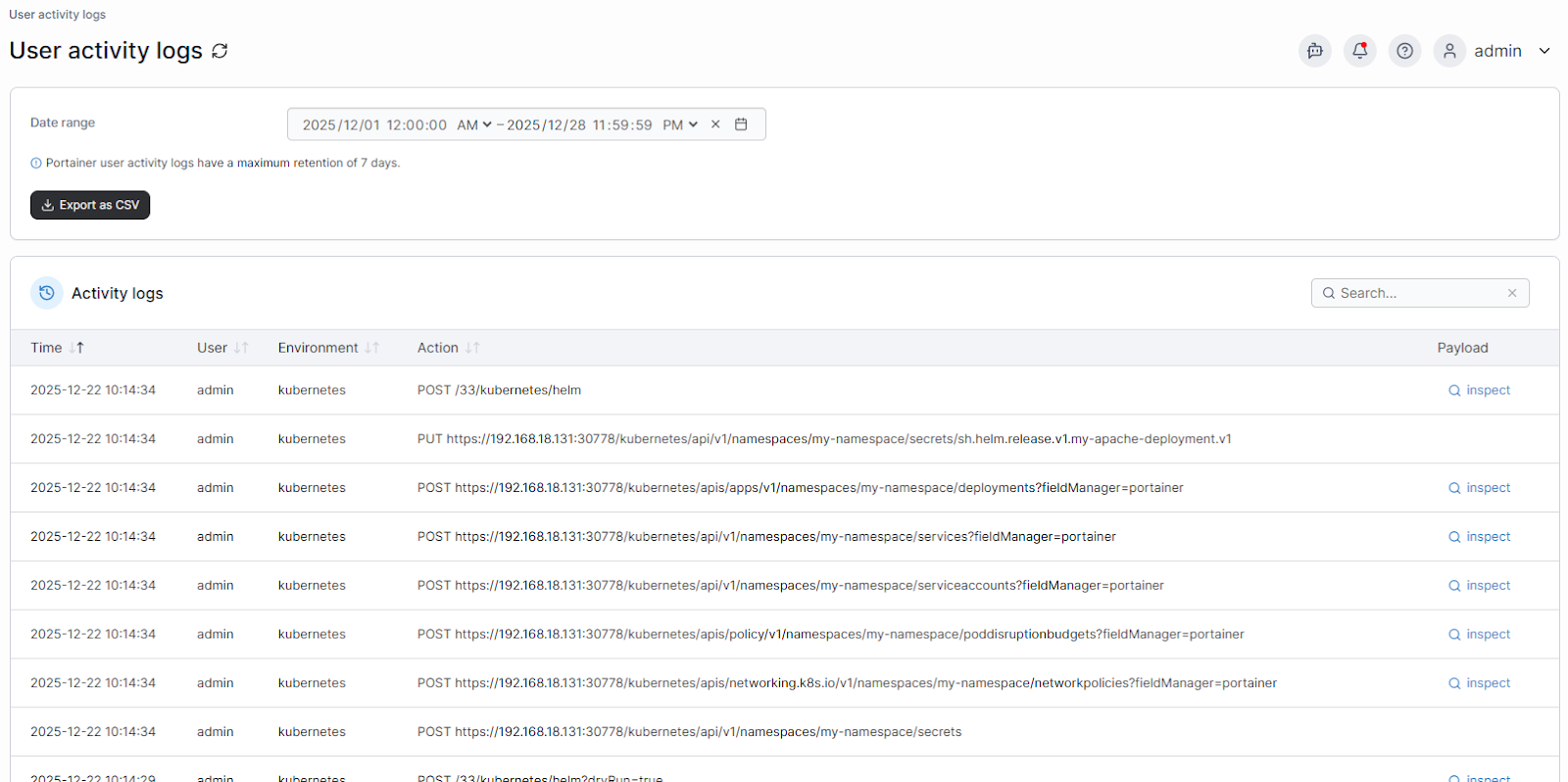
- Enterprise Compliance and Auditing: Track configuration changes, user actions, and deployment activity across clusters to meet regulatory requirements.
- Multi-Cluster Visibility: Monitor Kubernetes, Docker, and Podman environments from a single interface, reducing blind spots.
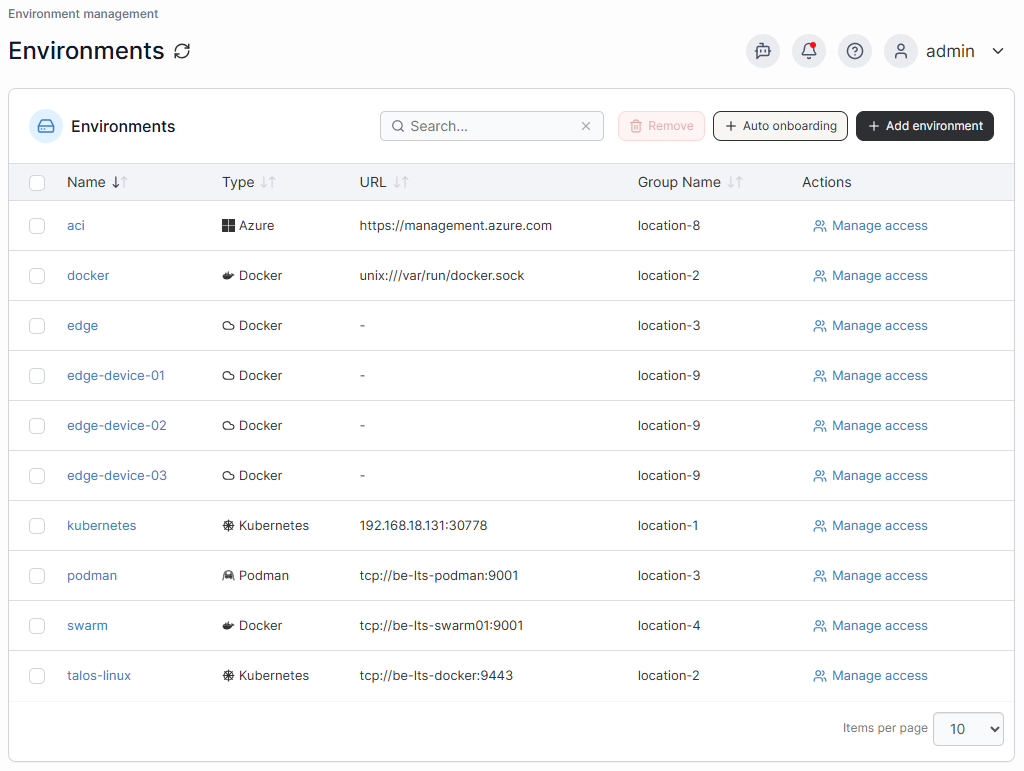
- Secure Deployment Workflows: Standardize images, enforce policies, and prevent misconfigurations before workloads reach production.
Contact our sales team to secure your enterprise container environment and reduce operational risk.
Further Reading: Why Portainer is Exactly the Container Management Platform Enterprises Need Right Now
Ensure Key Container Security with Portainer
Protecting containerized environments requires visibility, control, and consistent policies across all workloads.
Portainer helps you enforce access rules, monitor activity, and maintain compliance from a single interface. Enterprises that adopt these practices reduce risk, prevent misconfigurations, and simplify audits.
Book a demo to see how Portainer can centralize your container security and simplify management across Kubernetes, Docker, and Podman clusters.