2026 Enterprise Container Management: Solutions & Expert Tips

92% of the IT industry now runs containers in production, and the application container market is on track to hit $35.6 billion by 2031. But container adoption and management are two very different things.
Platform teams lose an average of 34 workdays per year just troubleshooting Kubernetes incidents, and without proper governance, those problems compound quickly as clusters scale across teams and environments.
Suddenly, the technology that was supposed to simplify infrastructure becomes its own operational burden.
This is exactly what enterprise container management solves. It’s the practice of bringing structured governance, security, and visibility to containerized environments so they stay operational and controlled as they grow.
In this guide, we break down what enterprise container management actually involves, where teams commonly get stuck, and how to build a container strategy that holds up under real production pressure.
What Is Enterprise Container Management?
Containers are lightweight, portable units that package an application together with everything it needs to run: code, runtime, libraries, and configuration.
Unlike traditional virtual machines, containers share the host operating system kernel, which makes them faster to start, easier to move between environments, and far more resource-efficient.
At a small scale, managing a handful of containers is straightforward. A single team running a single cluster with a few deployment scripts can keep things under control without much overhead.
Enterprise scale, on the other hand, is a different problem entirely. Here, you’re dealing with hundreds or thousands of containers spread across multiple clusters, cloud providers, on-prem data centers, and edge locations. Teams need to coordinate deployments, enforce security policies, control access, and maintain visibility across the entire environment simultaneously.
Enterprise container management is the discipline that brings structure to that complexity. It combines container orchestration platforms such as Kubernetes with governance frameworks, role-based access control, policy enforcement, and centralized observability.
The goal is to give platform teams the structure they need to operate containerized environments securely and consistently, no matter how large or distributed they become.
The Importance of Strong Container Management for Large Enterprise Teams
Containers scale fast, but the governance around them usually doesn’t. Without a structured management layer, operational problems compound quickly and become expensive to fix. Here’s why strong container management matters.
1. Visibility Gaps Across Clusters and Environments
As organizations expand from a single cluster to dozens spread across cloud providers, on-prem infrastructure, and edge locations, visibility is the first thing that suffers. Teams lose track of:
- What is actually running and where
- Which containers are consuming which resources
- Whether live deployments still match their intended configurations
The numbers back this up too: reports suggest that 82% of Kubernetes workloads are overprovisioned, a direct consequence of poor visibility into actual resource consumption. When no one has a centralized view across environments, waste and misconfiguration start being the norm.
2. Security and Compliance Exposure
Containers are ephemeral, fast-moving, and often deployed by teams that aren’t security specialists. This combination poses a real risk when there’s no centralized policy enforcement. Common issues include:
- Containers running with excessive privileges
- Teams pulling unscanned public images into production
- No network isolation between workloads
For enterprises in regulated industries like finance, defense, and government, these pose technical risks and potential compliance liabilities. Strong container security practices ensure that policies are applied consistently across every cluster rather than enforced retroactively after something goes wrong.
3. Operational Complexity That Slows Teams Down
88% of teams report year-over-year increases in their total cost of ownership for Kubernetes, largely due to operational overhead.
Kubernetes complexity at enterprise scale entails YAML sprawl, fragmented toolchains, and manual processes that slow delivery. If, for example, your platform team is spending more time keeping the platform running than anyone else is spending building on it, something has gone wrong.
4. Inconsistent Workflows Across Teams
In large organizations, different teams almost always adopt their own tools, scripts, and deployment workflows. One team uses Helm charts, another writes raw manifests, and a third relies on a CI/CD pipeline that nobody else fully understands.
This isn’t a problem on its own, but it can become one when teams need to hand off workloads or respond to incidents together and realize they’re all operating from completely different playbooks.
A structured management layer establishes shared workflows and guardrails so that every team works from the same foundation, regardless of which cluster or environment they’re in.
5. Rising Costs Without Clear Accountability
Cloud-native infrastructure makes it easy to spin up new clusters, allocate CPU and memory limits, and forget about them, a pattern that quickly turns into a shadow IT management problem at scale. With over 65% of workloads running at less than half their requested CPU or memory, chronic overspend has become an industry-wide problem.
Without clear governance and cost controls, organizations end up paying for capacity nobody is using, and nobody is accountable for.
Enterprise container management ties resource allocation to ownership. Platform teams get the data they need to rightsize workloads and justify infrastructure spend to leadership.
How Is Enterprise Container Management Different from Basic Setups?
Running containers in a dev environment and running them across an enterprise are fundamentally different challenges. Here’s how the two differ.
1. Access Control and Governance
In a basic setup, a small team typically shares cluster access with broad permissions. Everyone can deploy, modify, and delete resources without much friction, and that’s fine when there are only a few people involved.
But at enterprise scale, that same open access model becomes a liability. Hundreds of users across multiple teams need different levels of permissions to different environments, and without clear boundaries, a single misapplied change can cascade into production.
Enterprise container management draws those boundaries through scoped access policies, namespace isolation, and audit logging, so that every action is trackable and aligned with organizational requirements.
Try Portainer today as your best solution to deploy, manage, and scale containerized workloads.
2. Single-Cluster vs. Multi-Cluster Operations
A basic container setup usually runs on a single cluster, where you’re dealing with one control plane, one set of configurations, and one environment to worry about. Enterprises, on the other hand, rarely have that luxury.
Production, staging, and development workloads often run on separate clusters, sometimes across different cloud providers or on-prem data centers. Managing multiple Kubernetes clusters means dealing with configuration drift, inconsistent policies, and fragmented visibility across all of them.
Enterprise container management provides a centralized control plane that brings consistency to these distributed environments.
Deciding between cloud and on-prem for your Kubernetes clusters? This guide breaks down the trade-offs to help you make a choice.
3. Deployment Complexity
In a basic setup, deploying an application might involve a single kubectl command or a straightforward CI/CD pipeline. The process is linear and easy to follow.
But enterprise deployments involve coordinating across namespaces, enforcing resource quotas, managing secrets, handling rollback strategies, and making sure every deployment meets security and compliance requirements before it reaches production.
This is where container orchestration platforms earn their value, but only when paired with a management layer that enforces consistency and reduces the margin for human error.
Managing deployments through kubectl or Lens? This guide shows how Portainer streamlines access to both.
How to Effectively Manage Containers at Enterprise Scale
Scaling containers across an enterprise requires a deliberate, structured platform engineering approach where each layer builds on the one before it. Here are the steps that consistently separate teams that scale successfully from those that get stuck.
Step 1: Standardize Your Container Platform
Before anything else, teams need to align on a single container orchestration platform. In 2026, that’s almost always Kubernetes, but the key decision is how you run it: managed services like EKS, GKE, or AKS, self-managed distributions like Kubernetes on bare metal, or lightweight options like K3s for edge environments.
The goal is to eliminate platform fragmentation early. When different teams run different orchestrators, every decision that follows, from access control to deployment workflows to monitoring, has to be duplicated and maintained separately. Standardizing the platform gives you a shared foundation to build everything else on.
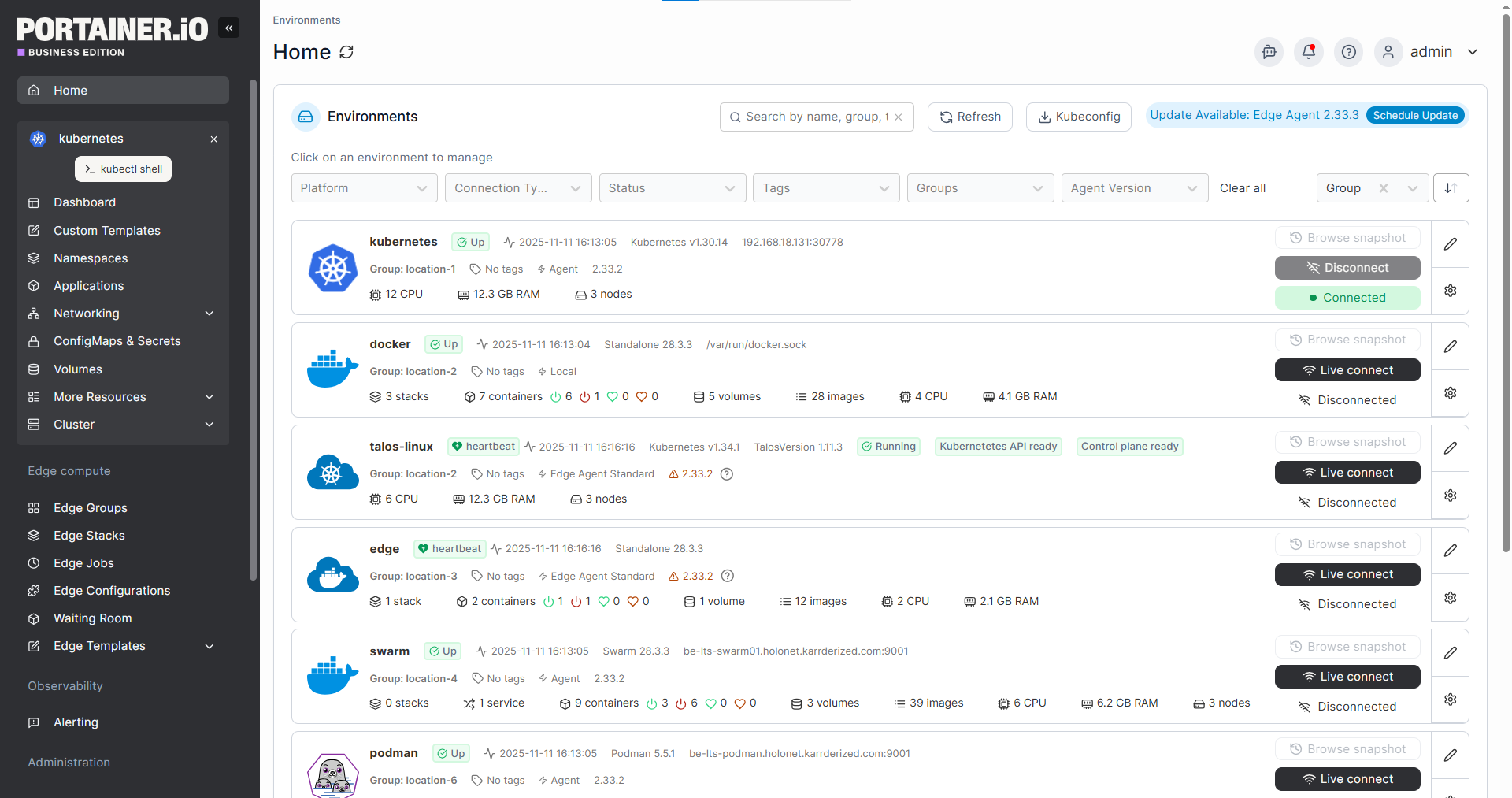
Platforms like Portainer help here because they’re platform-agnostic. Whether your teams are running Docker, Kubernetes, or Podman, Portainer provides a single management interface across all of them, so standardization doesn’t mean forcing everyone onto one runtime.
Step 2: Establish Governance and Access Controls
Once the platform is standardized, the next step is locking down who can do what and where.
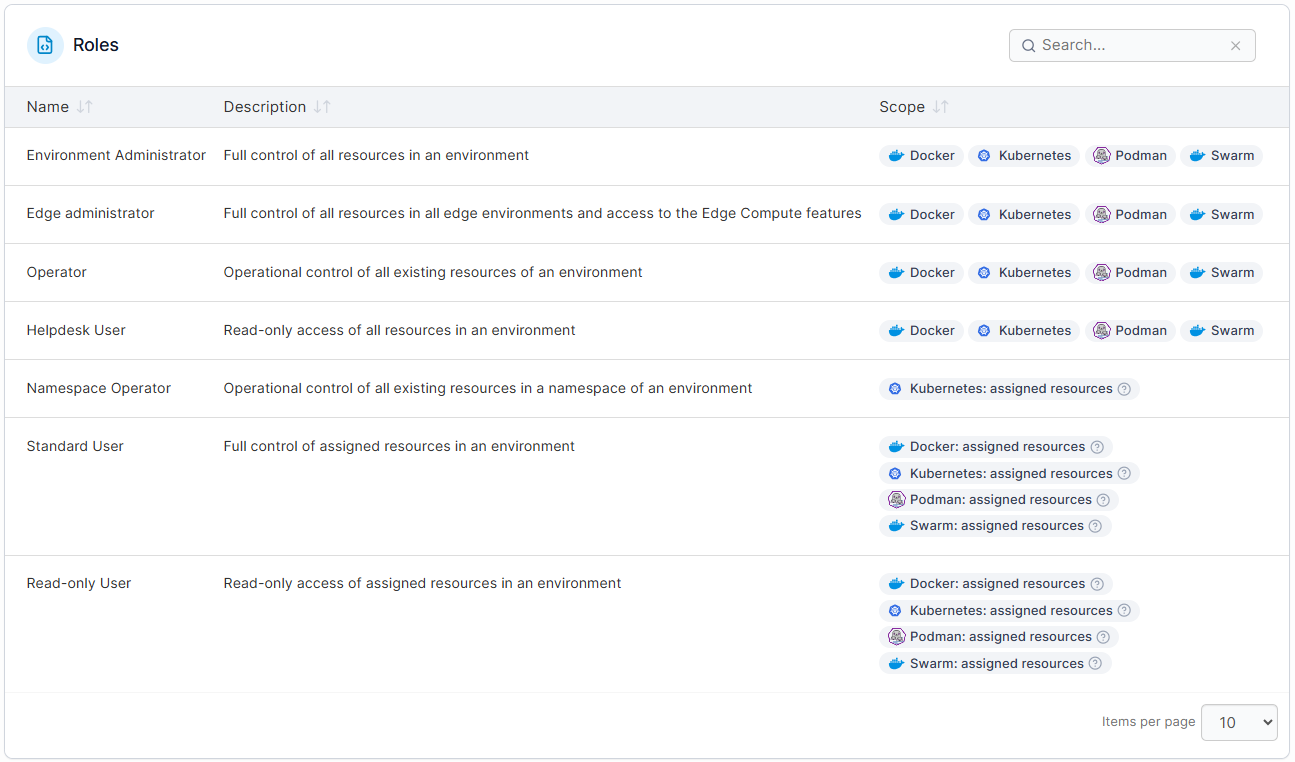
This means implementing role-based access controls, scoping permissions to specific namespaces and clusters, and setting up audit logging so that every action is traceable.
Of course, this is especially important for enterprise teams. This is what separates a controlled environment from one where a single misconfiguration can cascade across production. Platform engineering best practices recommend defining access policies early rather than retrofitting them after an incident forces your hand.
Portainer handles this by orchestrating Kubernetes’s RBAC engine through a centralized, UI-driven model. Teams can define roles scoped to specific clusters or namespaces, and the most restrictive role always applies unless explicitly overridden, keeping things secure by default without the administrative headache of managing hundreds of individual role bindings.
Step 3: Centralize Visibility Across Environments
With governance in place, the next priority is ensuring teams can see what’s happening across all clusters and environments from a single place. This includes:
- Real-time resource utilization across clusters
- Deployment status and health checks
- Configuration drift between environments
- Cost allocation by team, namespace, or workload
Without centralized visibility, platform teams end up logging into individual clusters to troubleshoot, which slows incident response and makes it nearly impossible to spot patterns across the broader infrastructure.
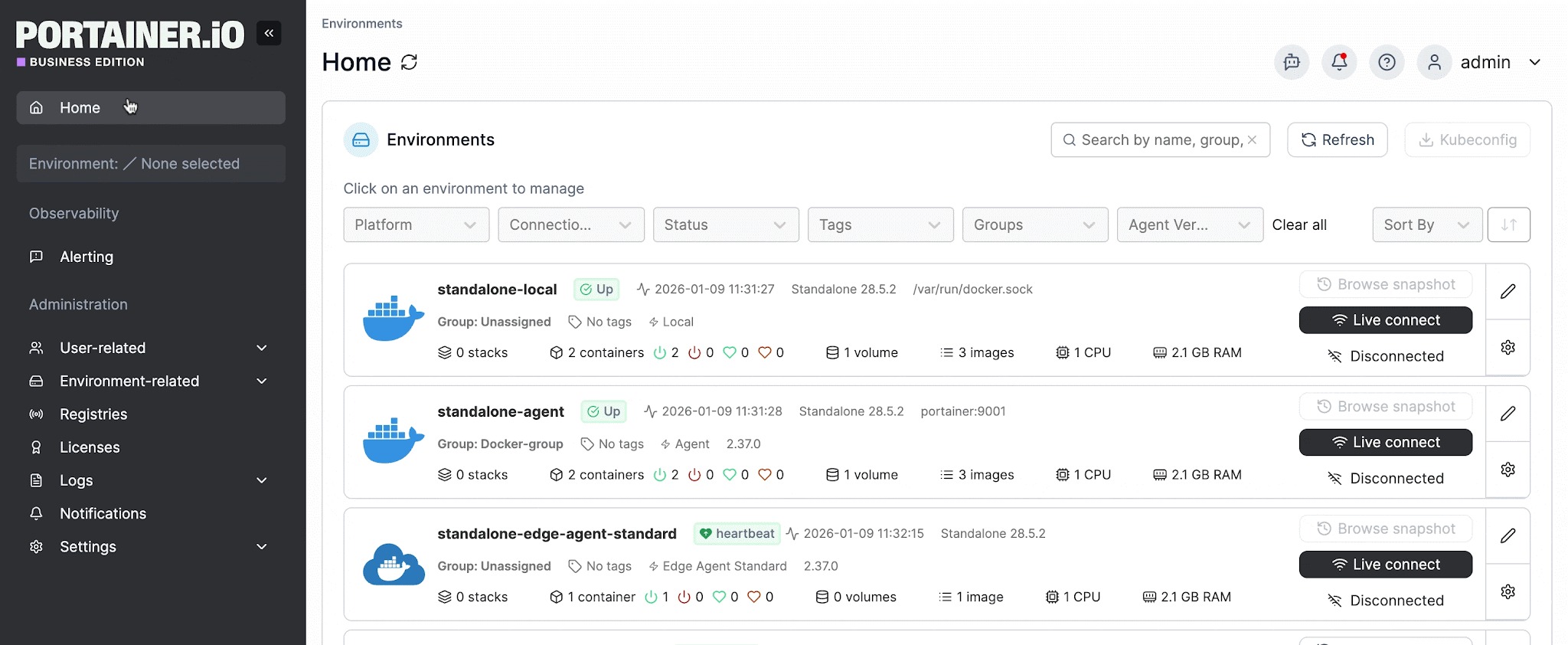
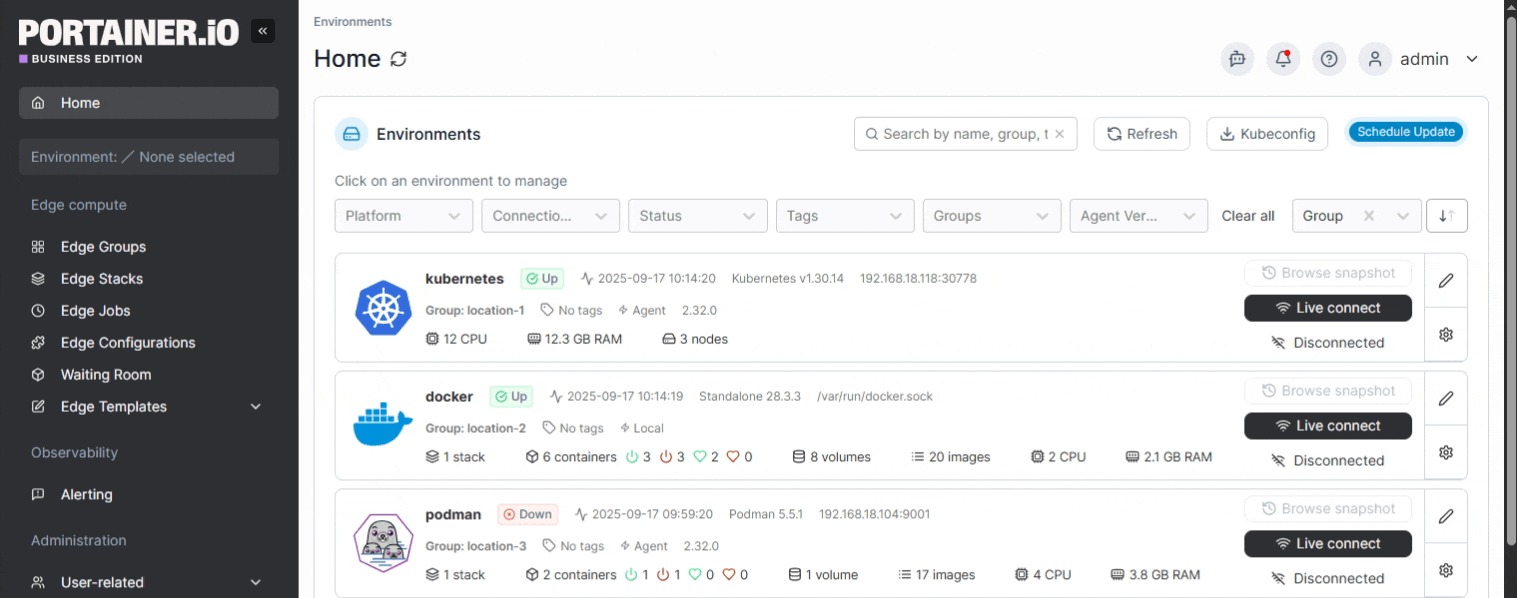
This is one of Portainer’s core strengths. Its multi-cluster dashboard gives platform teams a single view of every environment they manage, whether it’s running in the cloud, on-prem, or at the edge, with real-time metrics on CPU, memory, node count, and container status.
Step 4: Automate Deployments and Enforce Consistency
Manual deployments don’t scale. At the enterprise level, teams need automated pipelines to enforce consistent deployment practices across all environments. This typically involves:
- GitOps workflows that reconcile live environments against a source of truth in version control
- Standardized templates or Helm charts that prevent configuration drift
- Automated policy checks that validate deployments against security and compliance requirements before they reach production
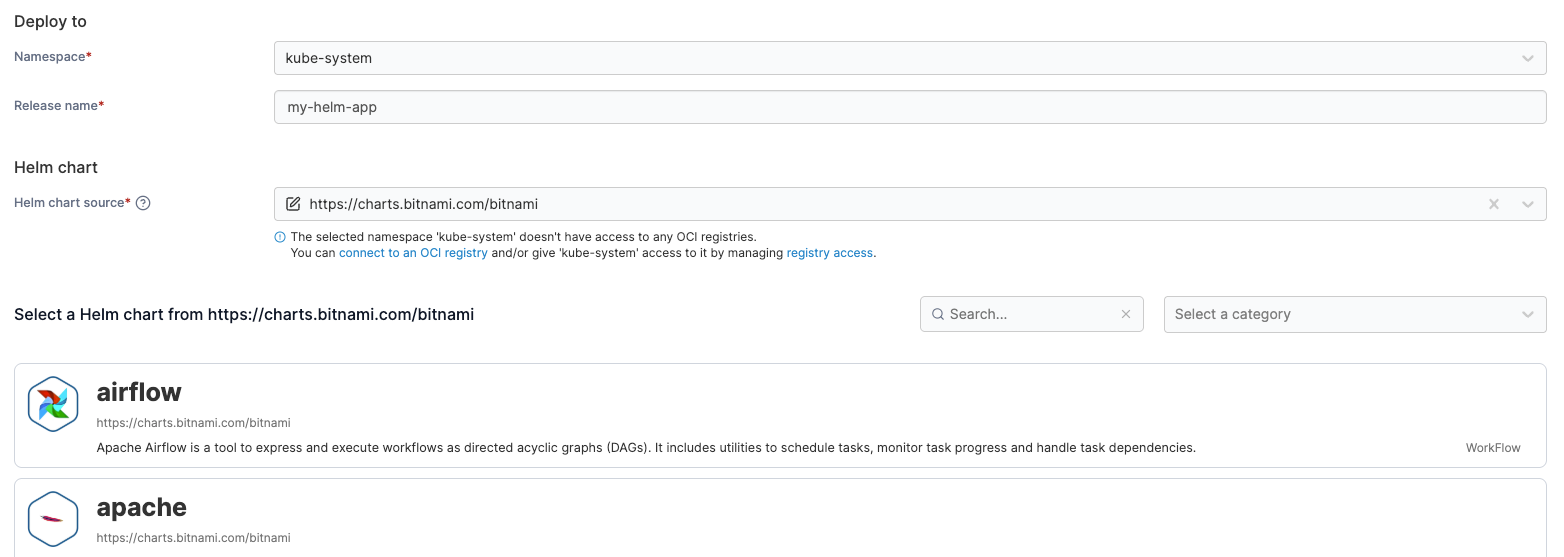
The goal here is to ensure that the routine, repeatable parts of deployment happen the same way every time, so teams can focus on the decisions that actually require their attention.
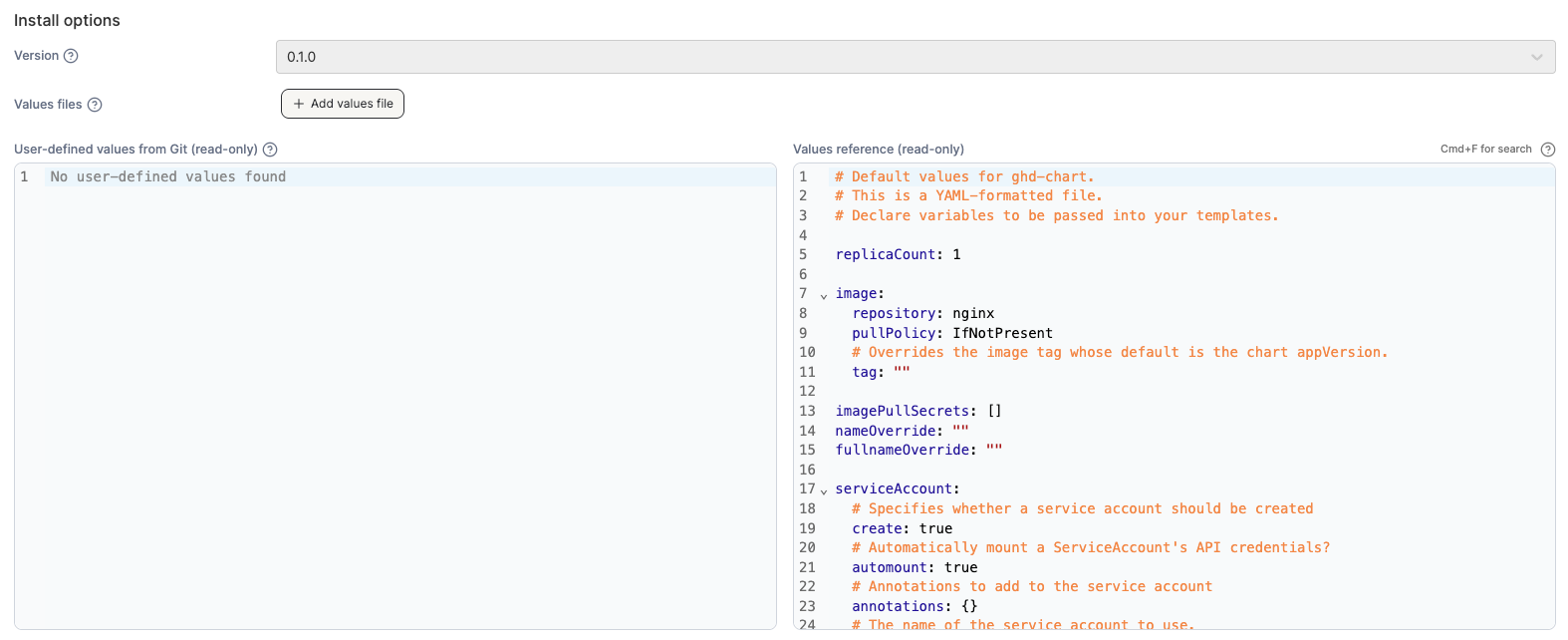
Portainer has GitOps built in, so teams can continuously reconcile workloads from a Git repo without needing to bolt on separate tools like Argo CD or Flux. Teams can also enforce GitOps-only workflows in production environments, disabling manual form-based deployments entirely if the organization requires infrastructure-as-code discipline.
Step 5: Build a Feedback Loop with Monitoring and Alerting
Containers are dynamic. Workloads scale up and down, pods get rescheduled, and configurations change constantly. Without a feedback loop that surfaces issues in real time, problems compound.
Enterprise container management requires monitoring and alerting that goes beyond basic uptime checks. Teams need visibility into resource consumption trends, anomaly detection for unexpected behavior, and alerts routed to the right people with sufficient context to act quickly.
Portainer provides built-in metrics and alerting with configurable thresholds, and teams can route notifications through Slack, email, Microsoft Teams, or webhooks. For organizations that need deeper observability, Portainer’s API feeds data directly into tools like Prometheus and Grafana, so it complements your existing monitoring stack rather than replacing it.
Try Portainer today as your best solution to deploy, manage, and scale containerized workloads.
Enterprise Container Management Best Practices and Solutions
Setting things up is one challenge, but keeping them running well over time is another. Here are some of the best practices and solutions for enterprise container management:
- Treat security as a default. Enforce image scanning before containers reach production, restrict container privileges by default, apply network policies between workloads, and properly store and rotate secrets. Portainer supports this through one-click pod security constraints using OPA Gatekeeper to block privileged containers, restrict registries, and enforce governance labels.
- Enforce policy consistently across every environment. A policy that applies to one cluster but not another creates gaps that teams won’t notice until something breaks. Portainer pushes global configurations down into every managed environment from a single control plane, covering ingress controllers, registry permissions, storage options, and kubectl access restrictions per cluster.
- Implement change windows for production. 79% of production outages stem from recent system changes, making control over when changes occur just as important as control over what changes are made. Portainer allows teams to define change windows so that GitOps-driven reconciliation occurs only within approved timeframes, giving operations teams predictability without slowing development.
- Centralize registry management. Containers are only as secure as the images they’re built from. Enterprise teams should define which registries are available per cluster and namespace. Portainer supports Docker Hub, AWS ECR, and custom private registries, and teams can browse images and tags directly in the UI.
- Build audit trails for compliance and accountability. In regulated industries, knowing who did what and when is a requirement. Portainer logs all user actions and configuration changes, and supports streaming those logs to your preferred SIEM, whether that’s Sentinel, Splunk, or any syslog target.
- Standardize developer access through self-service. When developers can deploy through a safe, intuitive interface without direct access to clusters, it reduces the risk of errors and frees up platform teams. Portainer enables this through application templates, resource quotas, and user-scoped namespaces, so developers get autonomy within guardrails.
Enterprise Container Management Done Right with Portainer
Enterprise container management doesn’t have to mean more complexity, more tools, or more overhead. Portainer was built to deliver enterprise-grade power including governance, multi-cluster visibility, and policy enforcement, without the enterprise-grade overhead that usually comes with it.
Everything covered in this guide, from governance and multi-cluster visibility to GitOps automation and policy enforcement, is available out of the box in a single, lightweight, self-hosted platform that teams can deploy on their own infrastructure in hours.
If you’re evaluating how to bring structure to your container operations without the steep learning curve or cost of platforms like OpenShift or Rancher, get a demo to see Portainer in action.