ArgoCD vs Flux: The Complete 2026 GitOps Comparison Guide

Choosing a GitOps tool sounds simple until you realize the two front-runners operate in completely different ways. The ArgoCD vs Flux choice comes down to a single split.
ArgoCD is a standalone application with a built-in web UI, API, and its own RBAC, and runs in nearly 60% of Kubernetes clusters for application delivery. Flux, by contrast, is a CLI-driven set of controllers that run inside your cluster.
Both are CNCF Graduated projects, and both keep your clusters in sync with Git.
This guide compares the two in depth: what each tool actually is, their key differences, how to choose between them, the real-world use cases each fits, and what to do when you need governance on top.
ArgoCD vs Flux at a Glance
| Dimension | ArgoCD | Flux |
|---|---|---|
| What it is | A standalone GitOps continuous delivery application | A GitOps toolkit of in-cluster controllers |
| Architecture | Runs as a standalone app (API server, repository server, application controller) | Runs as a set of controllers inside the cluster (the GitOps Toolkit) |
| Interface | Built-in web UI, plus CLI and API | CLI and YAML driven; no built-in UI (third-party options available) |
| Multi-cluster | Central control plane; one instance manages many clusters; ApplicationSets for templating | Independent per cluster by default; optional hub-and-spoke for central control |
| Access control (RBAC) | Its own RBAC model with SSO (OIDC, OAuth2, LDAP, SAML) | Native Kubernetes RBAC via service-account impersonation |
| Sync behavior | Auto-sync is opt-in; self-heal and prune off by default; polls roughly every 3 minutes or on webhook | Automated by default; per-resource reconcile intervals; drift correction and prune built in |
| Progressive delivery | Via Argo Rollouts (replaces the Deployment with a Rollout resource) | Via Flagger (wraps your existing Deployment) |
| Best for | Teams wanting visibility, self-service, and central control | Teams wanting automation, a lean footprint, and independent clusters |
Understanding ArgoCD and Flux
ArgoCD and Flux solve essentially the same problem in different ways. Both pull the desired state from Git and reconcile it against your cluster, so what runs always matches what is committed. The difference is in the structure of how they do it.
What Is ArgoCD
ArgoCD is a declarative, GitOps continuous delivery tool for Kubernetes. Created at Intuit and now a CNCF-Graduated project, it treats your Git repository as the source of truth for the desired application state.
Technically, ArgoCD is implemented as a Kubernetes controller that compares the live state of your apps against the target state defined in Git. When the two drift apart, it flags the app as out of sync and can reconcile it back to what is committed. It reads manifests in whatever form you already use: Kustomize, Helm, Jsonnet, or plain YAML.
Under the hood, ArgoCD is built from a few components that work together:
- API server: exposes the web UI, CLI, and automation endpoints.
- Repository server: pulls manifests from Git and renders them.
- Application controller: compares the rendered state against the live cluster and drives the sync.
A single change can flow from a Git commit through these components to one or more clusters.
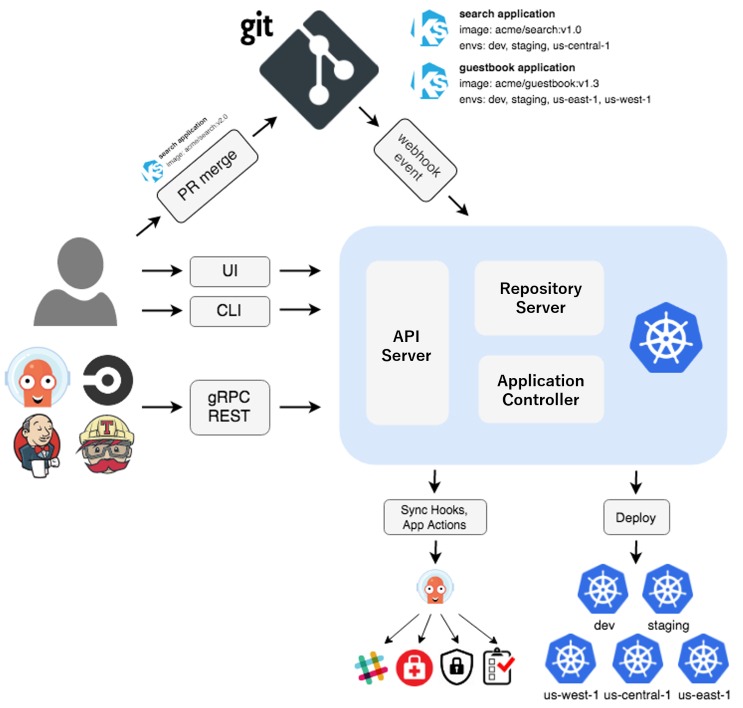
Image source: https://argo-cd.readthedocs.io/en/stable/assets/argocd_architecture.png
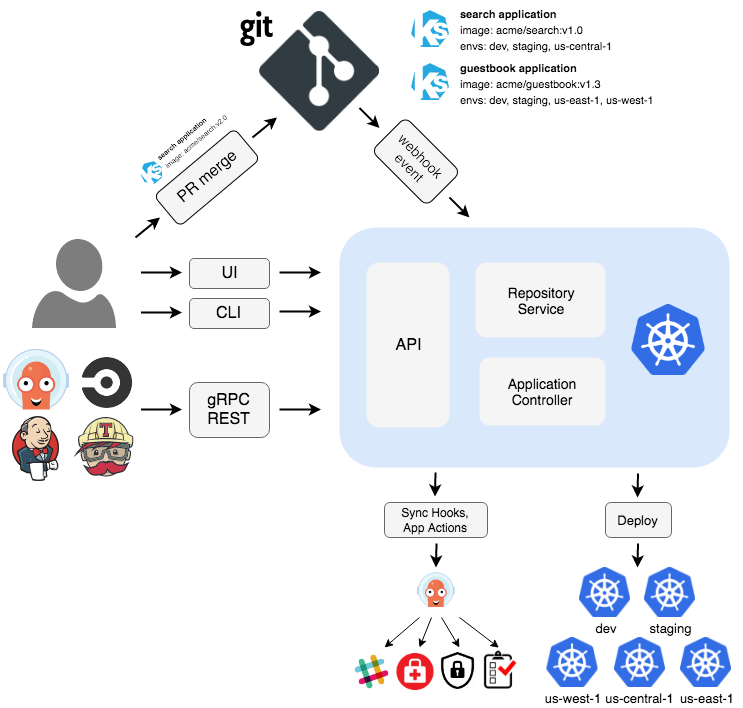
What sets ArgoCD apart is that it runs as a standalone application with its own web UI, API, and RBAC, rather than a set of in-cluster components you assemble yourself.
What Is Flux?
Flux, in its current version (Flux v2), is a CNCF-Graduated GitOps toolkit for Kubernetes. Originally built at Weaveworks, it was the first GitOps project to graduate, and, like ArgoCD, it uses your Git repository as the source of truth.
In Flux, everything is defined as a Kubernetes custom resource and reconciled by the cluster’s own control loops, so it behaves like a native extension of Kubernetes. It reads manifests as Kustomize overlays, Helm charts, or plain YAML, and can pull them from Git, Helm repositories, OCI registries, or S3-compatible buckets.
Rather than a single program, Flux is a set of specialized controllers collectively known as the GitOps Toolkit. A default install runs four, each owning a single job:
- Source controller: fetches manifests and artifacts from your sources, whether that is Git, a Helm repository, an OCI registry, or an S3 bucket.
- Kustomize controller: applies those manifests and reconciles the cluster to match.
- Helm controller: manages Helm chart releases declaratively.
- Notification controller: receives webhooks and sends alerts to channels like Slack.
Optional image automation controllers can also track new container images and write the updates back to Git.
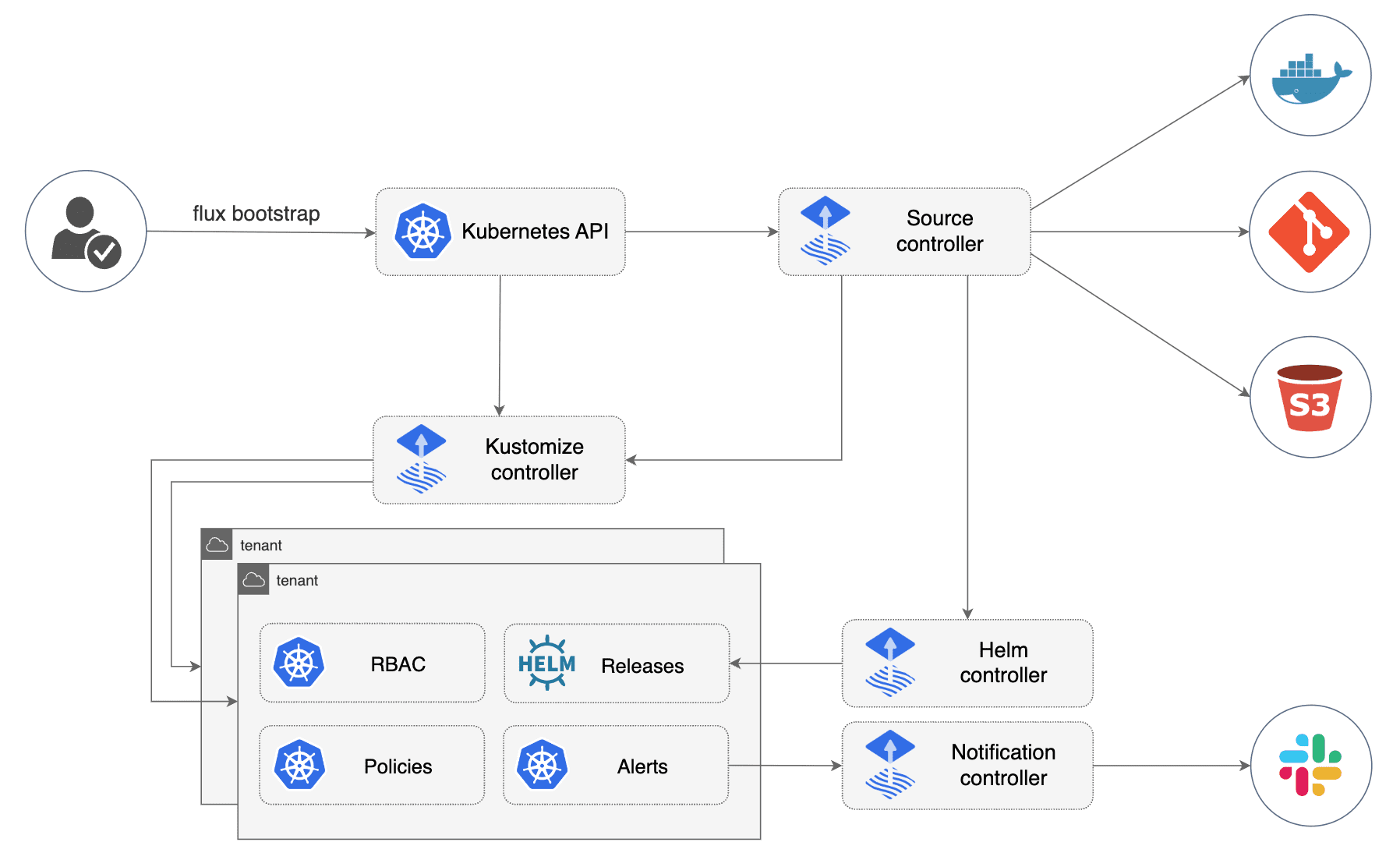
Image source: https://fluxcd.io/img/diagrams/gitops-toolkit.png
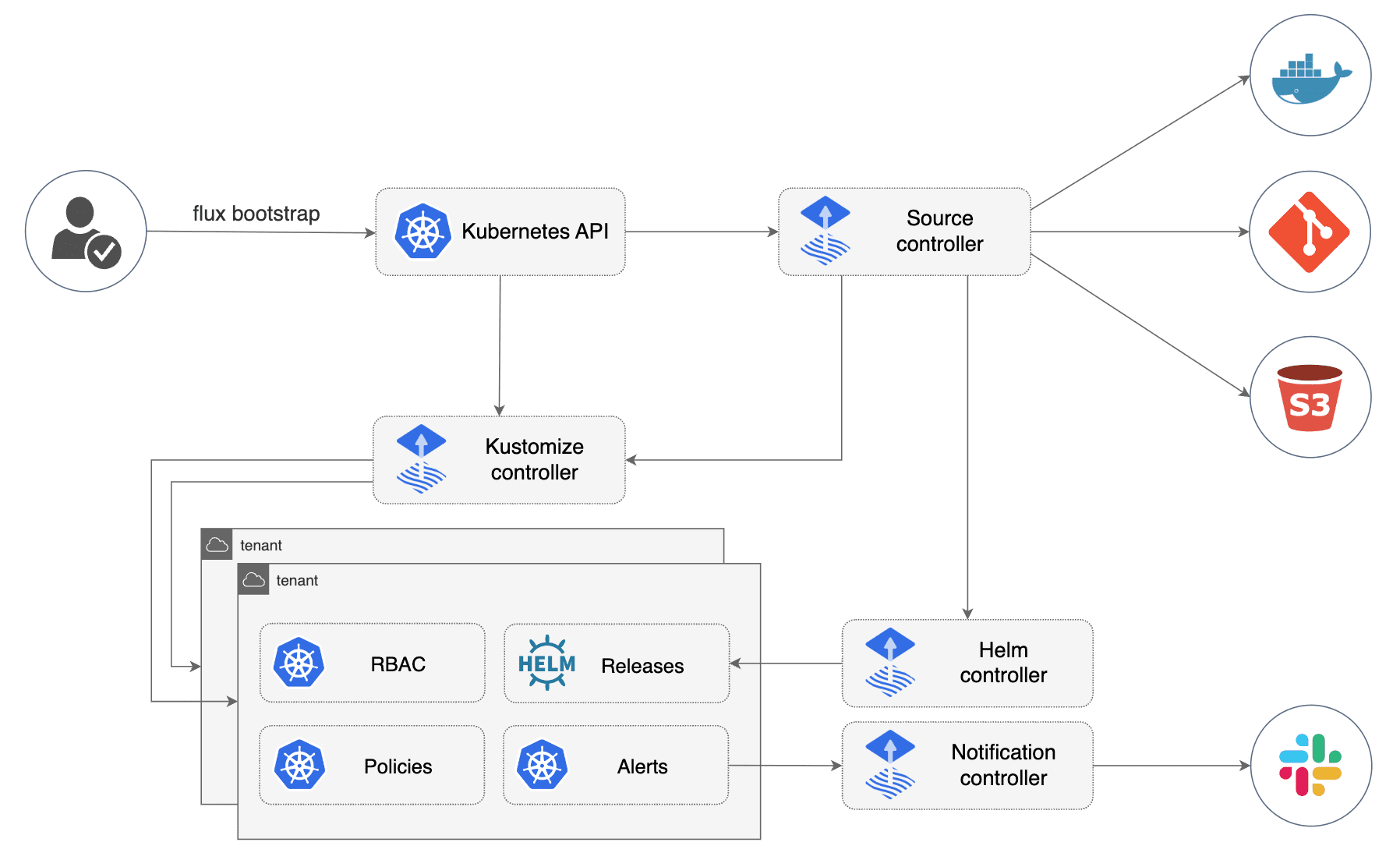
What sets Flux apart is that it runs as the set of in-cluster controllers you assemble yourself, driven by the flux CLI and YAML rather than a standalone application with its own interface. It leans on the cluster’s own machinery, using native Kubernetes RBAC via impersonation rather than a separate permission system.
Manage ArgoCD and Flux more efficiently
Try Portainer to bring both GitOps approaches under one interface.
Key Differences Between ArgoCD and Flux
Both ArgoCD and Flux reach the same end, but the paths they take differ in ways that show up in daily work. Here are the differences that matter most when you’re choosing between them.
1. User Interface and Visibility
With ArgoCD, you get a built-in web dashboard out of the box. From a single screen, it lets you:
- See a live map of every application and its health
- Track sync status and the exact difference between what’s in Git and what’s running in the cluster
- Trigger a sync or roll back a change without touching the command line
For teams where developers and operators both need to see deployment state, this visibility is the single biggest reason to opt for ArgoCD. Its built-in UI is widely credited as the main driver of its adoption lead.
Flux, on the other hand, is driven entirely by the flux CLI and YAML. There’s no dashboard in the box, so you monitor what’s happening via commands, Kubernetes events, and metrics instead.
If your team wants a screen, you add one yourself. Open-source options like Capacitor or the community-maintained Weave GitOps project work well, and some cloud platforms also include their own Flux UIs.
Pro Tip:
If you do run ArgoCD’s UI, resist the urge to create or edit resources by clicking in it. Doing that pulls your cluster out of sync with Git, which is exactly what GitOps exists to prevent. Keep every change in Git, and use the UI to observe and troubleshoot rather than to make one-off edits.
2. Multi-Cluster Management
ArgoCD was designed for multiple clusters, with a single ArgoCD instance serving as the central control plane. You register your other clusters with it, and it reconciles and displays them all from a single place, giving you a single UI and a single pane of glass across the whole fleet.
For larger setups, its ApplicationSet feature lets you template the same application across many clusters in one go.
Flux works the other way around. By default, each cluster runs its own Flux controllers and reconciles itself independently, which has its own advantages:
- Smaller blast radius, since each cluster keeps running on its own
- Smaller attack surface, since no cluster’s API needs to be exposed to a central system
- A natural fit for air-gapped sites and strict multi-tenancy
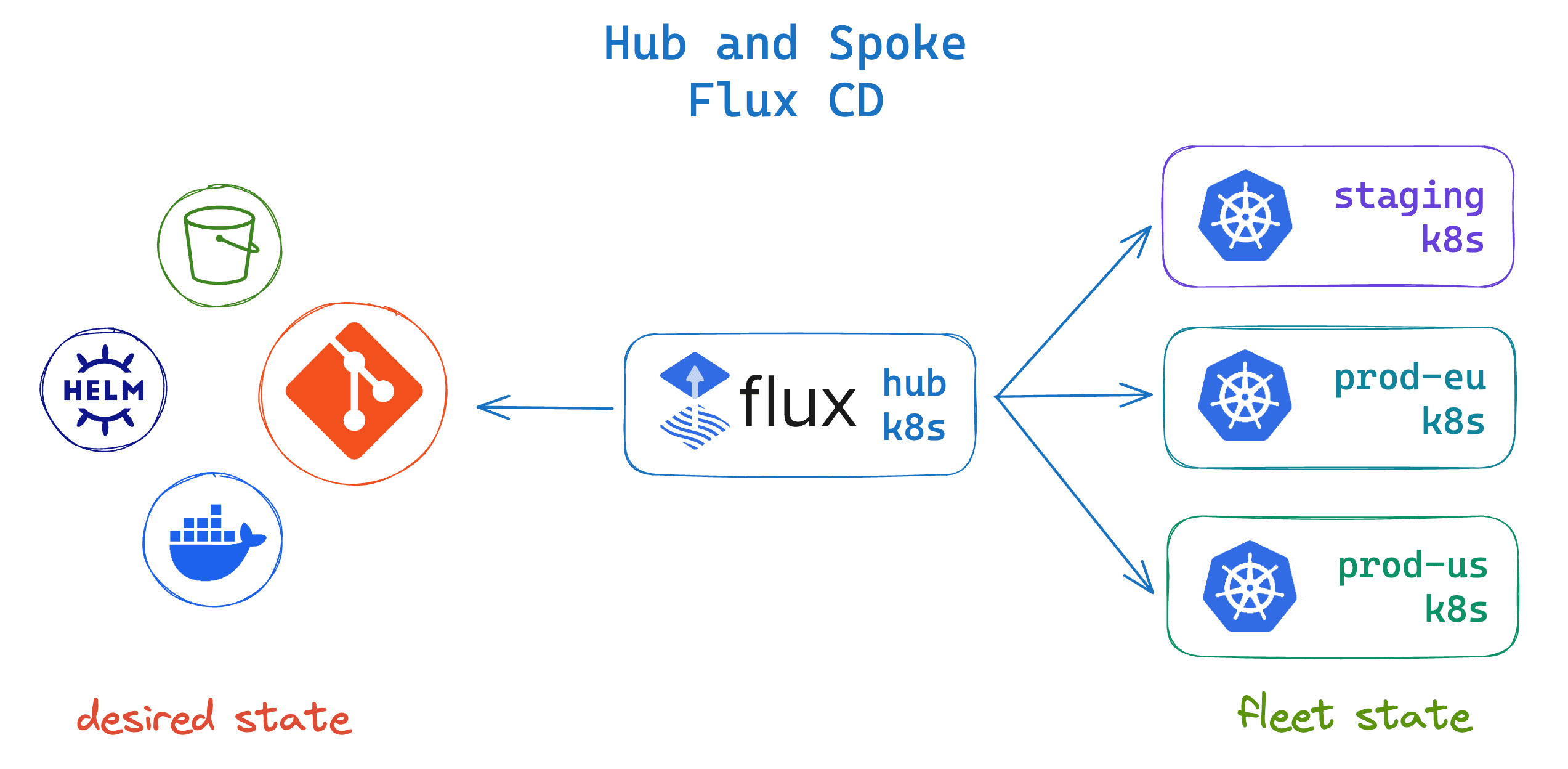
The cost of this is more overhead, because you bootstrap, update, and monitor Flux separately on every cluster. When you’d rather operate centrally, though, Flux also supports a hub-and-spoke mode where one hub cluster reconciles the rest, giving you a single place to work from along with a single point of failure to plan around.
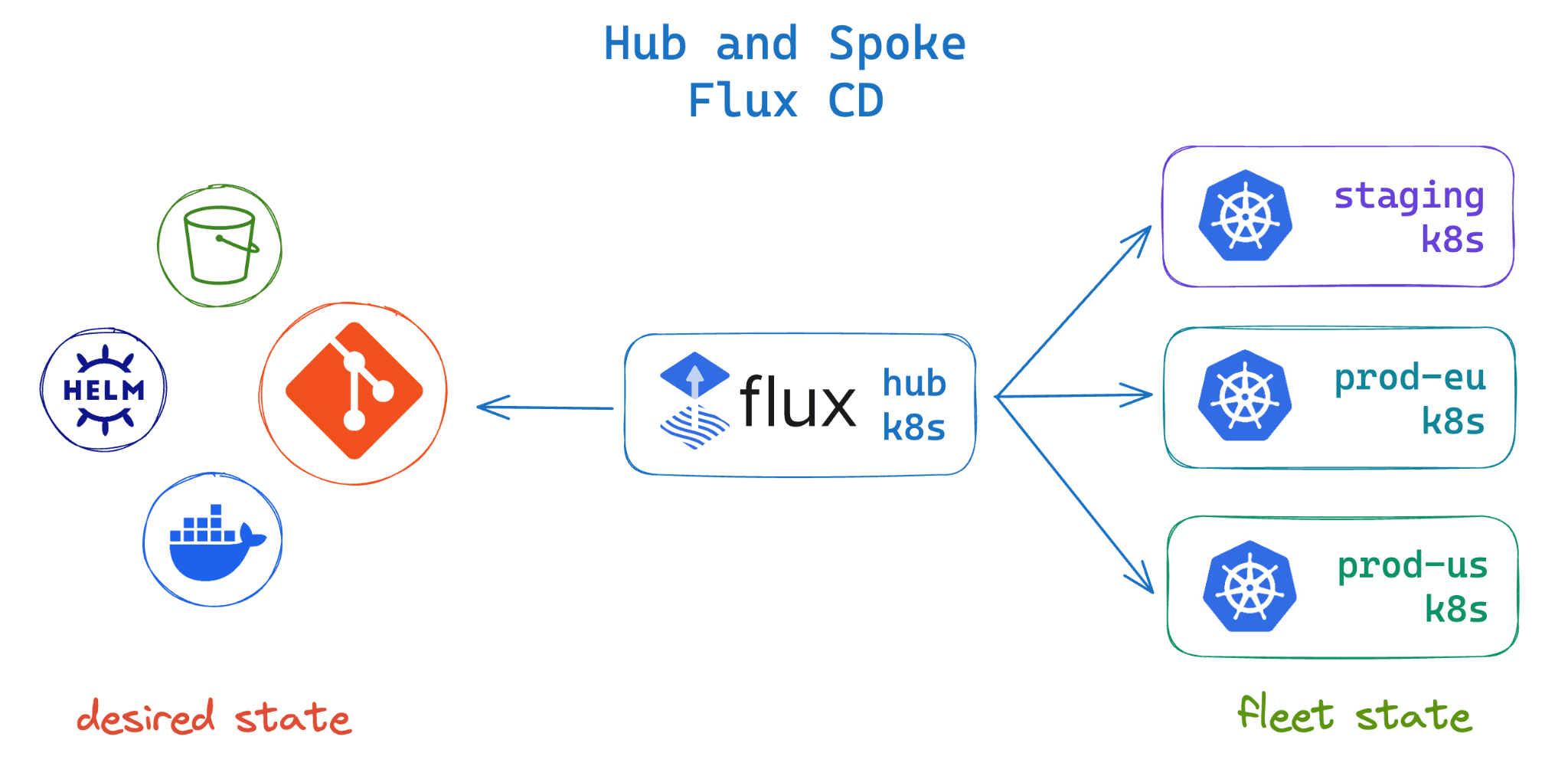
Image source: https://fluxcd.control-plane.io/images/diag-fluxcd-hub-and-spoke.png
ArgoCD and Flux both reconcile your clusters, but neither governs who is allowed to do what across them. Portainer adds that layer, with centralized RBAC, access control, and visibility across every cluster from one place. Explore multi-cluster management with Portainer.
3. Access Control and RBAC
ArgoCD comes with its own role-based access control built into the application. Through ArgoCD’s own RBAC model, you can:
- Define who can view, sync, or manage each application.
- Scope those permissions to specific projects.
- Connect it to your identity provider through SSO (OIDC, OAuth2, LDAP, or SAML).
Access is managed within ArgoCD itself, which suits teams who want a single, consistent permission layer across every cluster Argo manages and who need to give developers scoped access without handing out cluster credentials.
Flux doesn’t add a permission system of its own. Instead, it relies on native Kubernetes RBAC, applying changes by impersonating a service account you nominate.
Each tenant gets a namespace, a service account, and the RBAC rules that go with it; Flux can only do what those rules allow. Security and platform teams tend to like this because access stays in one place, the Kubernetes API, and follows least privilege by default.
4. Sync Behavior
Both tools monitor Git and pull changes into the cluster, but they differ in how much you can steer the process.
With ArgoCD, automated sync is something you opt into, and it comes with two toggles worth knowing:
- Self-heal: when someone changes a resource directly in the cluster, ArgoCD reverts it back to match Git.
- Prune: when you remove a resource from Git, ArgoCD deletes it from the cluster.
Both are off by default as a safety measure, so out of the box, ArgoCD will flag an app as out of sync and wait for you to approve the change. During the reconciliation interval, it polls Git roughly every 3 minutes, or immediately if you wire up a webhook.
Flux leans further toward automation. Each resource you define carries its own reconciliation interval, so Flux pulls and applies on that schedule without anyone pressing a button. Drift correction and pruning are part of how it normally runs (not optional switches you turn on later).
You also get fine-grained control per resource, since one Kustomization can reconcile every minute while another runs every hour.
Pro Tip:
Turning on self-heal can fight with other controllers. If a Horizontal Pod Autoscaler scales your replicas, a GitOps tool that also manages that field will keep reverting it, and the two end up in a tug-of-war. Either let Git own the value, or exclude that field from reconciliation (ArgoCD’s ignoreDifferences does this), so the autoscaler can do its job.
5. Progressive Delivery
Neither ArgoCD nor Flux handles progressive delivery on its own. Canary releases, blue-green deployments, and automated rollbacks come from a companion project in each ecosystem.
For ArgoCD, that companion is Argo Rollouts, a separate controller from the wider Argo project. It replaces the standard Kubernetes Deployment with a Rollout resource, then gradually shifts traffic to the new version while monitoring metrics, and automatically rolls the release back if those metrics look wrong.
Flux pairs with Flagger, a CNCF-Graduated project from the same family as Flux. Rather than replacing your Deployment, Flagger wraps the one you already have and automates the canary analysis around it, shifting traffic step by step and pausing or rolling back when something’s off.
Both rely on the same supporting cast: a service mesh or ingress controller (such as Istio, Linkerd, or NGINX) to split the traffic, and a metrics source (such as Prometheus) to decide whether a release is healthy. The pairing usually lines up with your GitOps choice: Argo Rollouts with ArgoCD and Flagger with Flux.
ArgoCD vs Flux: How to Choose
There’s no universally right answer here. Both tools are mature, CNCF-Graduated, and proven in production at scale, so the choice comes down to how your team works and what you want the tool to do for you.
When to Choose ArgoCD
ArgoCD is the stronger fit when visibility matters to more than just the platform team. Here are a few reasons to pick ArgoCD:
- You want developers and SREs to see deployment state directly, without building your own tooling
- You’re managing several clusters from a single control point
- You’d rather adopt one ready-made GitOps platform than assemble your own from separate pieces
- You expect to lean on the broader Argo ecosystem, such as Argo Rollouts for progressive delivery, Argo Workflows for pipelines, and Argo Events
- Your team has mixed skills and values a guided, visual experience over assembling primitives.
If most of these sound like your team, ArgoCD will likely feel like the path of least resistance. You get a visual, all-in-one platform that works well when people beyond the platform team need to see what’s deployed.
When to Choose Flux
Flux is the stronger fit when you prefer automation and composition over a console. Here are a few reasons to choose Flux:
- Your team lives in the CLI and manages everything as YAML
- You want a lean footprint that scales well across large fleets
- You prefer independent, self-sufficient clusters with multi-tenancy enforced through native Kubernetes RBAC
- Your environment includes air-gapped or strictly isolated sites
- You’re happy assembling your own stack, from the dashboard to Flagger to your own observability
If that sounds like your team, Flux will feel right at home. You get lean, composable building blocks that reward teams who’d rather automate and assemble than work from a UI.
Can You Use Both?
Yes, you can run ArgoCD and Flux together, though it’s more the exception than the rule. Because the two do the same core job, most organizations standardize on one for application delivery, since running both can add unnecessary operational overhead.
Where teams do combine them, they usually split by layer or by team. A common pattern uses Flux to bootstrap and run in-cluster infrastructure and add-ons, while ArgoCD handles application delivery with its UI for developers.
Another is migration, where an organization runs both side by side as it moves from one to the other. And sometimes it’s simply that different teams prefer different tools.
At scale, the harder problem is often governing access and keeping visibility across every cluster, rather than the GitOps tool itself.
Portainer plays a different role from ArgoCD and Flux. Rather than reconciling your clusters, it sits across them as a management layer for access control and visibility. It also stretches that same governance beyond Kubernetes to your Docker and Swarm environments, so even though your GitOps tool only handles the Kubernetes side, your mixed infrastructure stays under one access model. See how Portainer compares to ArgoCD and Flux.
ArgoCD vs Flux: Use Cases
Here are the situations where each tool earns its place. Whichever set sounds closest to your own environment is a strong signal toward that tool.
ArgoCD
ArgoCD is at its best when deployment needs to be visible and self-service across a whole organization. Here are a few situations where that strength really shows:
- A platform team building an internal developer platform. In large organizations, dozens of product teams often need to deploy and manage their own applications, but granting every developer direct cluster access poses security and operational risks. This is the exact problem Intuit set out to solve, and it’s why the company built Argo CD in the first place. Today, Intuit runs it in production at scale, managing thousands of applications across nearly 400 clusters, allowing hundreds of teams to self-serve through the UI while the platform team maintains central control.
- An SRE team running clusters across several regions. When you’re responsible for clusters spread across regions or cloud accounts, the hardest part of an incident is often just seeing what’s wrong and where. ArgoCD’s single console shows the sync status and health of every application in one place, and lets you roll an application back to its last good state with a click.
- A team already invested in the wider Argo ecosystem. Many teams adopt more than one Argo project together, since they’re designed to work as a family. If you already use Argo Rollouts for canary and blue-green releases (the same tool that powers large-scale releases at companies like Salesforce and Spotify) or Argo Workflows for pipelines, then pairing them with ArgoCD keeps your whole delivery toolchain consistent, with one mental model instead of several to learn and maintain.
- A team with mixed Kubernetes experience. Not every organization has a deep bench of Kubernetes specialists, and forcing less-experienced engineers to work entirely through kubectl and YAML slows them down and invites mistakes. ArgoCD’s visual interface lowers that barrier, so developers and operators of different skill levels can understand the deployment state and act on it from the same screen.
Across all of these, the common thread is visibility and safe delegation. If you want more people to participate in deployments while the platform team keeps control, ArgoCD is usually the tool that gets you there.
Flux
Flux is at its best when automation and a light footprint matter more than a dashboard. Here are a few situations where that strength really shows:
- A small platform team managing a large or fast-growing fleet. As the number of clusters climbs, a tool that needs constant hands-on attention forces you to grow the team just to keep up. Flux avoids that because each cluster reconciles itself from Git with no central console in the loop. This is how Deutsche Telekom runs the platform behind its 5G core, reaching around 200 clusters with roughly 10 engineers, and plans to scale to thousands without growing the team in step.
- An infrastructure team managing the platform layer as code. Application delivery is only part of the job; someone also has to manage the cluster’s foundations, such as controllers, CRDs, and policies. Because everything in Flux is a Kubernetes custom resource, teams use it to reconcile that platform layer the same way they manage applications, so the entire foundation stays version-controlled and reproducible rather than configured by hand.
- Edge, air-gapped, or strictly isolated environments. Some sites have poor connectivity, sit behind an air gap, or must remain isolated for compliance reasons, and a central management plane that reaches into each one is either impractical or not allowed. Flux fits this well, since it supports air-gapped installation and lets each site run independently and reconcile independently.
- A team that prefers to assemble its own stack. Not everyone wants an all-in-one platform with choices already made for them. Teams who would rather pick their own dashboard, wire in Flagger for progressive delivery, and choose their own observability tooling get exactly that with Flux, which hands you composable building blocks instead of a fixed set of features.
Across all of these, the common thread is lean, hands-off automation. If you want a fleet that scales without scaling your team, and you’re comfortable assembling the pieces around it, Flux is usually the tool that gets you there.
Run ArgoCD or Flux With Real Governance on Top Using Portainer
Whether you choose ArgoCD or Flux, you’ll have a capable GitOps engine keeping your clusters in sync with Git. What neither tool sets out to do is govern who can access what across all of those clusters, or give you a consistent view of them as your fleet grows.
That’s the layer Portainer adds. It sits on top of your GitOps setup as a self-hosted management platform, bringing enterprise-grade RBAC, access control, and operational visibility across every cluster, whether on-prem, in the cloud, or at the edge.
And because Portainer is vendor-agnostic, the governance layer stays consistent no matter what sits underneath (ArgoCD or Flux, one cloud or several, Kubernetes alongside Docker), so you’re never locked into a single tool’s or vendor’s way of managing access.
Your GitOps tool continues to handle deployments, while Portainer maintains consistent access and oversight around it.
If that’s the piece your team is missing, see how Portainer works with a quick demo.
FAQs
1. I keep reading about Argo CD and Flux, but how do you choose between them? Are they the only options?
The choice comes down to how your team prefers to work. ArgoCD suits teams that want a built-in visual UI and central control across many clusters. Flux suits teams that want lean CLI-driven automation and independent per-cluster reconciliation. Other GitOps tools do exist, though ArgoCD and Flux are the two CNCF-Graduated market leaders. Portainer’s built-in GitOps engine handles core reconciliation without requiring either as a dependency, which suits teams that want GitOps without running a separate tool for it.
2. Is Flux harder to use than ArgoCD?
Sometimes, yes. Flux has no built-in dashboard and is driven entirely by the CLI and YAML, so teams that prefer a visual interface generally find ArgoCD easier to start with. Teams comfortable with kubectl and YAML find Flux perfectly workable, and community options like Capacitor or Weave GitOps add a dashboard when one is needed.
3. Do I need GitOps from the start for Kubernetes, or is it something I add later?
From the start, if you have the option. GitOps establishes Git as the source of truth and reconciliation as the deployment model, which becomes harder to introduce once teams have built habits around manual kubectl or ad-hoc deployments. ArgoCD suits teams starting with self-service GitOps and a visual interface, while Flux suits teams who want lean automation from day one. Portainer’s built-in GitOps engine offers a lower-friction alternative if you don't want to run either separately.
4. Does Portainer replace ArgoCD or Flux?
No. Portainer is a management layer that runs alongside your GitOps tool, adding centralized RBAC, access control, and visibility across every cluster. Portainer’s own GitOps engine can handle basic reconciliation if you’d rather not run a separate tool, but teams already invested in ArgoCD or Flux keep those in place and use Portainer for the governance layer around them.
5. Can ArgoCD and Flux run on the same cluster?
Yes. Some teams use Flux to run in-cluster infrastructure and add-ons while ArgoCD handles application delivery for developers. Others run both during a migration. Most organizations standardize on one to avoid the overhead of managing two GitOps engines, and keeping visibility consistent across both becomes its own problem when they do run together.