Managed Kubernetes: What It Is, How It Works, and Use Cases

Imagine your Kubernetes cluster goes down in the middle of an urgent release, or an upgrade is delayed because only one engineer knows the control plane.
That’s the reality for many teams running self-managed Kubernetes.
Managed Kubernetes solves problems like this by shifting infrastructure ownership to a cloud provider, allowing your team to focus on shipping software instead of babysitting clusters.
This guide covers exactly what managed Kubernetes is, how it works operationally, what providers handle versus what stays with your team, and when outsourcing cluster management makes more sense than going it alone.
What is Managed Kubernetes?
Managed Kubernetes is a service where a cloud provider operates the Kubernetes control plane for you. The provider installs, runs, patches, and maintains core cluster components.
You still run standard Kubernetes, i.e., deploy containers, use kubectl, and manage workloads normally. The difference is that the provider maintains the cluster infrastructure, so you focus on applications rather than running Kubernetes itself.
What Kubernetes Managed Providers Typically Handle
A Kubernetes managed service provider operates the infrastructure that keeps the cluster running. Most managed Kubernetes services handle:
- Control plane provisioning: API server, scheduler, etcd, controller manager
- Upgrades and patching: Both Kubernetes versions and underlying OS components
- High availability: Control plane redundancy across availability zones
- Monitoring and health checks: Automated recovery from control plane failures
- Initial cluster networking: VPC integration, load balancer provisioning
What you still own (even on managed)
A managed Kubernetes service does not remove operational responsibility for the workloads running inside the cluster.
You’ll still manage:
- Node management: Sizing, scaling, and patching worker nodes (unless using Fargate/Autopilot)
- Application deployment: Manifests, Helm charts, CI/CD pipelines
- Security configuration: RBAC policies, network policies, secrets management
- Storage and persistent volumes: Provisioning and managing stateful workloads
- Cost optimization: Right-sizing nodes, managing idle resources
Note:
A managed Kubernetes cluster removes infrastructure complexity; it doesn't remove Kubernetes complexity. You still need to understand how Kubernetes works to use it effectively.
Further reading: Kubernetes Architecture: Components and Best Practices
Managed Kubernetes Vs. Self-Managed Kubernetes
The primary difference is operational ownership.
Neither model is universally better. The right choice depends on your team’s Kubernetes expertise, infrastructure requirements, and the operational overhead you’re willing to accept.
Let’s see the differences:
| Area | Managed Kubernetes | Self-Managed Kubernetes |
|---|---|---|
| Control plane management | Provider installs, runs, and patches control plane components such as the API server and etcd | Your team installs and maintains control plane nodes |
| Infrastructure setup | Provider provisions cluster infrastructure automatically | Engineers design and configure infrastructure manually |
| Upgrades and patching | Provider handles control plane upgrades and security patches | You schedule and execute upgrades yourself |
| Operational complexity | Lower. Infrastructure management is abstracted | Higher. Teams manage every layer of the cluster |
| Flexibility and customization | Limited to provider capabilities | Full control over cluster configuration |
| Maintenance overhead | Reduced. Core Kubernetes operations handled by the provider | High. Requires in-house Kubernetes expertise |
Self-managed clusters give you full control over every configuration decision. That flexibility comes at a cost.
On the other hand, managed Kubernetes trades some of that flexibility for significantly lower maintenance overhead. For most teams, that tradeoff is worth it.
Further Reading: Managed Vs. Unmanaged Kubernetes
How Does Managed Kubernetes Work?
Here’s the managed Kubernetes workflow in practice:
Step 1: Provision Your Cluster
Start by opening your provider’s console, CLI, or infrastructure-as-code tool and defining your cluster configuration:
- Region: Pick the region closest to your users or data sources
- Kubernetes version: Select from the provider’s supported versions list
- Networking: Assign a VPC, CIDR ranges, and subnet configuration
- Node pool baseline: Set your initial instance types and node count
Submit the request. The provider automatically provisions the control plane, configures etcd, sets up the API server, and connects it to your chosen network. This process typically completes in 3–10 minutes, depending on the provider.
Step 2: Configure Your Node Pools
With the control plane live, define the worker nodes that will actually run your workloads:
- Choose instance types based on workload requirements (CPU-heavy, memory-heavy, GPU)
- Set minimum and maximum node counts for each pool
- Enable cluster autoscaler so node counts adjust automatically under load
- Create separate node pools for different workload types if needed (e.g., one pool for general workloads, one for ML jobs)
The provider automatically registers each node with the control plane. At this stage, your team focuses on capacity planning rather than node registration mechanics.
Step 3: Authenticate and Connect
Once your cluster is running, download the kubeconfig file directly from your provider’s console or CLI:
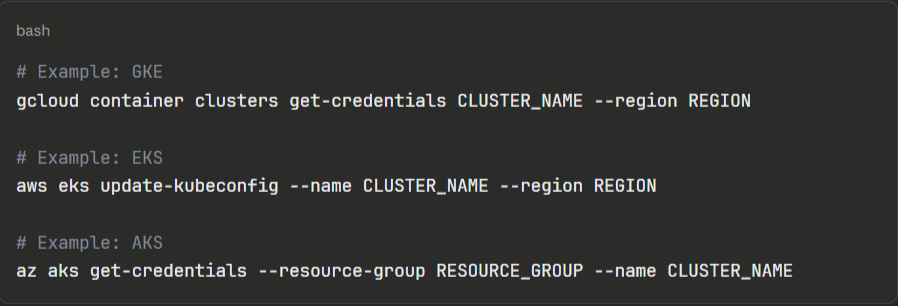
Add this kubeconfig to your CI/CD pipelines, local development environment, and any tooling that needs cluster access. From here, your cluster behaves like any standard Kubernetes cluster.
Step 4: Deploy Your Workloads
Deploy applications using your standard Kubernetes workflow, i.e., manifests, Helm charts, Kustomize, or a GitOps tool such as Argo CD or Flux. The managed layer is completely transparent at this stage.
A typical first deployment looks like:

Your team owns all application configuration, resource requests and limits, health checks, and rollout strategies. The provider’s managed layer does not interact with your workloads.
Step 5: Set Up Observability
Before running production workloads, connect monitoring and logging:
- Enable the provider’s native monitoring (CloudWatch for EKS, Cloud Monitoring for GKE, Azure Monitor for AKS) or deploy Prometheus and Grafana into the cluster
- Configure log aggregation either provider-native or a third-party stack like Loki or Datadog
- Set up alerts for node pressure, pod crash loops, and resource saturation
Most teams skip this step during initial setup and pay for it later. Get Kubernetes observability running before your first production Kubernetes deployment.
Step 6: Manage Ongoing Upgrades
The provider notifies your team when new Kubernetes versions are available and when your current version approaches end-of-life. Upgrades follow a two-step process:
- Upgrade the control plane first: Trigger this from the console or CLI; the provider handles it with zero downtime
- Upgrade node pools separately: Either rolling (nodes replaced one at a time) or blue/green (new node pool spun up alongside the old one)
Always test workloads on the new version in a staging cluster before upgrading production. Node pool upgrades cause pod rescheduling, so workloads need proper pod disruption budgets configured to avoid downtime during the process.
Main Benefits of Managed Kubernetes
Here are some reasons engineers switch from self-managed to managed Kubernetes:
Your Engineers Stop Babysitting Infrastructure
Reddit’s software engineer, Harvey Xia, said,
“It would take 30+ hours for an engineer to spin up a cluster, including over 100 steps, including those of configuring a network, provisioning hardware or picking a cloud vendor, installing a control plane, and adding on tools for observability and autoscaling.”
With a managed Kubernetes service, cluster provisioning drops to under 10 minutes. Most importantly, control plane management, patching, and availability monitoring shift entirely to the provider.
A Redditor shared the relief he and his team felt after switching from self-managed to managed Kubernetes. In the comment section, another user noted the pain of managing Kubernetes in-house compared to outsourcing to a managed service provider.
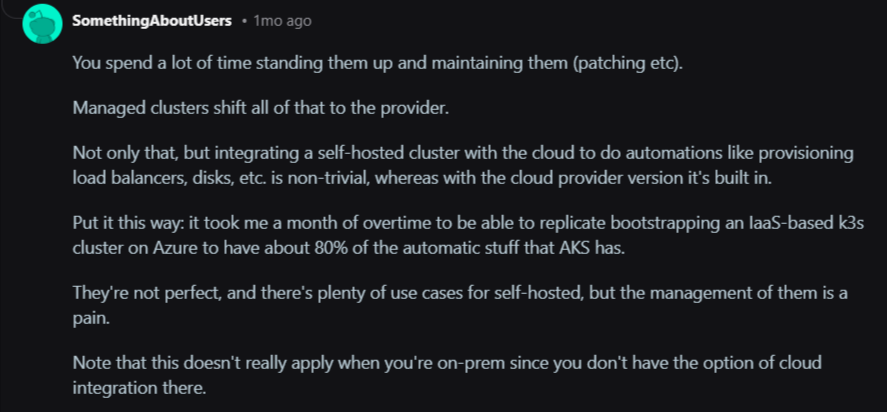
Image: Reddit
Your engineers can spend the recovered time on product work rather than on infrastructure archaeology.
Faster Deployments Without Extra Headcount
A report by the Global Journal of Engineering and Technology Advances shows that managed services can accelerate the deployment of new services by 30-40%. Some organizations report even higher gains, such as a 61% reduction in time-to-market for new services or a reduction in build-to-deliver cycles from two months to two weeks.
That speed comes from removing the dependency on infrastructure setup before every deployment. Teams push to a cluster that’s already running, already monitored, and already hardened rather than provisioning environments before every release cycle.
Lower Total Cost of Ownership Than It Appears
The most common objection to managed Kubernetes is the price tag. A Redditor posted that managed K8s is more expensive than spinning up raw VMs.
That comparison ignores the biggest cost line: people.
In response to the Reddit thread, a user shared the reality of the scarcity and high cost of hiring an experienced Kubernetes expert.

Image: Reddit thread stating the high cost of hiring experienced K8s experts
Kubernetes experts earn between $120,000 and $180,000 per year. And you need a team of three to five engineers to cover a self-managed cluster around the clock properly. That’s $360,000–$900,000 in annual salaries before a single workload deploys.
Managed Kubernetes significantly reduces the total cost of ownership. According to a case study published in the Global Journal of Engineering and Technology Advances report, organizations that migrated to cloud-native architectures with managed Kubernetes saw infrastructure costs drop by 60% and maintenance costs fall by 42%.
Container Management at Genuine Production Scale
Cummins, the global powertrain manufacturer, faced exactly the problem that managed Kubernetes services solve.
Their legacy telematics system had fragmented into 35 separate software versions, each tied to a specific vendor’s hardware. Every new feature required separate integration and testing across dozens of suppliers.
They containerized their edge software, standardized deployment with Portainer Business Edition, and worked with Portainer’s managed services team.
In return, Cummins reduced 35 separate software variants down to one, delivered their new platform on time, and established a future-proof architecture now being adopted as an industry reference model.
Contact the Portainer managed services team to build and operate your Kubernetes platform while you focus on what moves your product forward.
Security Hardening Without a Dedicated Security Team
Securing a Kubernetes cluster requires configuring RBAC, network policies, secret encryption, audit logging, and CIS benchmark compliance. That can be a tedious ongoing workload for your team.
Managed Kubernetes services automatically apply security patches to the control plane while your team still owns application-level security.
The best solution for managing your Kubernetes clusters in production
When to Outsource the Management of Your Kubernetes Environment
Running Kubernetes in-house makes sense when you have the team, the expertise, and the workload complexity to justify it.
So, outsource Kubernetes management when:
- Your team lacks dedicated Kubernetes expertise: Running production clusters without experienced platform engineers means incidents take longer to resolve, upgrades get deferred, and security gaps accumulate quietly.
- Infrastructure management pulls engineers away from product work: If your developers spend meaningful time on cluster maintenance, you need to take some of the workload off their plates.
- Your cluster upgrade cadence has slipped: Falling more than two minor versions behind on Kubernetes is a common sign that operational overhead has outpaced internal capacity.
- You’re scaling across multiple clusters or environments: Managing one cluster manually is manageable, but managing 5+ clusters across dev, staging, and production without tooling or dedicated ownership becomes a full-time job.
- Uptime requirements exceed your team’s on-call capacity: A 99.9% SLA requires a response at 2 am. A managed Kubernetes service provider handles that by default.
- You’re entering a regulated industry. Healthcare, finance, and government workloads require audit trails, RBAC enforcement, and security hardening that managed services deliver out of the box.
How Portainer Helps You Manage Your Kubernetes Environments
A managed Kubernetes service removes the complexity of the control plane. But what it doesn’t solve is the operational layer above that, which requires managing multiple clusters, enforcing access controls, giving developers a safe way to deploy, and maintaining visibility across environments.
That’s the gap the Portainer platform fills.
Portainer acts as a unified control plane across your Kubernetes clusters (whether they run on EKS, AKS, GKE, on-premises, or at the edge) without requiring a dedicated platform engineering team at every touch point or vendor lock-in.
Concretely, that means:
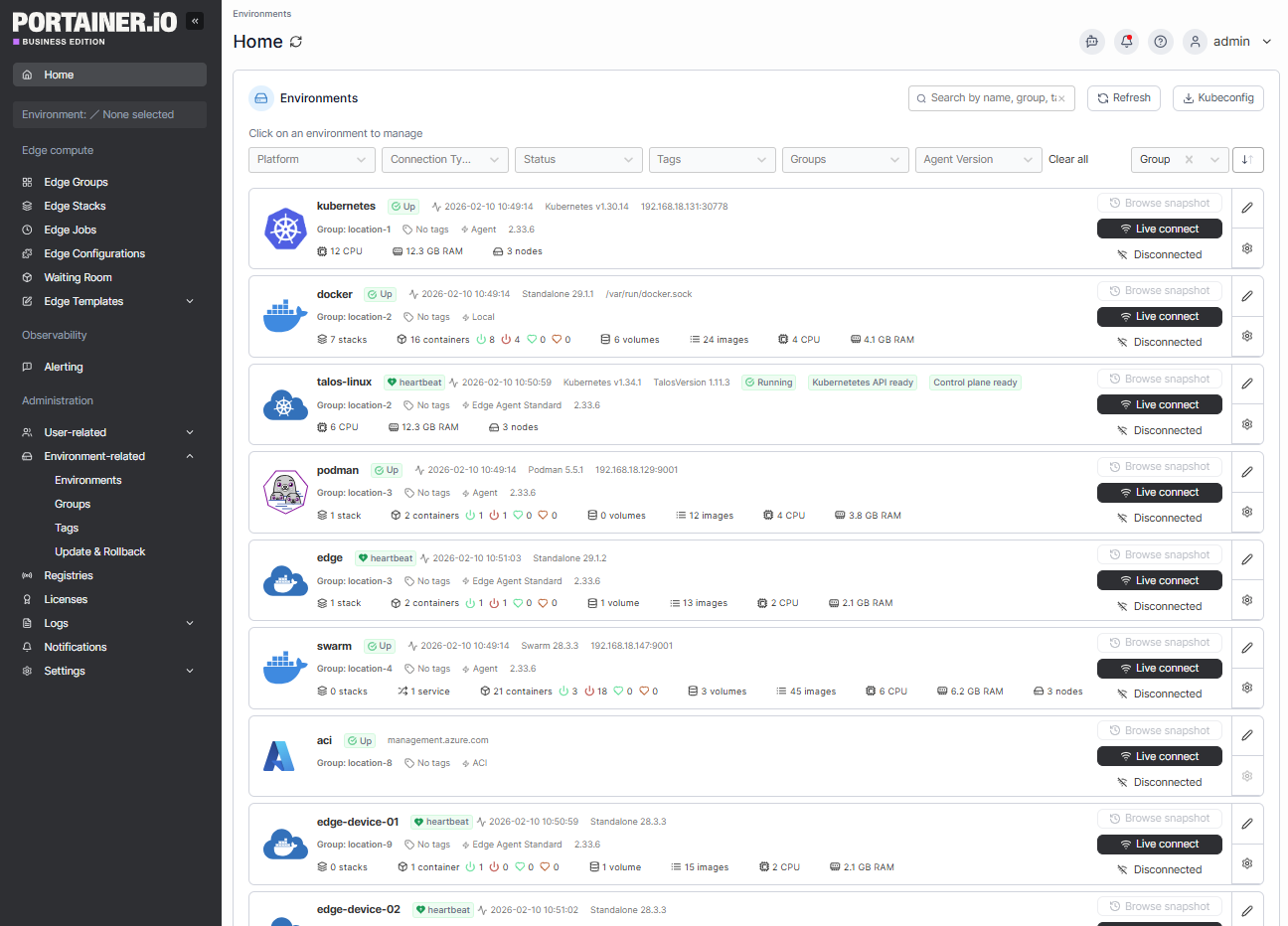
- Multi-cluster fleet management: Manage thousands of clusters and remote edge nodes with full visibility from a single interface.
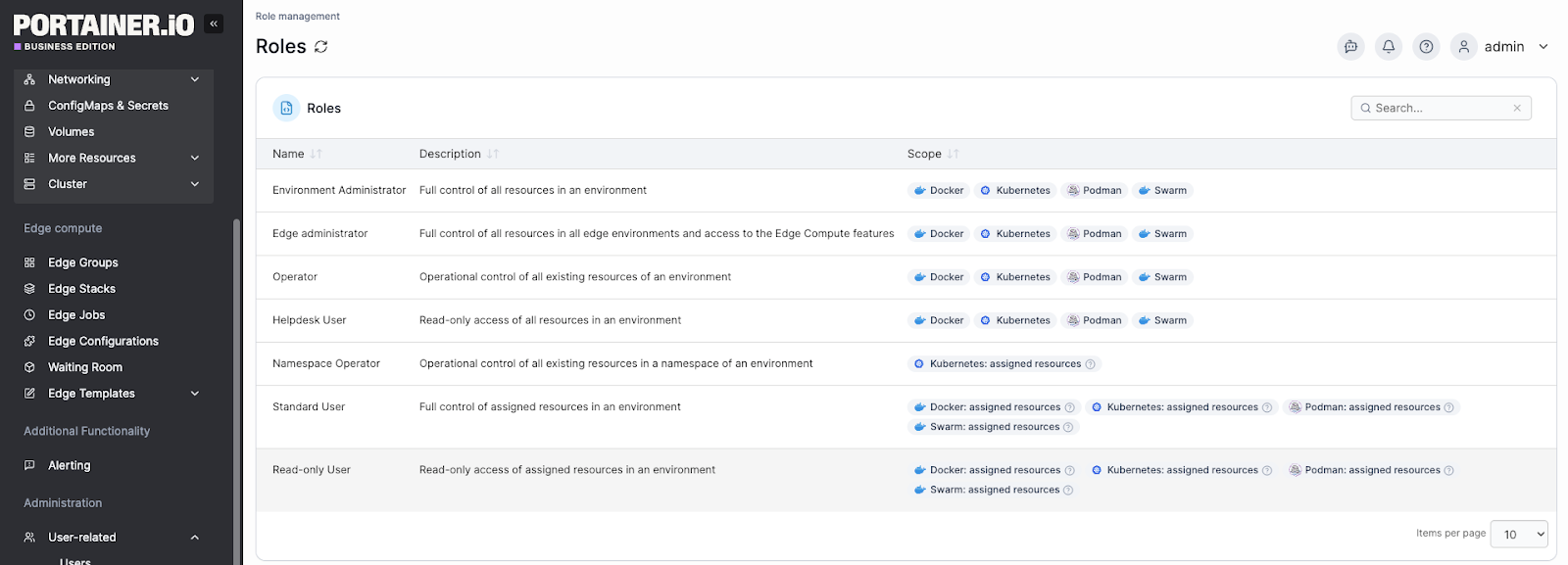
- Unified access control: Integrate with existing identity providers and enforce granular RBAC through a single interface, removing the need for in-cluster frameworks and reducing the attack surface
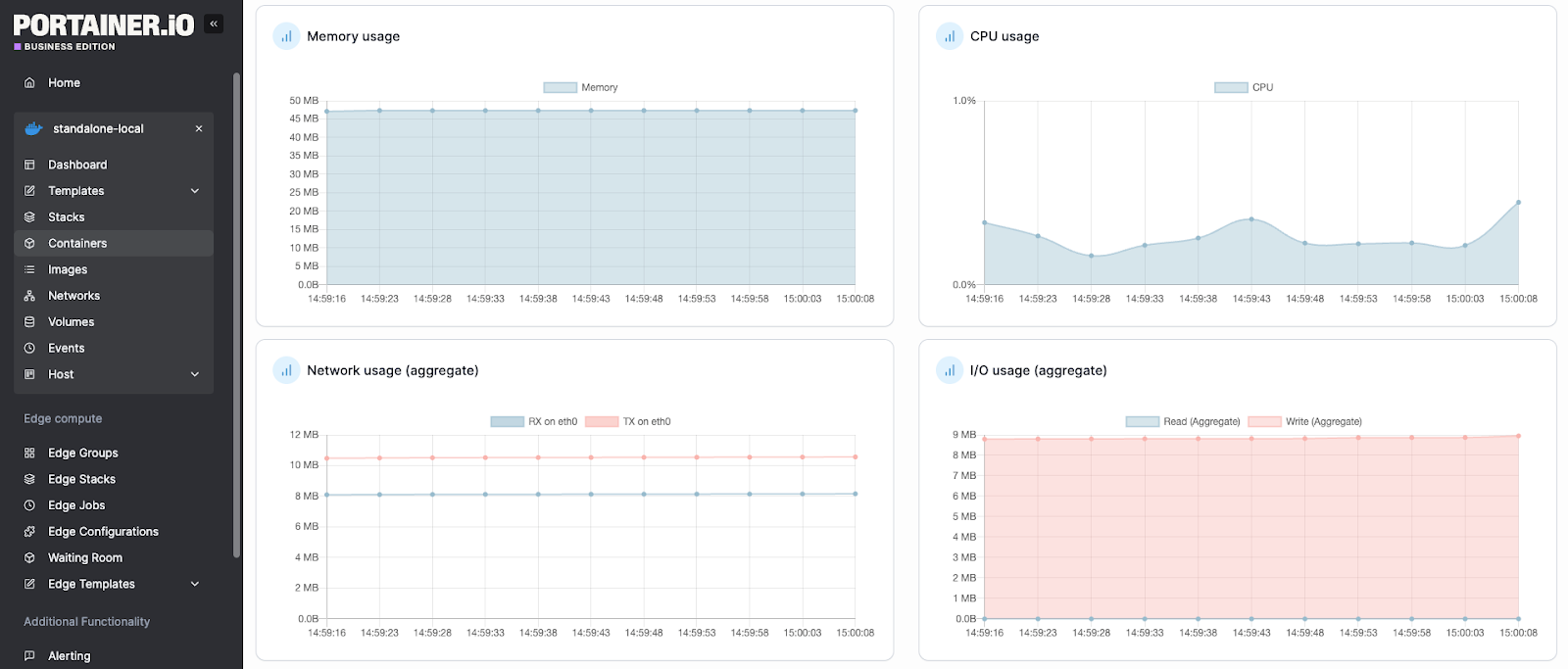
- Real-time observability: Monitor cluster health, view logs, inspect YAML, and triage issues with built-in alerting and enterprise-grade observability
- GitOps automation: Automate application delivery using a built-in GitOps reconciler, enabling non-expert users to deploy applications safely and repeatably
- Compliance and governance: Enable OPA Gatekeeper, define change windows, set quotas, and stream audit logs directly to your SIEM
Book a demo to learn why enterprises across industries use Portainer to manage their Kubernetes platforms.
A Better Way to Manage Kubernetes with Portainer Managed Services
Managed Kubernetes removes the hardest parts of running Kubernetes, but operating clusters across environments, teams, and workloads still requires the right tooling and expertise.
Portainer bridges that gap, giving your team the platform to manage existing clusters and the option to bring in experienced Kubernetes engineers when you need them. And that’s from initial setup through ongoing maintenance, security hardening, and support.
Talk to our Kubernetes managed services team to see how Portainer’s engineers reduce Kubernetes management workloads for teams.