5 Best Container Security Tools in 2026: Features & More

Container security issues usually show up when you’re trying to cover too many layers (image scanning, runtime detection, access control, compliance) with too few solutions.
Each layer has its own tooling, its own configuration, and its own blind spots, so getting the stack wrong means vulnerabilities compound before anyone catches them.
According to Sysdig’s Cloud-Native Security & Usage Report, 87% of container images running in production contain high or critical vulnerabilities. And with Gartner projecting that over 95% of organizations will run containerized applications in production by 2029, the attack surface continues to grow.
This article breaks down five of the best container security tools in 2026, each covering a distinct layer of the security stack: image scanning, runtime threat detection, governance and access control, full-platform protection, and developer-first CI/CD scanning.
We’ll also walk through how to choose the right container security tool based on your environment and team needs.
5 Best Container Security Tools in 2026
| Name | Key Features | Best For | Pricing | G2 Rating |
|---|---|---|---|---|
| Trivy | Multi-target scanning, auto-vulnerability DB updates (every 6 hrs), CI/CD integration | DevOps/platform teams needing reliable container scanning without licensing costs | Free | - |
| Falco | eBPF-based kernel monitoring, customizable detection rules (MITRE, PCI DSS, HIPAA), flexible alert routing | Security/platform teams running Kubernetes needing real-time runtime threat detection | Free | - |
| Portainer | Granular RBAC, identity provider integration (SSO/LDAP), OPA Gatekeeper policy enforcement, SIEM export | Enterprise IT/platform teams needing centralized access control and audit logging | Custom pricing | 4.8/5 (296 reviews) |
| Aqua Security | Image scanning, policy enforcement, runtime protection with drift prevention, compliance reporting | Enterprise security teams needing end-to-end workload protection | Custom pricing | 4.2/5 (57 reviews) |
| Snyk | Base image recommendations, IDE/Git/CI/CD integration, K8s manifest scanning | Development teams wanting container scanning embedded directly into workflows | Free tier; paid starts at $25/mo | 4.5/5 (132 reviews) |
1. Trivy: Best for Container Image Vulnerability Scanning
Trivy is an open-source security scanner maintained by Aqua Security. It scans container images, filesystems, Git repositories, and Kubernetes clusters for vulnerabilities, misconfigurations, and exposed secrets from a single binary.
Key Features
- Multi-Target Scanning From a Single Binary: Trivy lets you scan container images, filesystems, Git repositories, VM images, and live Kubernetes clusters with a single CLI tool. This means you only need one scanner to handle pre-commit checks, CI/CD pipeline gates, and production audits.
- Automatic Vulnerability Database Updates: Trivy pulls from multiple vulnerability sources, including the National Vulnerability Database (NVD), Red Hat Security Data, Debian Security Tracker, and language-specific advisory databases. The database updates every six hours, so newly disclosed CVEs show up in your scans within hours of publication.
- CI/CD Pipeline Integration: Trivy integrates with existing build pipelines via native support for GitHub Actions, GitLab CI, Jenkins, and CircleCI. You can configure it to fail builds only when high or critical vulnerabilities are found, which prevents noisy low-severity findings from blocking deployments while still catching the issues that matter.
Pricing
Trivy is completely free under the Apache 2.0 license.
Where Trivy Shines
- Zero setup friction: Install it, point it at a target, get results. No API keys, no account creation, no configuration files. Basic scanning works in roughly 30 seconds.
- Broad coverage in one tool: Most open-source scanners focus on one target type. Trivy handles container images, IaC files, Kubernetes manifests, secrets, and license checks in a single pass.
Where Trivy Falls Short
- No centralized dashboard: Trivy is CLI-first. There’s no built-in UI for tracking vulnerabilities across teams or environments over time. You’ll need to build reporting on top of it or upgrade to Aqua’s commercial platform.
- Limited remediation guidance: Trivy tells you what’s wrong, but it doesn’t recommend base image upgrades or provide fix paths. You get the CVE, the severity, and the fixed version if one exists. Prioritization and action planning fall on your team.
Customer Reviews
“I appreciate Trivy for being open-source and not requiring any payment,” shares Dmitrey K.
“Trivy generates many false positives, flagging non-existent vulnerabilities. Improvements could include better contextual analysis or granular filtering,” says Utsav S.
Who Trivy Is Best For
- DevOps and platform engineering teams that need a reliable container scanner in their CI/CD pipelines without adding licensing costs.
2. Falco: Best for Runtime Threat Detection
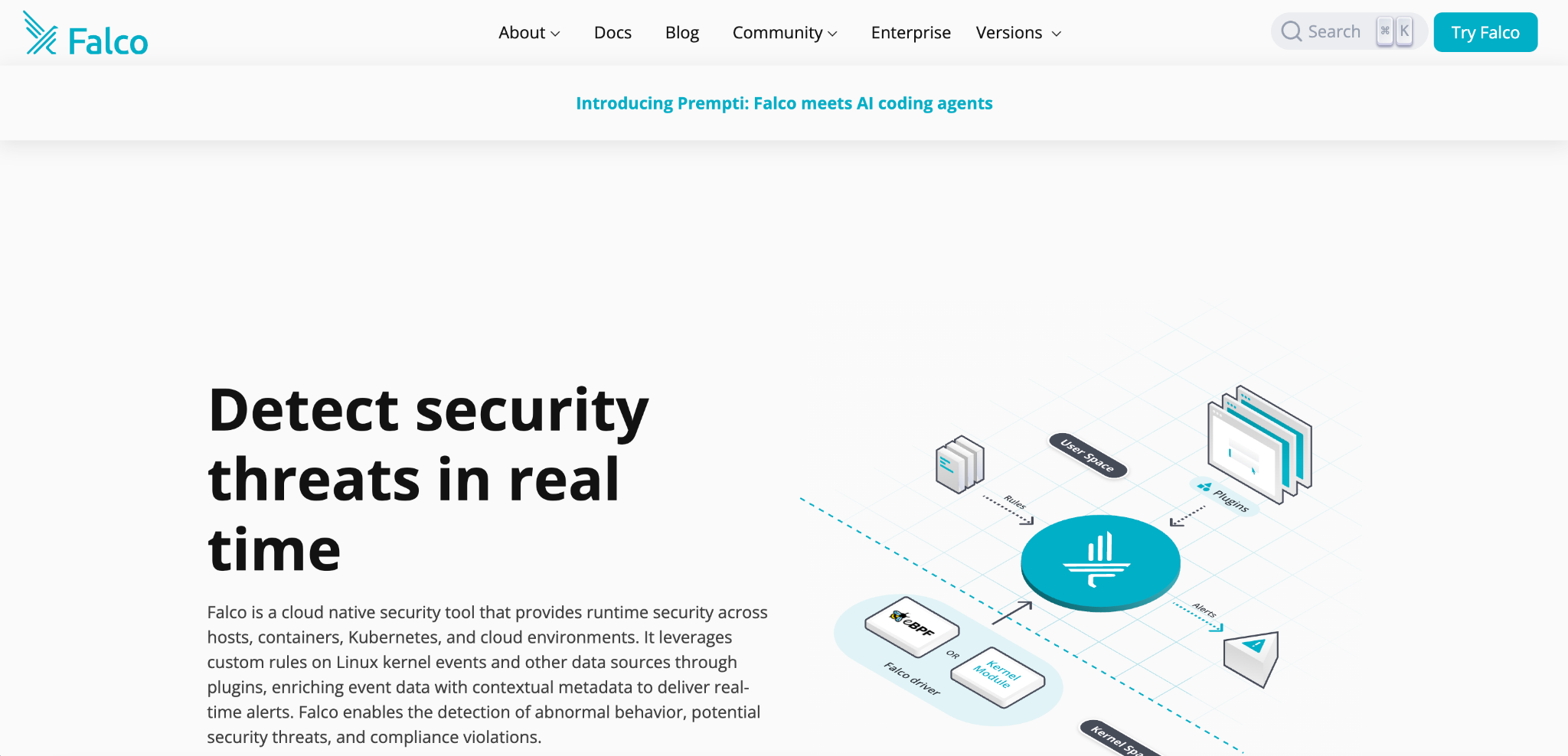
Next on our list of the best container security tools is Falco. It’s an open-source runtime security tool originally created by Sysdig and now a CNCF-graduated project.
It monitors kernel-level system calls using eBPF to detect suspicious behavior in containers, Kubernetes clusters, hosts, and cloud environments in real time.
Key Features
- eBPF-Based Kernel Monitoring: Falco uses eBPF to hook into Linux system calls at the kernel level (without requiring kernel modules). This means it can detect actions such as privilege escalation, shell spawning, unauthorized file access, and unexpected outbound network connections in real time.
- Customizable Detection Rules: Falco has a comprehensive default ruleset that covers common attack patterns aligned to frameworks like MITRE ATT&CK for Containers, PCI DSS, HIPAA, and NIST 800-190. All rules are written in YAML and fully customizable.
- Flexible Alert Routing via Falcosidekick: Falcosidekick is a companion tool that plugs into whatever alerting and incident response stack your team already uses. It routes Falco alerts to 70+ destinations, including Slack, PagerDuty, Splunk, Prometheus, Grafana, AWS EventBridge, and more.
Pricing
Falco is completely free under the Apache 2.0 license.
Where Falco Shines
- Catches what image scanners miss: A container image can pass every vulnerability scan and still get compromised at runtime. Falco, being a kernel-level monitoring tool, detects the actual behavior (a shell spawning, a sensitive file being read, an unexpected outbound connection) to signal a live threat. It covers the gap between pre-deployment scanning and post-deployment reality.
- CNCF graduated with strong ecosystem trust: Graduated status means Falco has passed the CNCF’s bar for production readiness, security audits, and governance.
Where Falco Falls Short
- Noisy out of the box: Default rules generate a high volume of alerts from day one, and legitimate operations frequently trigger false positives. If you go with Falco, expect to spend significant time tuning rules, writing exceptions, and suppressing known-good behavior.
- No built-in threat blocking: Falco detects and flags threats, but doesn’t stop them by default. Stopping a malicious action requires integrating Falco with response automation or admission controllers. If you need in-line blocking, you'll need to layer additional tooling on top.
Customer Reviews
“It is really good for Linux systems and is a cloud native security tool so it is quite good at the scalability front,” says Anussha H.
“Falcon sometimes releases unnecessary alerts due to its default settings. Also, people with little knowledge in security field will find it hard to operate,” shares Mansi S.
Who Falco Is Best For
- Security and platform teams running Kubernetes in production that need real-time threat detection beyond what build-time image scanning can provide.
Want to go deeper on how to secure your containerized environments beyond tooling? Our guide on 10 Container Security Best Practices for Enterprises in 2026 covers everything from image hygiene to runtime isolation.
3. Portainer: Best for Container Security Governance and Access Control
Image scanning and runtime detection solve part of the container security problem, but they don’t answer a more fundamental question: who has access to your environments, what are they allowed to do, and is there an audit trail when something changes?
That’s the layer Portainer covers. It’s a self-hosted container management platform with built-in security governance that centralizes RBAC, identity management, policy enforcement, and audit logging across Docker, Kubernetes, and edge environments from a single control plane.
Key Features
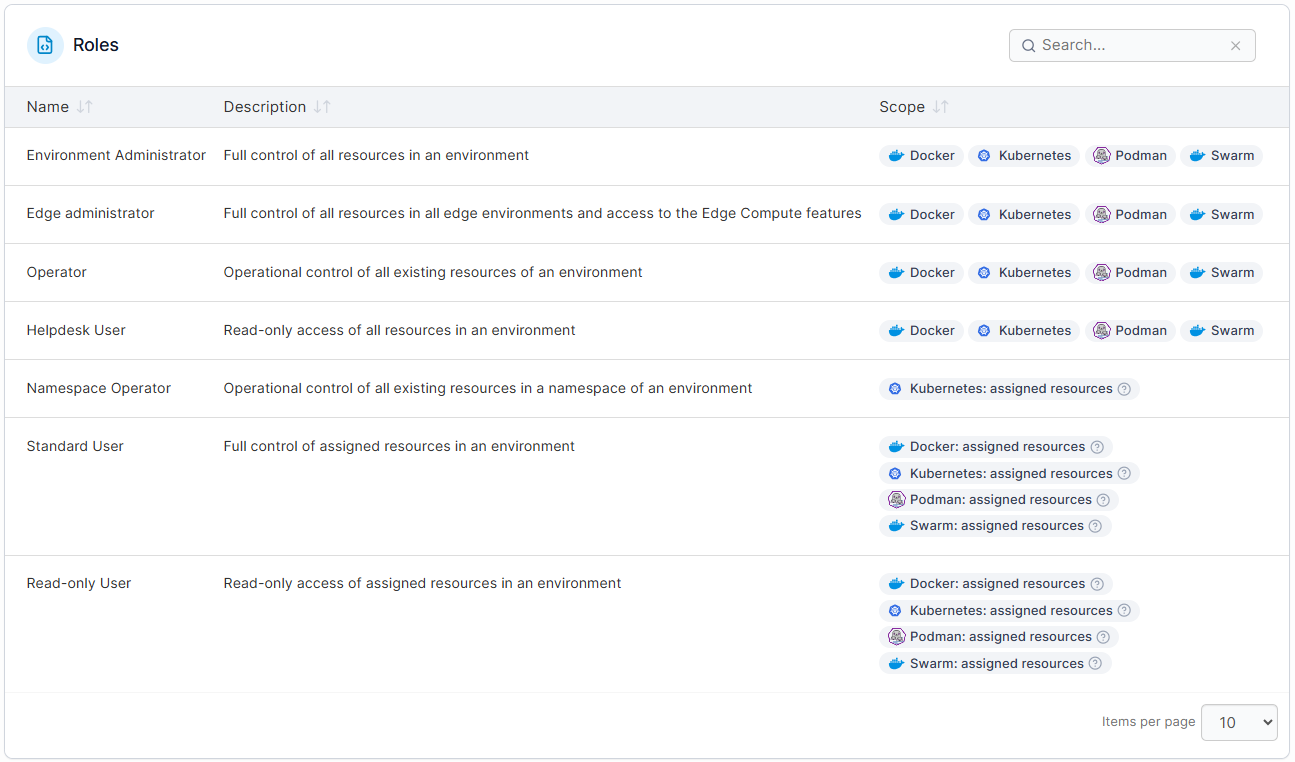
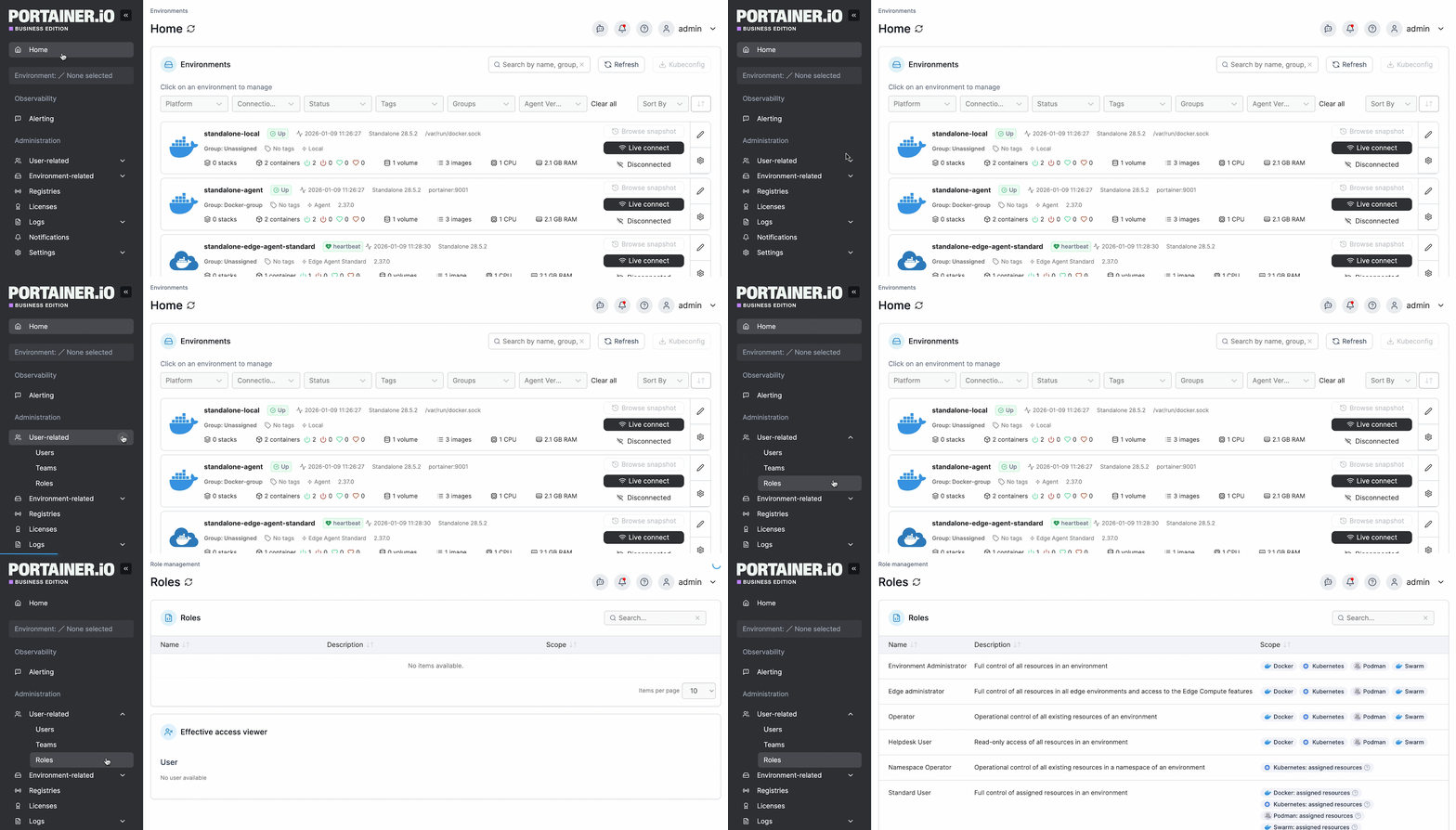
- Role-based access control across all environments: Portainer provides granular RBAC with predefined roles (Environment Administrator, Operator, Helpdesk, Standard User, Read-Only User, and Namespace Operator) that can be scoped per environment, per environment group, or per Kubernetes namespace. A single user or team can hold different roles across different environments, so your platform team might have full access in staging but only Operator-level access in production.
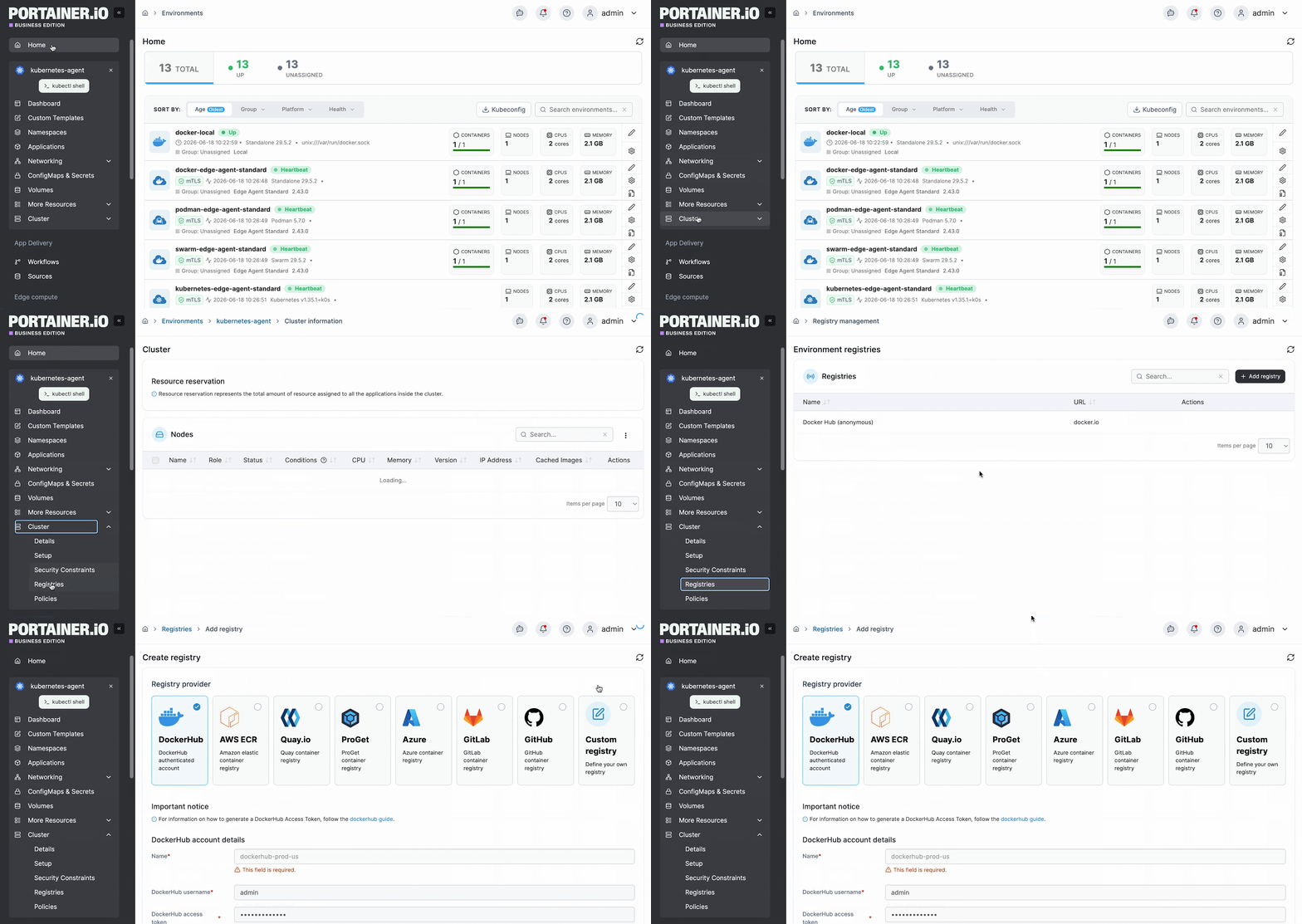
- OPA Gatekeeper policy enforcement and registry controls: Portainer integrates with Open Policy Agent (OPA) Gatekeeper to enforce security policies at the admission level. You can block privileged containers, enforce resource limits, or require specific labels and annotations on all deployments. Portainer also lets you centralize registry management across environments, defining which registries are available per cluster and namespace so teams can only pull from approved sources. Policies are evaluated at deployment time, so non-compliant workloads are stopped before they reach production.
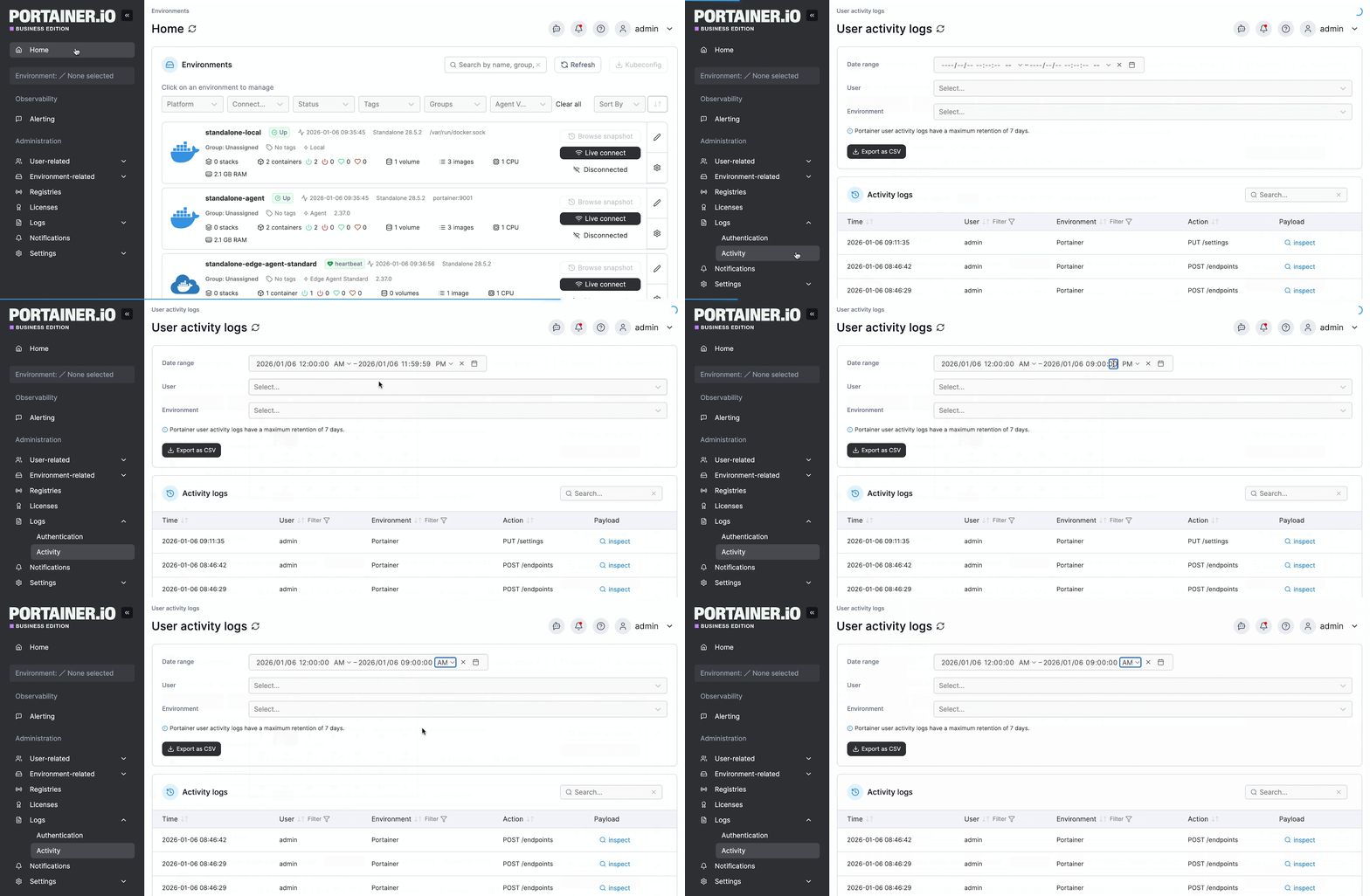
- Full audit logging with SIEM export: Every action taken through Portainer is logged: user authentication events, resource changes, deployment actions, and configuration modifications across all managed environments. Logs can be streamed to external platforms like Splunk, Microsoft Sentinel, or any syslog target, giving security and compliance teams a centralized record of activity across their entire container estate.
Pricing
| Plan | Cost |
|---|---|
| Enterprise IT | Enterprise pricing: Speak to sales |
| Edge / IIoT | Enterprise pricing: Speak to sales |
For complete plan details and volume-based options, visit Portainer’s Enterprise Pricing page.
See Portainer in action
Where Portainer Shines
- Centralized governance across hybrid environments: Portainer provides a single control plane to manage access, enforce policies, and track activity across cloud, on-prem, and edge environments.
- Lowers the barrier to secure container management: Kubernetes RBAC is powerful but complex, with hundreds of verbs, roles, and bindings. Portainer abstracts it into a visual interface that lets teams manage roles, scoping, and identity integration without writing YAML. Security governance doesn’t bottleneck on a small group of Kubernetes specialists.
- FIPS 140-3 compliant mode: For organizations in regulated industries or government environments, Portainer offers a FIPS 140-3 compliant mode, which isn’t something you’ll find in most container management tools.
Where Portainer Falls Short
- Not a vulnerability scanner or runtime detection tool: Portainer doesn’t scan container images for CVEs or monitor system calls for live threats. It covers the governance and access control layer, so teams that need scanning and detection will need to pair it with dedicated tools for those functions.
- Built for multi-environment scale: Portainer’s governance features are designed for teams managing multiple clusters, environments, or distributed edge deployments. If you’re running a single small cluster with a handful of users, the access control and policy enforcement tooling may be more than you need.
Customer Reviews
“I use Portainer for hosting over 20 containerized applications and it provides a simple yet intuitive user interface for managing these applications easily. I like how easy it lets me manage every aspect of my containerized applications, including managing their lifecycle, their images, networks, and storage,” says a user in consulting.
“Portainer makes monitoring and managing docker containers and docker compose stacks MUCH easier. Re-creating docker containers with small modifications from the original, without having to remember the exact command that started it in the first place, is a big productivity win,” shares Rudolf B.
See Portainer in action
Who Portainer Is Best For
- Enterprise IT and platform teams managing container deployments across multiple environments that need centralized access control, policy enforcement, and audit logging without requiring deep Kubernetes expertise across the entire team.
- Organizations in regulated industries (healthcare, finance, government, defence) where compliance frameworks demand documented access controls and full audit trails across container infrastructure.
- Teams managing edge and IoT deployments where governance needs to scale across hundreds or thousands of distributed nodes through a single management plane.
4. Aqua Security: Best for Full-Platform Container Security
Aqua Security is a cloud-native application protection platform (CNAPP) that covers the entire container security lifecycle, from image scanning through runtime protection, in a single commercial product.
Key Features
- Container image scanning and policy enforcement: Aqua scans container images for vulnerabilities, misconfigurations, secrets, and unsafe packages before deployment. Teams can define assurance policies that block non-compliant images from being promoted across environments, preventing risky workloads from reaching production.
- Runtime protection with drift prevention: Aqua monitors running containers in real time and can block suspicious behavior as it happens. Its drift prevention feature enforces image immutability, meaning any unauthorized changes to a running container are automatically detected and stopped.
- Compliance reporting: Aqua maps security findings to common regulatory frameworks, giving compliance teams ready-made reports for audit cycles.
Pricing
| Plan | Cost |
|---|---|
| Enterprise | Custom pricing based on protected workloads, deployment type, and features |
Where Aqua Security Shines
- Full lifecycle coverage: Aqua addresses build-time, deployment-time, and runtime risks without requiring teams to stitch together separate tools for each stage.
- Active runtime enforcement: Unlike tools that only alert on threats, Aqua can actively block malicious behavior in running containers. Drift prevention and runtime policies give security teams enforcement capabilities that go beyond detection.
Where Aqua Security Falls Short
- Complex to navigate: Aqua’s UI can be difficult to work with, particularly for teams without prior experience. Understanding the different modules and finding the right data takes time and onboarding investment.
- Proprietary ecosystem creates vendor dependency: Aqua uses proprietary data formats and tooling across its platform. For organizations that invest heavily in Aqua's scanning, runtime, and compliance workflows, migrating away from or integrating with other security tools becomes harder over time. Teams that prefer open standards or want flexibility to swap components of their security stack should factor in the long-term dependency.
Customer Reviews
“The breadth and depth of features along with the research provided by their world class research org has helped me tremendously in securing the products I support both internally and in external production,” shares a user in the computer software.
“Currently the hardest part is understanding the different modules in the UI. Many people have trouble navigating it to find the data the need if they don't have the needed experience,” says Mitchell M.
Who Aqua Security Is Best For
- Enterprise security teams running containers at scale that need end-to-end workload protection, active runtime enforcement, and compliance reporting from a single platform.
5. Snyk: Best for Developer-First Container Scanning in CI/CD
Snyk Container is the container security product within Snyk’s broader developer security platform. It scans container images for OS-level and application-level vulnerabilities and recommends specific base image upgrades to resolve them.
Where other tools on this list are built for security or platform teams, Snyk is designed to surface findings directly inside developer workflows: IDEs, pull requests, and CI/CD pipelines.
Key Features
- Base image recommendations: When Snyk finds vulnerabilities in a container image’s OS layer, it reports the CVE and recommends specific alternative base images or versions that resolve the issues. If your application uses node:16 with known vulnerabilities, Snyk might suggest node:16-alpine as a smaller, more secure alternative. This turns scan results into actionable next steps rather than a list of problems for your team to research.
- Developer workflow integration: Snyk integrates with IDEs (VS Code, IntelliJ), Git platforms (GitHub, GitLab, Bitbucket), CI/CD pipelines (GitHub Actions, GitLab CI, Jenkins, CircleCI), and container registries (Docker Hub, ECR, ACR, GCR, Artifactory, Harbor).
- Kubernetes manifest scanning: Beyond container images, Snyk scans Kubernetes manifests for configuration issues: containers running as root, missing resource limits, exposed secrets, and violations of pod security standards. This catches deployment-level misconfigurations that image scanning alone won’t flag.
Pricing
| Plan | Cost |
|---|---|
| Free | $0 |
| Team | $25/month/contributing developer |
| Ignite | $1,260/year/contributing developer |
| Enterprise | Contact sales |
Where Snyk Shines
- Actionable remediation: Snyk’s base image recommendations and automated fix pull requests set it apart from scanners that only list CVEs. Developers get a clear path from “vulnerability found” to “vulnerability resolved” without needing to research fixes manually.
- Low friction for developer adoption: Because Snyk lives inside IDEs, Git platforms, and CI/CD pipelines, developers don’t need to learn a separate tool or check a separate dashboard. This lowers the barrier to getting security feedback into the development cycle early.
Where Snyk Falls Short
- False positives require triage effort: Snyk can flag vulnerabilities that turn out to be non-issues, and in some cases, miss genuine ones. Teams should expect to invest time differentiating real risks from noise, particularly in the early stages of adoption and across language-specific dependencies.
- Expensive at scale, with a dated UI: Snyk’s per-developer pricing adds up quickly as teams grow, and the interface isn't as intuitive as the rest of the developer experience. For teams evaluating container scanning specifically, the cost relative to open-source alternatives is a common sticking point.
Customer Reviews
“I like that Snyk easily runs scans and even provides the versions in which vulnerabilities are fixed. This feature is valuable because it helps me identify security risks or bad implementations in my code changes without having to test and update my code and dependencies manually,” shares Manseerat K.
“After some months of project being imported, scanned, and tested, snyk starts providing false-positives issues as well,” says a user in IT and services.
Who Snyk Is Best For
- Development teams that want container vulnerability scanning embedded directly into their CI/CD pipelines and IDEs, with actionable base image recommendations to speed remediation.
Security governance is only as strong as the management platform underneath it. For a full comparison of the platforms that handle day-to-day container operations, see 6 Best Container Management Software & Platforms in 2026.
How to Choose the Right Container Security Tool
Picking the right container security tool depends less on which one has the longest feature list and more on how it fits your environment, your team, and your operational requirements.
Here are four key considerations to help narrow it down.
1. What layers of the security stack do you need to cover?
Container security covers several distinct problems: image scanning, runtime detection, access control, policy enforcement, compliance reporting, and secrets management.
Some teams need a tool that handles one layer well, while others need coverage across multiple layers.
If your primary concern is catching vulnerabilities before deployment, an image scanner like Trivy or Snyk will cover that. If you need runtime threat detection, Falco is purpose-built for it. If you need full lifecycle coverage from a single vendor, a platform like Aqua Security handles scanning, runtime, and compliance.
But you also can’t overlook governance: who can access your environments, what they’re allowed to deploy, and whether there’s a record of every action taken.
Tools like Portainer are built specifically for this, providing centralized RBAC, policy enforcement, and audit logging across all your environments.
2. How complex is your environment?
A team running a single Kubernetes cluster in one cloud provider has a very different security tooling need than an organization managing dozens of clusters across cloud, on-prem, and edge.
Single-cluster environments can often get by with lighter tooling: an open-source scanner, a runtime detection agent, and basic Kubernetes RBAC configured manually.
But as environments scale across multiple clusters, regions, or infrastructure types, managing security policies and access controls individually per cluster becomes unsustainable.
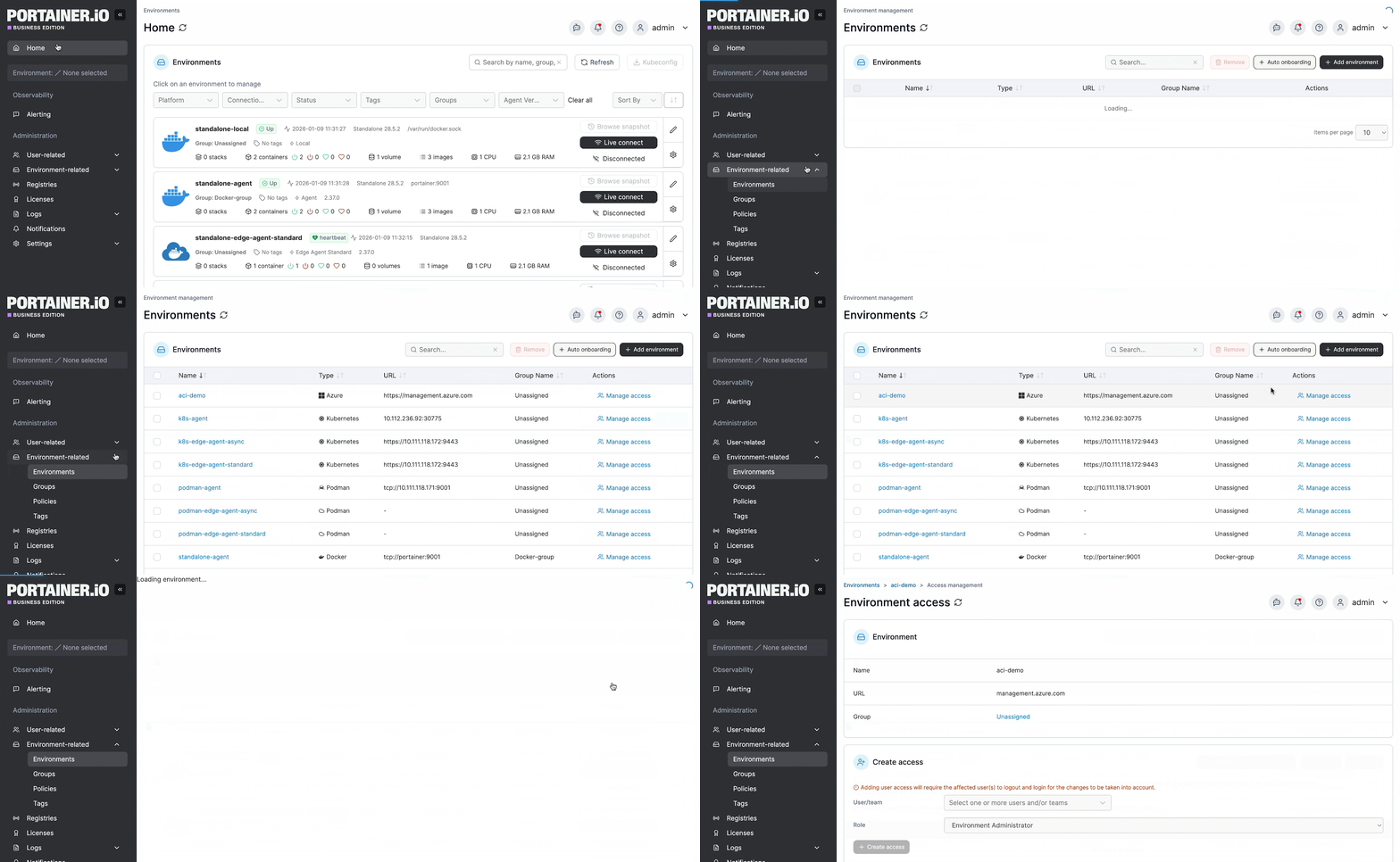
This is where a tool that unifies management across different infrastructure types matters. Portainer, for example, provides a single control plane for Docker, Kubernetes, Podman, and edge environments from one interface.
Teams managing mixed infrastructure don’t need to switch between separate tools or dashboards per platform. And since Docker doesn’t natively support RBAC at all, Portainer gives teams the same level of access control and governance across their Docker environments that Kubernetes provides natively, without managing it separately.
Once you’ve locked down your security stack, the next question is how you deploy. Our breakdown of the 7 Best Kubernetes Deployment Tools in 2026 covers the leading options.
3. Open-source vs. commercial: which fits your operational model?
Trivy and Falco are fully open-source, and Aqua Security and Snyk are commercial platforms. The choice between them is more than just the price tag.
Open-source tools give you transparency, flexibility, and zero licensing fees, but your team owns the maintenance: building dashboards, tuning rules, and troubleshooting without vendor support.
Commercial platforms reduce that burden with managed UIs, pre-built compliance reports, and dedicated support, at the trade-off of higher cost and, in some cases, vendor lock-in.
There’s also a middle ground that doesn’t force you into either extreme.
Portainer is a lightweight management platform with enterprise security governance built in, where a single instance can manage thousands of clusters while consuming as little as one vCPU and 2GB of RAM.
And because it’s vendor-agnostic, it avoids the lock-in trade-off entirely. You can swap underlying infrastructure or pair it with any scanning and detection tools without re-architecting your governance layer.
For organizations that want structured access control, identity integration, and compliance tooling without the operational weight of a full CNAPP platform, it sits between the DIY open-source approach and the all-in-one vendor commitment.
Ensure Container Security With Portainer
Container security is rarely solved by a single tool. You need a stack that covers scanning, detection, enforcement, and governance, with each layer doing its job well.
The tools discussed in this article address different parts of that stack, from catching vulnerabilities before deployment to monitoring threats at runtime to embedding security directly into developer workflows. But scanning and detection only go so far without governance underneath.
That’s the layer Portainer occupies. It gives enterprise IT and platform teams centralized RBAC, policy enforcement, identity integration, and audit logging across Docker, Kubernetes, and edge environments from a single control plane. You get enterprise-grade governance without the overhead or specialist headcount that security platforms typically demand.
If your organization is looking to bring structure and security governance to your container operations, get started with Portainer.
FAQs
1. What is container security?
Container security is the set of practices and tools used to protect containerized applications and their supporting infrastructure from vulnerabilities, misconfigurations, and unauthorized access.
2. What are the main types of container security tools?
Container security tools generally fall into a few categories: image vulnerability scanners (like Trivy and Snyk) that check for known CVEs before deployment, runtime detection tools (like Falco) that monitor containers for suspicious behavior in production, full-platform security solutions (like Aqua Security) that cover multiple layers in a single product, and governance and access control platforms (like Portainer) that manage RBAC, policy enforcement, and audit logging across environments.
3. Are open-source container security tools enough for enterprise use?
It depends on the layer. Open-source tools like Trivy and Falco provide enterprise-grade scanning and runtime detection at no cost. However, they lack built-in dashboards, vendor support, and centralized governance features. Enterprise teams typically pair open-source scanning and detection tools with a management platform that handles RBAC, identity integration, compliance logging, and policy enforcement across multiple clusters and environments.
4. How does container security differ from Kubernetes security?
Kubernetes security focuses specifically on securing the Kubernetes control plane, API server, etcd, and cluster configuration. Container security, on the other hand, is broader. It covers the full lifecycle of containerized workloads regardless of the orchestrator, including image scanning, registry controls, runtime protection, access governance, and compliance. Organizations running Kubernetes still need container security practices that extend beyond what the cluster itself provides.
5. What is the most common container security risk?
Vulnerable base images are the most common container security risk. Many of these come from outdated or unpatched base images that teams pull from public registries without scanning. Regular image scanning, registry controls, and base image update policies are the first line of defense. For AWS environments specifically, AWS container security practices around ECR scanning and IAM controls are worth reviewing alongside these fundamentals.