Edge Management: How to Manage Optimize at Scale

Edge management is the practice of deploying, monitoring, updating, and governing software running across distributed edge infrastructure.
Whether that’s 50 factories, 200 retail locations, or a fleet of field gateways with unreliable connectivity, the goal is the same: keep everything consistent and operational without being hands-on at every site.
With IDC’s Worldwide Edge Spending Guide projecting global edge computing spending to reach $380 billion by 2028, investment is clearly accelerating. But for many organizations, the ability to actually manage what they’ve deployed hasn’t really kept pace.
This guide breaks down what edge management covers (and where it stops), the capabilities a serious setup requires, a step-by-step rollout sequence for distributed sites, and how to avoid the mistakes that erode reliability at scale.
What Is Edge Management?
Edge management is the discipline of controlling the software layer running on edge nodes. This includes the applications, containers, configurations, updates, and everything in between that determines what each site actually does.
It’s a term that often gets conflated with adjacent categories, so it’s worth drawing clear lines.
IoT device management, for example, focuses on the hardware lifecycle: provisioning physical devices, pushing firmware, collecting telemetry, and tracking device health. It answers the question “Is this device online and functioning?” Edge management picks up where device management stops and takes it a step further: “What software is this device running, and is it the right version?”
Similarly, mobile device management (MDM) handles laptops, phones, and tablets. It’s concerned with endpoint policies, OS patching, and app distribution for user-facing devices. Edge management, on the other hand, deals with containerized workloads running on industrial gateways, field servers, and OT infrastructure.
Then there are edge computing platforms, which provide the underlying compute substrate: the hardware, operating systems, and runtimes that make processing possible at the edge. Edge management sits on top of that layer. The platform gives you somewhere to run workloads. Edge management determines what runs, when it updates, who has access, and how configuration stays consistent across the fleet.
The tools, skills, and operational processes for each of these layers differ, and organizations that blur the lines between them tend to encounter friction as they scale.
The Capabilities a Strong Edge Management Setup Must Cover
Here are six capabilities that represent the baseline for any edge management setup that needs to work reliably across multiple sites.
1. Centralized Fleet Visibility and Inventory
When you’re running workloads across dozens or hundreds of edge nodes, you need a reliable way to know what’s happening across all of them.
Centralized fleet visibility gives operations teams a single view of every node: what software version it’s running, its resource consumption, and its connection status, without requiring SSH access or site-by-site checks.
You can do without it, but you’ll end up relying on spreadsheets, tribal knowledge, or manual audits to track what’s deployed where. This can work at five sites, but at fifty, it’s simply unsustainable. Nodes fall out of date without anyone noticing, and troubleshooting a production issue turns into a guessing game about which sites are running which version.
A strong edge device management dashboard should surface this information in real time and let teams filter by location, software version, health status, and grouping, so answering “what’s running where” takes seconds.
2. Remote Application Deployment and Lifecycle Management
Edge management largely exists because sending someone to a site every time software needs to change isn’t really the right use of resources. Remote deployment means pushing new workloads, updates, configuration changes, and rollbacks to edge nodes from a central control plane without on-site intervention.
This covers the full arc of an application’s life: initial deployment, version updates, scaling, and eventual retirement. At scale, it’s the difference between a two-hour fleet-wide update and a two-month site-by-site rollout that’s already outdated by the time it finishes.
When remote deployment is missing or only partially implemented, teams default to ad hoc processes: SSH scripts, manual file transfers, or one-off commands that vary by operator. And you end up with a situation where Site A is running version 2.3, Site B is still on 2.1, and Site C has a locally modified configuration that no one documented. Every manual touchpoint introduces variance, and variance at scale is where outages start.
3. Offline-Tolerant and Async Operations
Factories with segmented OT networks, remote energy installations, and field gateways behind strict firewalls all share a common constraint: reliable connectivity to a central management plane isn’t guaranteed, and in many industrial IoT environments, it’s not even the norm.
When you’re offline-tolerant, the edge node continues running its workloads independently when the connection drops. Async operations, on the other hand, go a step further: the management plane queues commands (deployments, updates, configuration changes) and executes them the next time the node reconnects. No commands are lost, and no manual re-triggering is needed.
Without this capability, a network interruption delays updates and leaves nodes in a partially applied state. Recovering from that across a fleet of disconnected sites is painful, time-consuming, and prone to further inconsistency.
4. Role-Based Access Control Scoped by Site or Region
Edge environments involve multiple teams, often across different locations, business units, or even external partners. And without structured access control, every operator effectively has the same level of access to every node, which creates a void that grows with each added site.
Role-based access control (RBAC) scoped by site or region means you can define precisely who can deploy, modify, or view workloads at which locations.
For example, a regional technician might have full deployment access to sites in their area but no visibility into nodes belonging to a different business unit. A central platform team might have read access everywhere but write access only through approved change workflows.
When RBAC is absent or too coarse-grained, two problems emerge:
- The blast radius of a mistake expands. An operator who can accidentally push a bad configuration to every node in the fleet will eventually do exactly that.
- Compliance and audit requirements become harder to meet, because there’s no boundary between who was authorized to make a change and who simply had access to do it.
The bigger your fleet gets, the more these gaps compound, and retrofitting access control after the fact is significantly harder than building it in from the start.
5. Monitoring, Diagnostics, and Alerting
Fleet visibility tells you what’s deployed, whereas monitoring tells you whether it’s healthy. At the edge, where nodes often run unattended in environments without local IT support, the ability to detect problems before they escalate is what prevents a single failing node from becoming a fleet-wide incident.
This starts with a centralized collection of system-level metrics (CPU, memory, storage, network throughput), application-level logs, and error states from every edge node. On top of that, automated alerts are triggered when thresholds are breached, so teams aren’t constantly watching dashboards. And remote diagnostics, including console access and log retrieval, let engineers troubleshoot without traveling to the site.
Without centralized monitoring, problems at remote sites stay invisible until they cause a visible business impact. And by the time that happens, the root cause is hours or days old, and the team is working backward with limited information.
6. Audit Logging and Compliance Traceability
In regulated industries like manufacturing, energy, healthcare, and government, knowing what changed is only half the requirement. You also need to prove who changed it, when, and whether they were authorized to do so.
Audit logging captures every management action taken across the fleet: deployments, configuration changes, access grants, rollbacks, and policy modifications. Compliance traceability means this data is structured, searchable, and retainable for the duration your regulatory framework requires.
Without it, compliance audits become a manual reconstruction exercise. Teams pull logs from individual nodes, cross-reference timestamps, and try to piece together a coherent timeline of changes. At a handful of sites, it’s tedious at the very least, and across a distributed fleet operating under strict regulatory requirements, it’s a serious liability.
The inability to demonstrate a clear chain of custody for changes can result in audit failures, fines, or loss of certifications that the business depends on.
How to Set Up Edge Management Across Distributed Sites Step by Step
If you’re looking to roll out edge management across your infrastructure, here’s a step-by-step sequence you can follow:
Step 1: Audit Your Sites and Catalog What’s Already Running
Before you do anything, you need to know what you’re working with. This means documenting the current state across every site you plan to bring under management.
For each location, capture:
- Hardware type and specs (industrial PCs, gateways, rack servers, single-board devices)
- Operating system and container runtime (Docker, Kubernetes, Podman, or none yet)
- Network connectivity profile (always-on, intermittent, air-gapped, behind a firewall)
- Software workloads currently running and how they were deployed
- Who currently has access and how changes are made today
This doesn’t necessarily need to be a lengthy exercise. Even a structured spreadsheet that covers these five points across your target sites will give you enough to make informed decisions in the steps that follow.
It’s important to note that what you’re really looking for here is variance. For example, if every site looks identical, your rollout is straightforward. But if half your fleet runs Docker on ARM gateways and the other half runs Kubernetes on x86 servers with intermittent connectivity, that changes everything from your control plane choice to your deployment strategy, and it’s better to know that now than to discover it mid-rollout.
Step 2: Choose Your Control Plane Model
Now that you have a clear picture of your fleet, you can make the most consequential infrastructure decision in the entire process: choosing your control plane.
This is where all management operations will originate from: deployments, updates, access policies, and monitoring. The core decision is whether to use a cloud-managed service or a self-hosted platform.
- Cloud-managed services: Options like AWS IoT Greengrass and Azure IoT Edge are faster to get started with if your fleet is primarily cloud-connected and lives within a single provider’s ecosystem. The trade-off is vendor lock-in and limited control over environments that sit outside that provider’s reach. If your audit from Step 1 shows a multi-cloud or hybrid footprint, a cloud-managed service might not work for you.
- Self-hosted platforms: Self-hosted platforms run inside your own infrastructure, which means you control where the management plane lives, how it connects to your edge nodes, and what happens when connectivity is unreliable. For organizations operating across air-gapped or connectivity-constrained environments, a self-hosted model is often the only viable option.
If you’re leaning toward self-hosted, Portainer is a strong option to consider. It runs as a lightweight container on a single VM, consumes minimal resources (as little as one vCPU and 2GB of RAM), and can manage thousands of edge environments from that single instance.
And since it’s self-hosted, the management plane stays within your infrastructure regardless of where your edge nodes sit, whether that’s across cloud providers, on-prem data centers, or factory floors with no persistent internet connection.
Portainer offers a dedicated Edge/IIoT pricing tier for exactly these deployments, built for teams managing large distributed fleets rather than centralized cloud clusters.
See Portainer in Action
Step 3: Onboard Your First Node
Once you have your control plane in place, start with a single edge environment to validate that the communication path between your control plane and an edge node works reliably.
This involves:
- Installing the agent or client on the edge node
- Confirming the node registers with the control plane and reports its status
- Testing that commands sent from the control plane reach the node and execute correctly
- If the site has unreliable connectivity, verifying that async command queuing works as expected
At this stage, resist the urge to onboard your entire fleet. A single node will give you a contained environment to identify configuration issues, firewall rules that need adjusting, or connectivity quirks specific to your network topology, without putting production at risk.
Once the first node is connected and communicating cleanly, you have a validated blueprint for onboarding the rest.
Step 4: Define Access Policies and Governance Boundaries
Before opening the platform up to your broader team, lock in your access model. This is significantly easier to get right up front than to reconfigure after teams are already deploying across the fleet.
Here are the key decisions to make at this stage:
- Which roles exist (admin, deployer, read-only viewer) and what each role can do
- How those roles are scoped (global, by region, by site, by business unit)
- Whether access is managed through your existing identity provider (LDAP, SSO, Active Directory) or within the platform itself
- What change control process applies to production environments
The goal is to make sure that by the time your team starts deploying workloads, every action is governed by a clear policy: who can deploy to which sites, who can approve changes, and who has visibility into what.
💡 Pro tip: If your organization operates across regulatory boundaries (healthcare, defense, energy), define your audit and retention requirements at this stage too. Adding compliance logging to an already-running fleet is far more disruptive than enabling it from day one.
Step 5: Deploy Your First Application Across a Small Fleet
With your first node validated and your access model in place, expand to a small group of nodes. Ideally, 3-5 sites that represent the diversity in your broader fleet: different hardware, different connectivity profiles, different regions.
Deploy a single application or stack across this group and validate:
- The workload deploys consistently to every node in the group
- Configuration is identical across sites with no site-specific drift
- Updates pushed from the control plane propagate to all nodes within the expected timeframe
- Rollback works cleanly if an update needs to be reversed
This is your proof-of-concept phase. It’s where you catch problems that didn’t surface on a single node: timing issues with async updates, RBAC scoping that doesn’t quite fit, or resource constraints on lower-spec hardware. Fix these before you begin operating at full scale.
Step 6: Expand to Full Scale and Operationalize
Once the small fleet is stable, begin onboarding the rest of your sites in batches. A phased approach will allow you to catch site-specific issues early and adjust your deployment templates as needed rather than dealing with the fallout of a single big-bang rollout.
As you scale, establish:
- Monitoring baselines for each site category (what “normal” looks like for CPU, memory, and connectivity)
- Alerting thresholds that trigger before problems become outages
- A standard operating procedure for common tasks: deploying new applications, rolling back updates, onboarding new sites, and offboarding decommissioned nodes
- A regular cadence for reviewing fleet health, access policies, and configuration consistency
At this point, edge management transitions from a setup project to an operational discipline. The infrastructure is in place, the governance model is defined, and the team has a repeatable process for every routine action.
Portainer gives teams a single control plane to manage containerized edge workloads from the first node to the full fleet. See how it works for industrial and IoT.
Where Some Edge Management Setups Fail
The capabilities covered above describe what a strong edge management setup looks like. Let’s now look at where these setups commonly fall short:
- Managing nodes individually: SSH-ing into devices one by one to push updates or check configurations works at a handful of sites. At scale, it introduces the exact inconsistencies that edge management is supposed to eliminate. If your process requires someone to touch each node individually, the approach simply isn’t feasible in the long term.
- Assuming always-on connectivity: Building your entire management workflow around a persistent connection to every node sounds reasonable in a data center, but it breaks down on a factory floor with segmented OT networks or a remote site behind a strict firewall. Commands fail, updates stall mid-rollout, and nodes end up in partially applied states that are painful to recover from.
- Treating access control as an afterthought: When every operator has the same level of access to every node, it’s only a matter of time before a misconfiguration intended for a single site gets pushed fleet-wide. Teams that defer RBAC until after a production incident are always solving a harder problem.
- No visibility into what’s running where: Without a centralized way to track software versions, resource usage, and node status across the fleet, problems at remote sites stay invisible until they cause a business-level impact. And at that point, there’s no quick way to determine which other sites might be affected.
- Treating compliance as a separate workstream: Audit logging, access traceability, and retention policies are often layered in after the platform is already operational. This creates gaps in the historical record and makes the next compliance audit significantly harder than it needs to be.
Managing diverse gateways and PLCs across multiple sites? This guide covers the most common IIoT challenges and how to address them.
See Portainer in Action
How to Choose the Right Edge Management Platform
The platform you choose depends less on feature lists and more on how well it fits the constraints you’re actually operating under. Here are five questions to answer before choosing an edge management platform.
1. How Diverse Is Your Fleet?
If every site in your fleet runs the same hardware, the same runtime, and the same workloads, most platforms will manage it without friction. The decision gets more consequential when your fleet is mixed.
A platform that requires separate tooling or workflows for each runtime type will add operational overhead that compounds with every site you onboard.
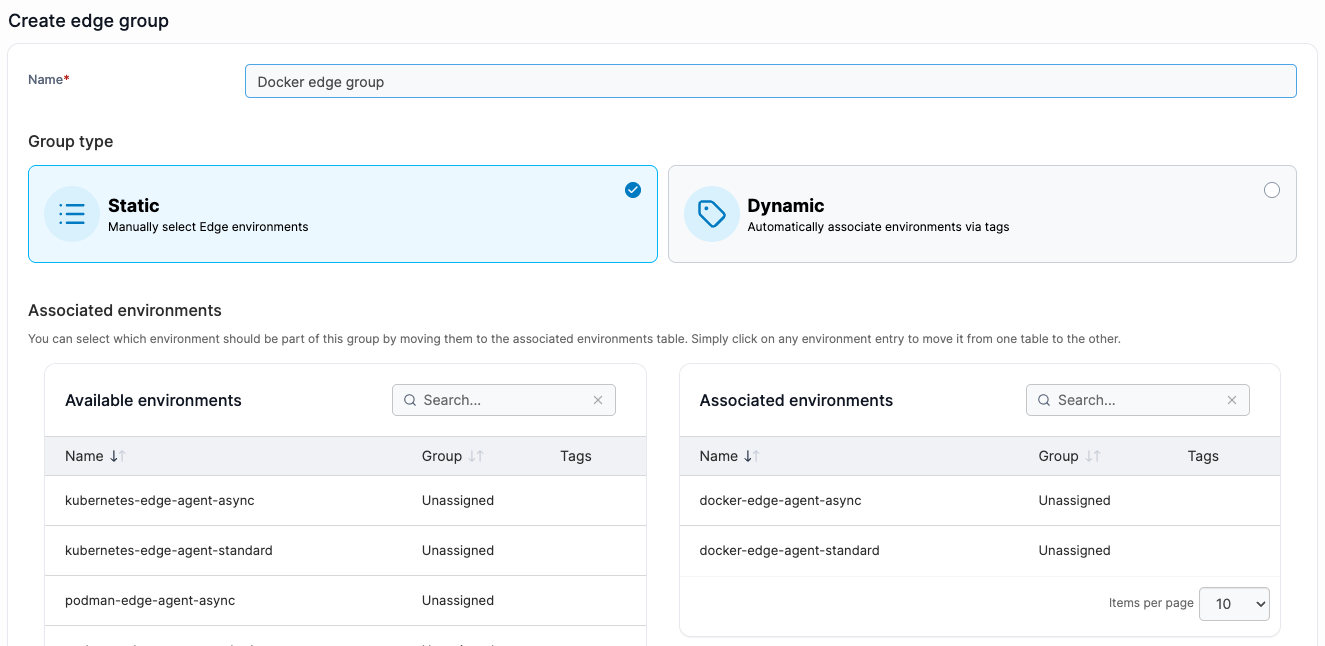
Portainer manages Docker, Kubernetes, Podman, and Swarm environments from a single interface. Its Edge Groups feature lets teams organize devices by location, hardware type, function, or any custom grouping, so a mixed fleet doesn’t require separate management workflows for each device category.
2. What Does Your Connectivity Look Like?
This is often the single biggest differentiator between platforms. A stable, always-on connection to every node is the assumption most management tools are built around. But not every edge environment operates that way.
Sites with limited bandwidth, restricted network access, or no persistent internet connection need a platform that can function when the link isn’t there. If it can’t, it’s a poor fit for any environment where intermittent connectivity is the norm.
Portainer offers two agent modes built for this:
- Standard Edge Agent: Establishes an on-demand tunnel for real-time interaction with connected environments. Best suited for sites with stable connectivity where teams need direct, live access to edge nodes.
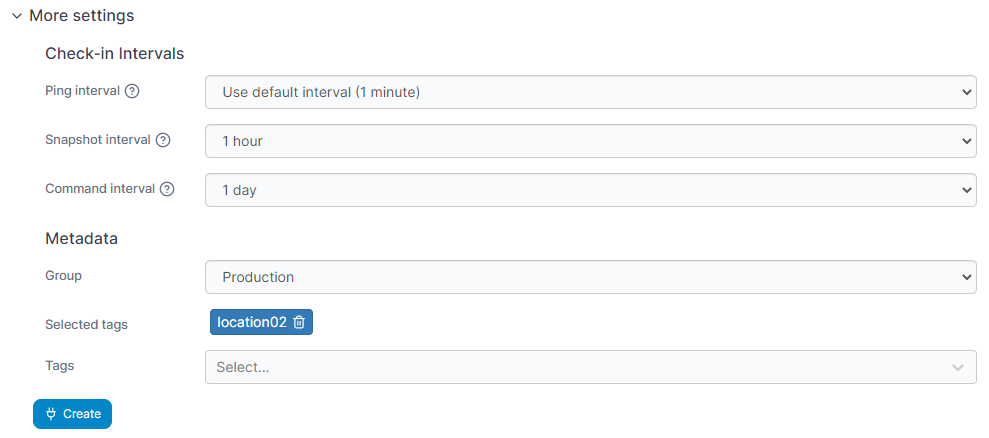
- Async Edge Agent: Purpose-built for intermittent or offline sites. It checks in at configurable intervals, pulls queued commands, and executes them locally. Ping, snapshot, and command frequencies are all adjustable per environment.
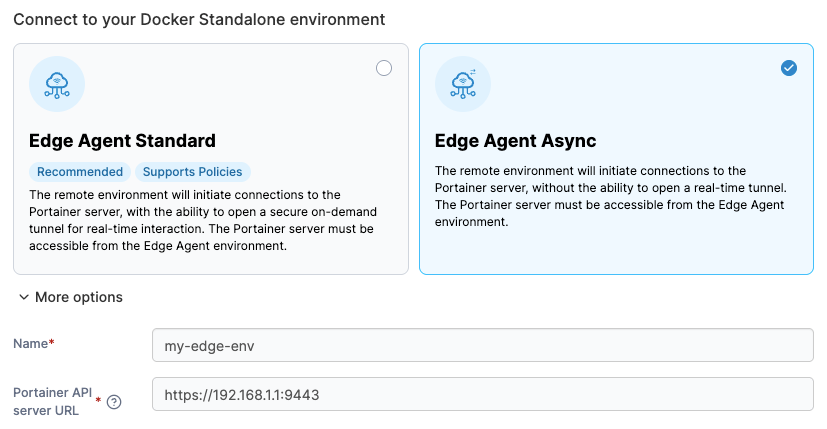
This means teams can tune each agent to match the specific bandwidth and connectivity profile at each site, rather than forcing one connection model across the entire fleet.
3. How Technical Is Your Team?
In manufacturing and industrial environments, the people responsible for day-to-day edge operations aren’t always Kubernetes specialists. They’re often OT engineers, site technicians, or generalist IT staff.
If the platform requires deep Kubernetes expertise to deploy an application or roll back an update, adoption stalls the moment it moves beyond the initial setup team.
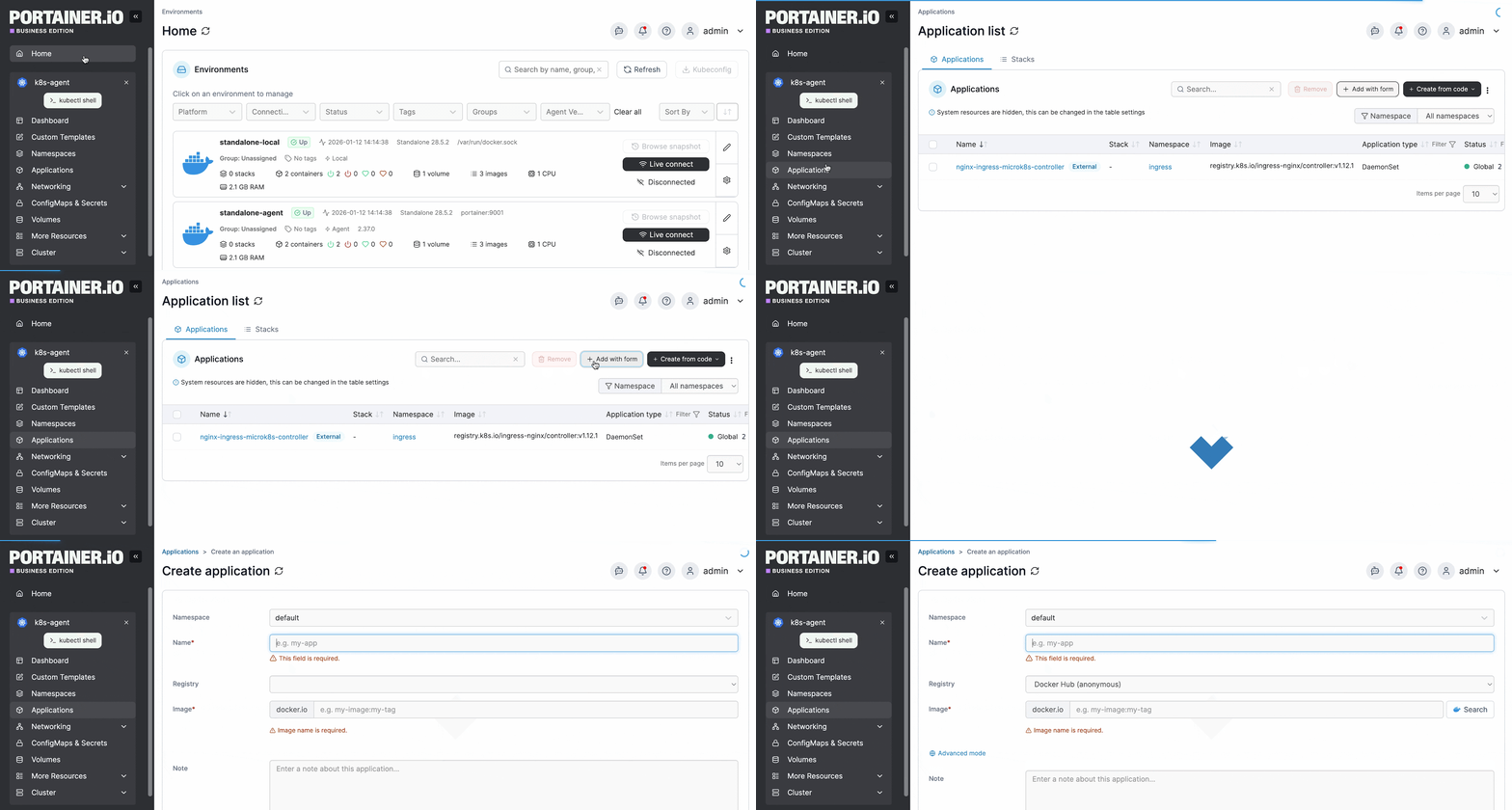
Portainer is designed around this reality. Application deployments can be done through form-based workflows and pre-defined templates rather than raw YAML manifests or kubectl commands.
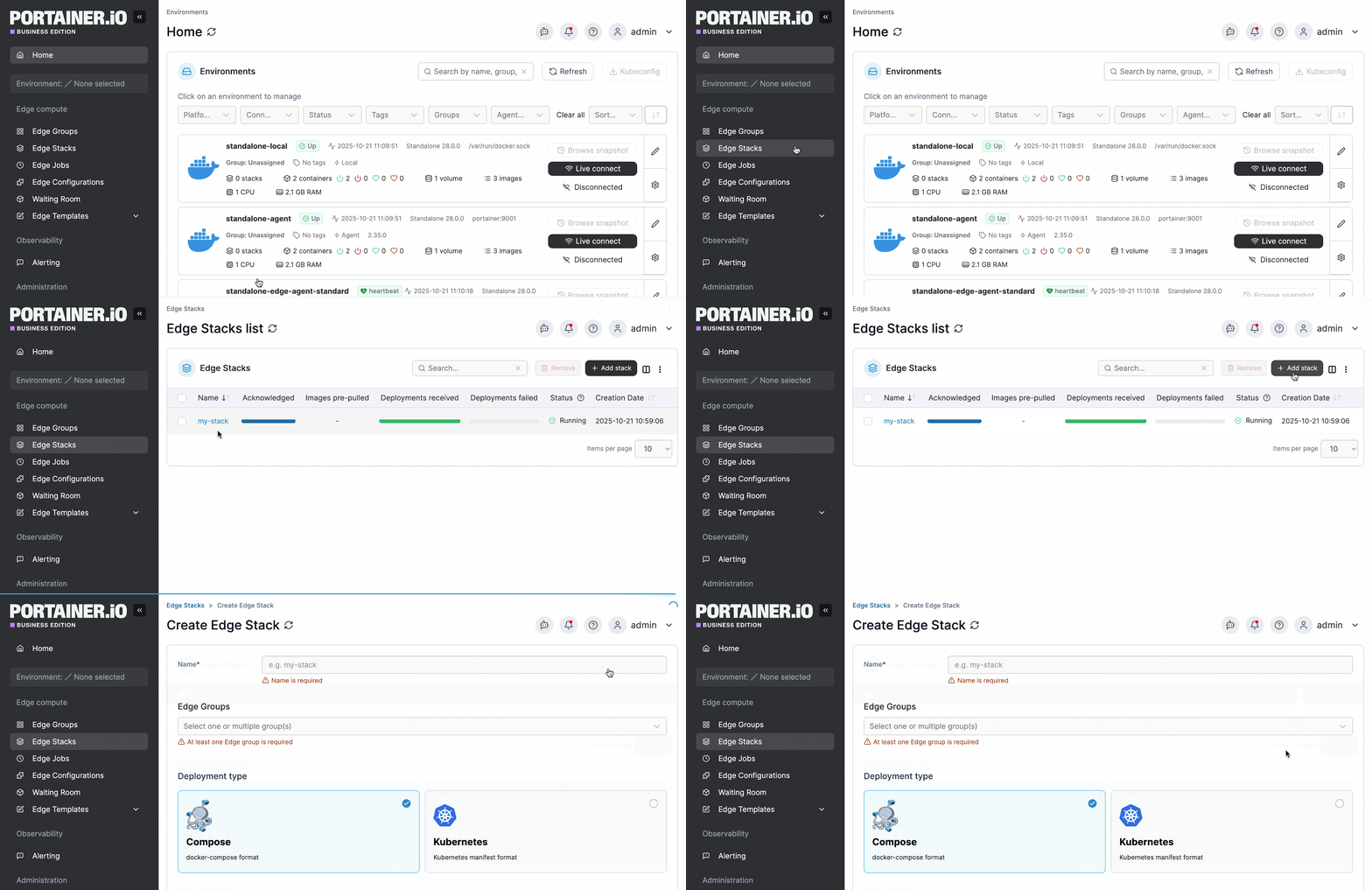
Edge Stacks let teams define a workload once and push it across an entire Edge Group in a single action. Teams with mixed skill levels can operate edge infrastructure day to day without bottlenecking on a dedicated Kubernetes engineer for every routine change.
4. Does the Platform Fit into Your Existing Stack?
An edge management platform needs to work with the tools your organization already relies on: identity providers, monitoring tools, and deployment pipelines. A platform that forces you to rip out your existing authentication system or replace your CI/CD tooling adds migration cost and organizational friction that can derail adoption.
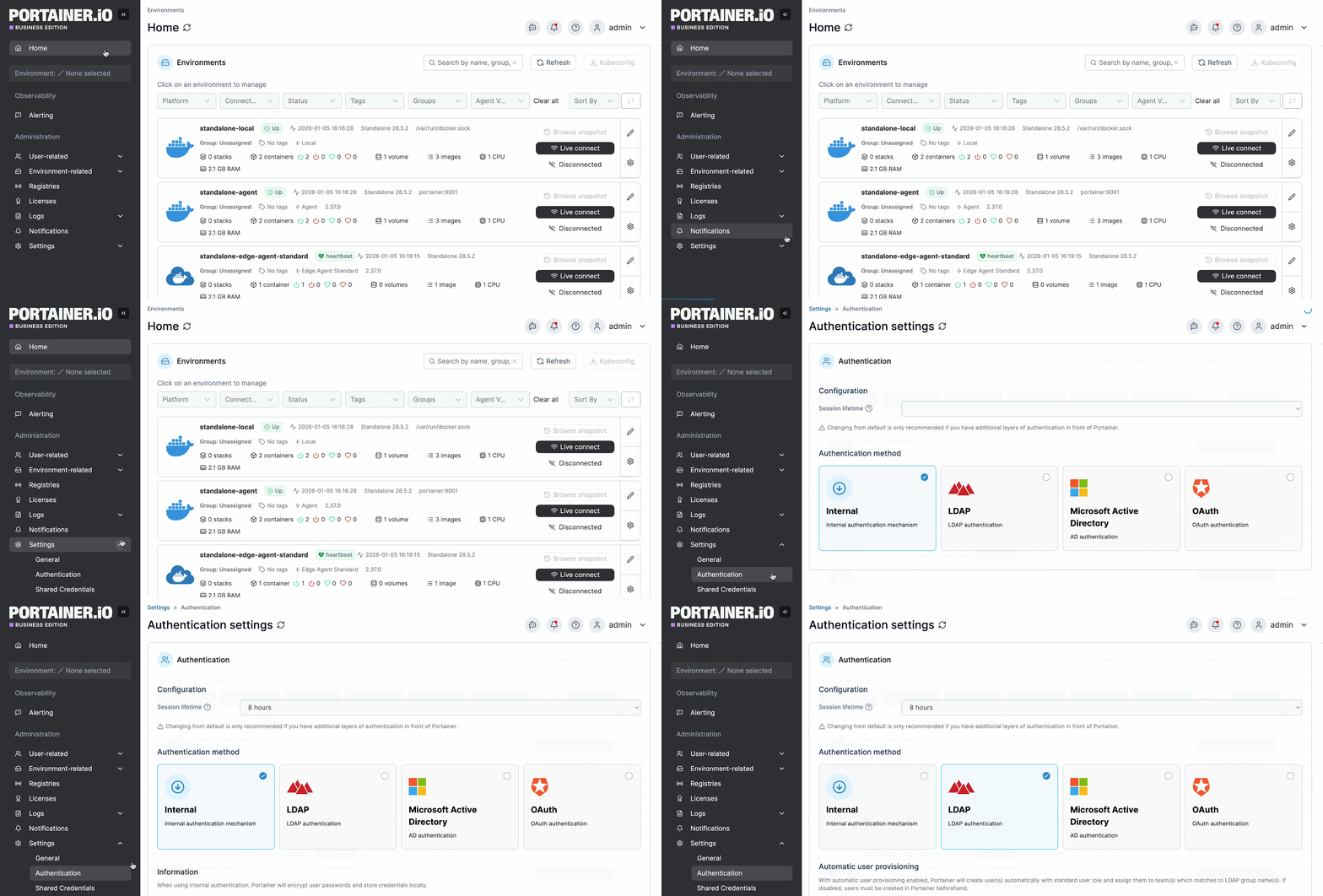
Portainer integrates with LDAP, Microsoft Active Directory, and OAuth for authentication, with automatic user provisioning and team membership mapping that mirrors your existing org structure.
It has built-in GitOps support that continuously reconciles workloads from your Git repo without requiring a separate tool like ArgoCD or Flux. And its API feeds environment data into tools like Prometheus and Grafana for teams that need observability beyond what the platform provides natively.
5. What Are Your Compliance Requirements?
For organizations in regulated industries, this question can narrow the field significantly. If the platform doesn’t provide built-in audit logging or granular access traceability, you’ll end up building that layer yourself.
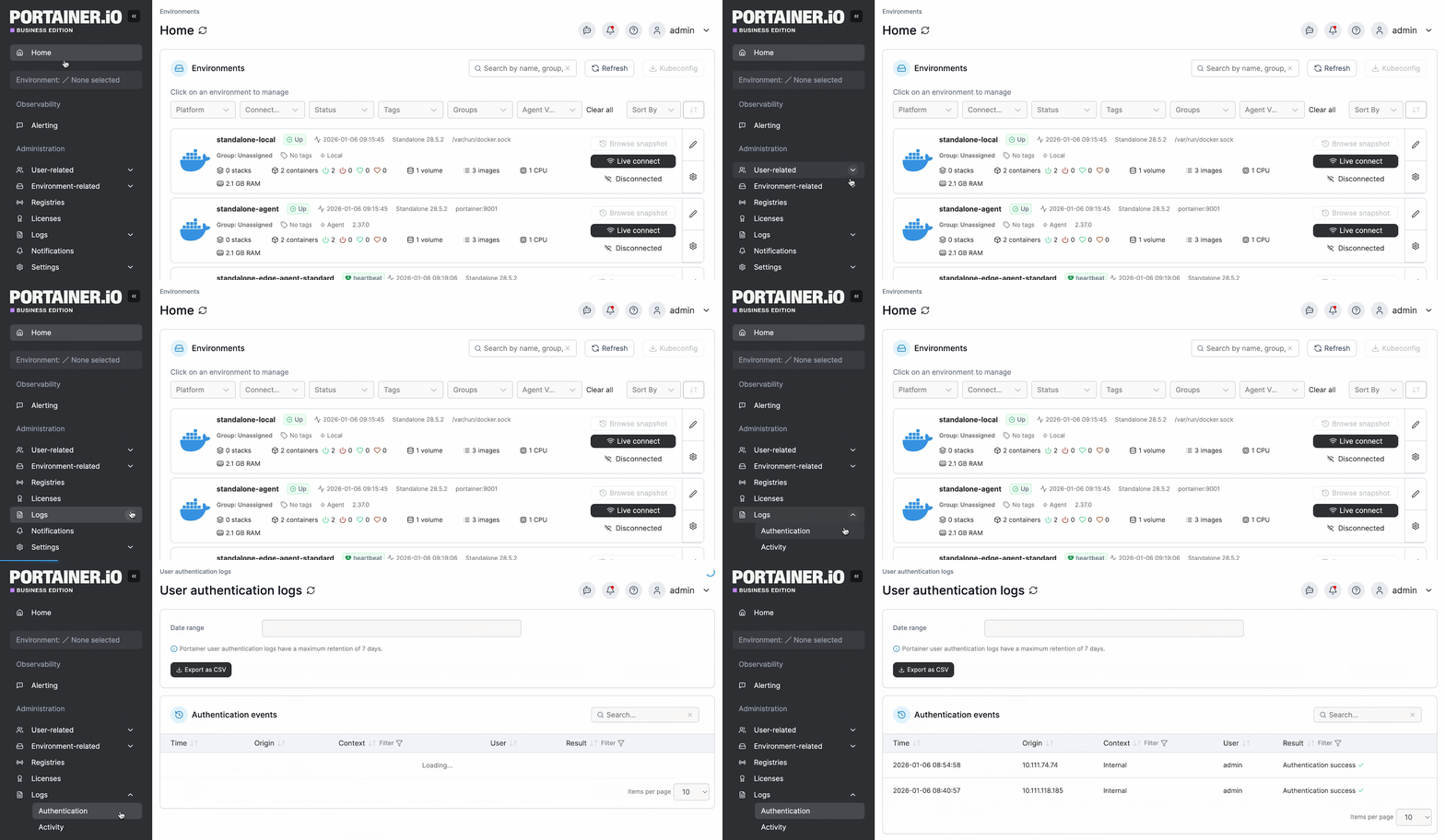
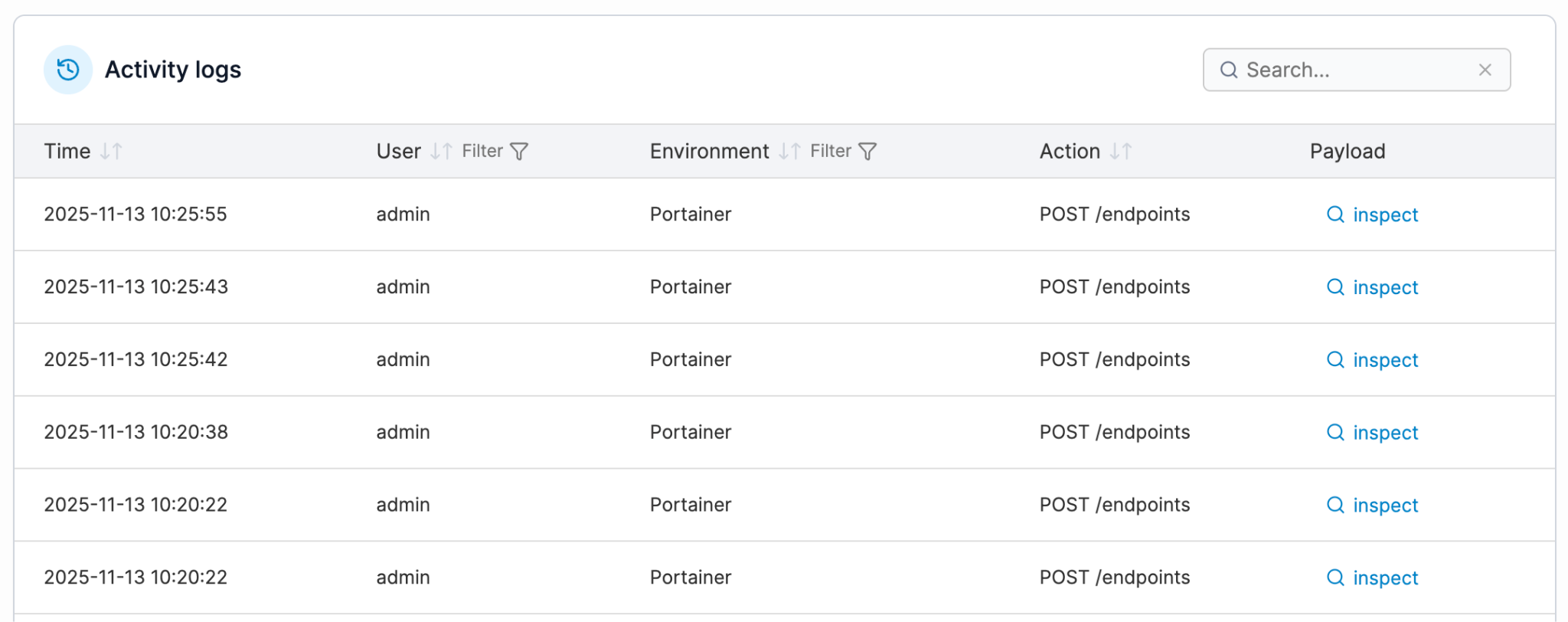
Portainer captures authentication and activity logs for every management action taken across the fleet. These logs can be streamed to external SIEM tools like Splunk, Microsoft Sentinel, or any syslog target.
Plus, its RBAC model provides environment-scoped access control with full traceability, so compliance teams can demonstrate exactly who changed what, when, and whether they were authorized to do so.
Run Distributed Edge Operations with Confidence Using Portainer
Edge management at scale comes down to a few things: knowing what’s running where, deploying and updating without being on-site, keeping access controlled, and maintaining visibility across the entire fleet. The platforms that get this right are the ones that reduce operational burden rather than add to it.
Portainer is built for teams managing containerized workloads across distributed edge environments, whether that’s a handful of sites or thousands of nodes across factories, retail locations, and remote infrastructure.
It’s self-hosted, lightweight, and designed to work across Docker, Kubernetes, Podman, and Swarm from a single control plane. You get enterprise-grade governance, RBAC, and audit capabilities without the overhead or specialist headcount those features usually require.
If you’re evaluating edge management platforms or looking to consolidate your current setup, get a demo to see how Portainer works across real edge environments.
FAQs
1. Is edge management the same as IoT device management?
No. IoT device management focuses on hardware lifecycle, firmware, and telemetry, whereas, edge management controls the software layer: applications, containers, configurations, and updates running on those devices.
2. Can you do edge management without Kubernetes?
Yes. Many edge environments run on Docker or Podman, especially on resource-constrained industrial hardware. Kubernetes is an option, but it isn’t a prerequisite.
3. Does edge management require a persistent internet connection?
No, it doesn’t. Platforms with async agent support can queue commands centrally and execute them when the node reconnects, making intermittent or air-gapped environments fully manageable.
4. Is edge management only relevant for industrial or manufacturing environments?
No. Any organization running software across distributed sites benefits from edge management, including retail chains, energy providers, logistics networks, healthcare facilities, and telecom operators.