Kubernetes Support: Services, Tiers & What Enterprises Need

In contrast to what the documentation suggests, provisioning and managing Kubernetes clusters through their lifecycle is difficult. And it worsens for enterprise needs that become complex as you scale. Hence, you need Kubernetes support.
But what type? What are the tiers available? Which one is the best for your needs, reliability, expertise, and long-term stability?
Let’s start from the top.
What Is Kubernetes Support & Why Kubernetes Community Support Isn’t Enough for Enterprises
Kubernetes support is structured, production-grade assistance for teams designing, operating, securing, upgrading, and troubleshooting Kubernetes environments.
However, it goes far beyond “getting a cluster running” and covers the full lifecycle of operating Kubernetes in production, from architecture decisions to upgrades and incident response.
This is what that looks like:
- Architecture guidance: Designing clusters for performance, resilience, and regulatory needs.
- Lifecycle management: Planning and executing upgrades in line with Kubernetes’ regular release cadence (three major releases per year, per Kubernetes documentation).
- Day-2 operations: Monitoring, scaling, backup strategies, and configuration management.
- Incident response: Troubleshooting outages, degraded workloads, and networking or storage failures.
- Security and governance: Managing RBAC, policy enforcement, and auditability across environments.
But do you really need Kubernetes support? Aren’t communities enough?
Community support (Slack channels, GitHub issues, Stack Overflow) is invaluable for learning and experimentation. However, enterprises face different stakes: SLAs, compliance obligations, uptime guarantees, and cross-team coordination.
For enterprises, production Kubernetes environments continue to scale and increase in operational burden over time. The complexity exposes the gap between what communities offer and what enterprises need:
- Community support helps you solve problems.
- Enterprise support prevents them, responds predictably, and operates with accountability.
That distinction becomes critical once you move from test clusters to revenue-impacting production systems. So, no, communities won’t suffice.
Types of Kubernetes Support Services
Below, we break down different Kubernetes support models. You’ll learn the tradeoffs, responsiveness, operational responsibility, and who each is best suited for.
Community Support
Community support is the open, ecosystem-driven layer behind Kubernetes. It includes official documentation, GitHub issues, Slack channels, forums, and discussion threads maintained by contributors.
What it offers:
- Open documentation and release transparency: Full access to upstream docs, changelogs, and enhancement proposals. These are helpful for understanding how features work and what changes in each release.
- Direct access to maintainers and practitioners: Engineers can raise issues in GitHub or ask implementation questions in community forums.
- Broad real-world troubleshooting insight: Many production issues have already been discussed publicly. So, you see the common patterns and workarounds.
Tradeoffs for enterprises:
- No SLAs or guaranteed response times: Critical incidents may wait hours (or days) before the community replies.
- No accountability model: Advice is informal and not contractually backed.
- Requires strong in-house expertise: Teams must validate guidance and own risk decisions.
Community support is ideal for organizations running non-critical workloads, building internal expertise, or testing Kubernetes before moving into fully supported production environments. But once clusters run revenue-critical systems, you need structured, accountable support beyond community channels.
Learn more about enterprise Kubernetes management platforms.
Vendor Support
Vendor support typically comes from a commercial Kubernetes distribution provider. It adds contractual backing to cluster operations.
What it offers:
- SLA-backed support: Defined response times for incidents, including production outages.
- Tested distributions: Curated Kubernetes versions, validated upgrades, and security patches.
- Escalation paths: Direct access to engineers who can investigate platform-level issues.
Operational implications:
- Reduced upgrade risk: Vendors validate version compatibility before release.
- Predictable incident handling: Clear ownership during outages.
- Less flexibility than upstream: Changes follow the vendor’s release cadence.
Tradeoffs:
- Subscription cost: It varies depending on environments and integrations. Red Hat OpenShift, for example, starts at roughly $50–$100 per node/month for production-ready support. VMware Tanzu, on the other hand, costs tens of thousands to hundreds of thousands of dollars annually for multi-core deployments (support included).
- Potential dependency on a specific distribution.
Vendor support is best for enterprises running customer-facing or regulated workloads. Ideally, the uptime and formal accountability here outweigh the flexibility of pure community support.
Fully Managed Kubernetes
Fully managed Kubernetes shifts most operational responsibility to a cloud provider or managed platform. Instead of running the control plane yourself, you get “Kubernetes as a service.”
What it includes
- Control plane management: The provider runs and patches the API server, scheduler, and etcd.
- Automated upgrades: Version updates and security patches are handled on a defined schedule.
- Integrated cloud services: Networking, load balancing, IAM, and storage are tightly coupled with the provider’s ecosystem.
- SLA-backed availability: Formal uptime guarantees and enterprise support channels.
Operational tradeoffs
- Less infrastructure control: You depend on the provider’s roadmaps, upgrade timing, and feature availability.
- Cost at scale: Managed fees (per cluster or per node) add to compute, storage, and data transfer costs.
- Cloud alignment required: Best suited for teams already standardized on a single cloud.
This support type is perfect for cloud-native SaaS companies, fast-growing startups, or enterprise teams that value speed over infrastructure ownership. For example, a fintech startup running customer-facing APIs may prefer a managed control plane to reduce operational overhead while focusing on application delivery.
Further reading: Managed vs. unmanaged Kubernetes
Shared-Responsibility Managed Services
This model sits between “do it yourself” and fully managed. The provider manages some parts of the lifecycle, while your team retains ownership of architecture, policy, and day-to-day decisions.
What it typically includes
- Advisory + escalation support: Access to certified engineers for troubleshooting, upgrades, and architecture reviews.
- Lifecycle assistance: Help with planning version upgrades, security patches, and configuration hardening.
- Best-practice guidance: Support for RBAC design, backup strategy, observability setup, and compliance alignment.
Operational tradeoffs
- Internal ownership remains: Your team runs clusters and responds to incidents.
- Skill dependency: Success depends on in-house Kubernetes knowledge.
- Clear boundary definition required: Responsibilities must be documented to avoid gaps during outages.
This support type is best for enterprises with internal platform teams that want external expertise as a safety net. For example, a retail company running Kubernetes on-prem may manage daily operations internally but rely on managed services for upgrade planning and incident escalation during peak seasons.
Real-life example:
A two-Person IT Team managed infrastructure supporting millions in research revenue and reduced downtime by 10% using Portainer managed services. According to Elliot Francis (Principal Software Engineer):
“Portainer is responsible for dropping my workload between 15 and 20% because I’m not going out and touching individual servers.”
Try Portainer managed services!
What are Portainer’s Managed Kubernetes Service Tiers?
There are two main tiers here: Platform Plus and Platform Enterprise. Both combine Kubernetes platform management with expert operational support.
However, they differ in depth of coverage and responsiveness.
TL;DR: Portainer managed services tiers at a glance
| Feature | Platform Plus | Platform Enterprise |
|---|---|---|
| Operational support | Expert guidance | Dedicated enterprise-level support |
| Monitoring & alerts | Included | Included + advanced operational oversight |
| Platform maintenance | Managed upgrades & lifecycle support | Fully managed lifecycle operations |
| Incident response | Business-hours escalation | 24/7 enterprise incident response |
| Strategic guidance | Best-practice support | Architecture and platform strategy support |
Platform Plus
Platform Plus provides support for organizations that want expert oversight without fully outsourcing their platform operations.
Scope & responsibility
- Managed Kubernetes platform lifecycle guidance
- Monitoring, alerts, and operational best practices
- Upgrade planning and cluster health reviews
- Access to platform experts for troubleshooting and escalation
What it does not include
- Fully outsourced day-to-day platform operations
- Dedicated enterprise response coverage for all incidents
- Full platform engineering ownership
Best for: Organizations with internal DevOps or platform teams that want operational guardrails while maintaining control.
Platform Enterprise
Platform Enterprise is designed for organizations that need deeper operational coverage, where Kubernetes reliability directly impacts business continuity.
Scope & responsibility
It includes everything in “Platform Plus” and:
- Full platform lifecycle management and operational oversight
- Continuous monitoring with structured incident response
- Architecture guidance and long-term platform strategy
What it does not include
- Ownership of application code or CI/CD pipelines
- Replacement of internal governance or compliance responsibility
Best for: Enterprises running mission-critical Kubernetes workloads that require 24/7 operational support and platform expertise at scale.
See how Portainer supports your Kubernetes environment
The Main Benefits of Using Kubernetes Managed Services
For teams without in-house Kubernetes expertise, managed Kubernetes services are crucial. They reduce operational burden and risk. We discuss the other benefits below.
Centralized Visibility Without Platform Engineering Overhead
When teams lack deep Kubernetes expertise, visibility becomes the first bottleneck. Clusters grow, workloads multiply, and suddenly no one has a clear view of what’s running where.
A managed Kubernetes service handles the infrastructure layer. But day-to-day clarity still matters.
Portainer bridges the gap. You get managed services and a centralized dashboard. With these, you can:
- View all clusters and environments in one place
- Monitor workloads, nodes, and health status
- Reduce reliance on CLI-heavy troubleshooting
- Empower IT or operations teams without deep Kubernetes training
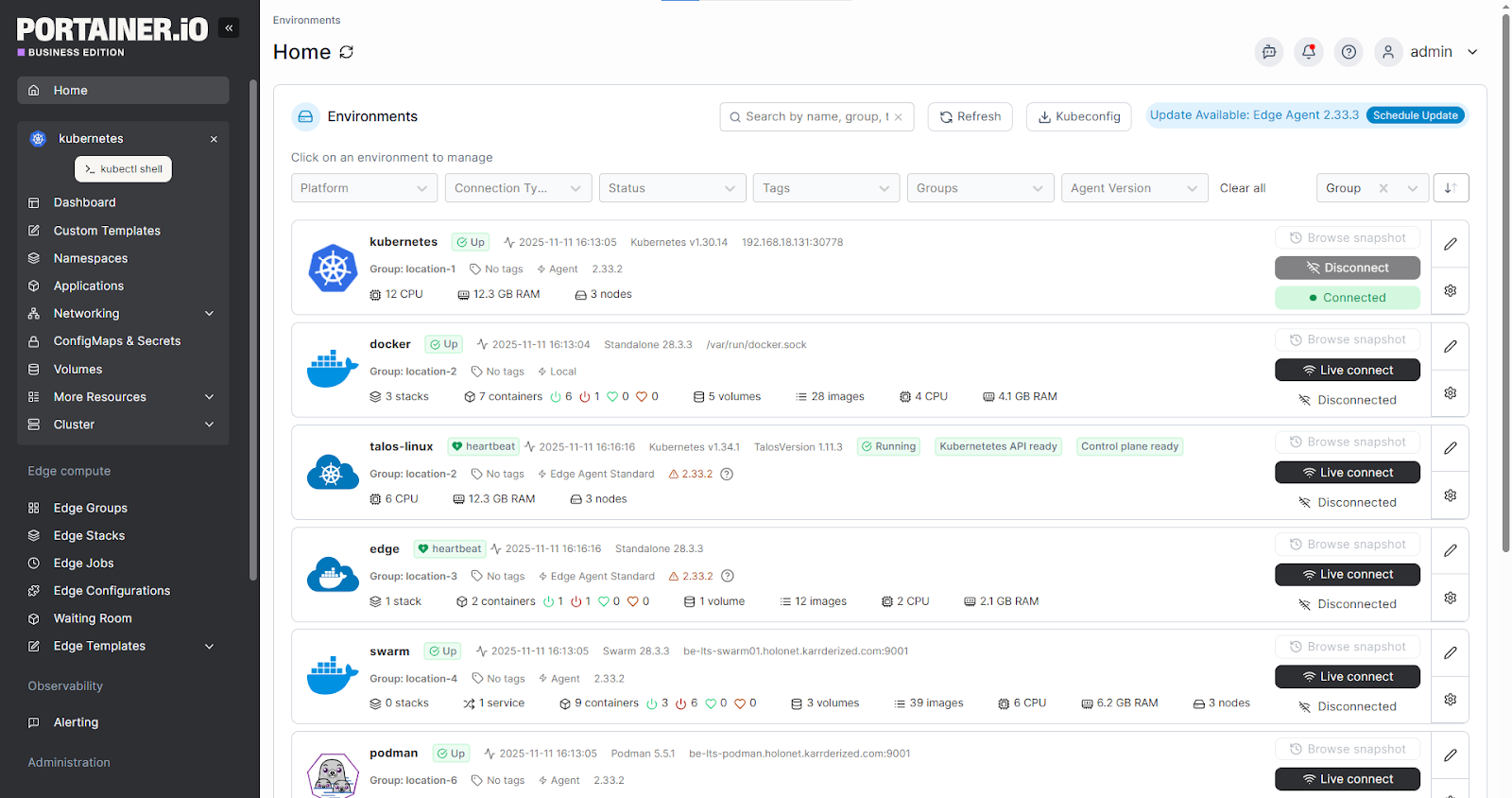
Instead of hiring a full platform engineering team, you gain controlled, visual access to your environments.
Role-Based Access Control Without Complexity
Once Kubernetes adoption spreads beyond DevOps, access management will likely become risky. How?
Developers will need deployment rights. Ops teams need visibility. Auditors need oversight. Without guardrails, clusters either become “too locked down” or “too exposed.”
Managed Kubernetes services handle the infrastructure layer, but access governance remains your responsibility. That’s where simplified RBAC matters.
With Portainer’s RBAC, teams can:
- Assign role-based permissions per cluster or namespace
- Restrict who can deploy, edit, or delete workloads
- Delegate access safely to non-Kubernetes specialists
- Enforce governance without complex YAML policies
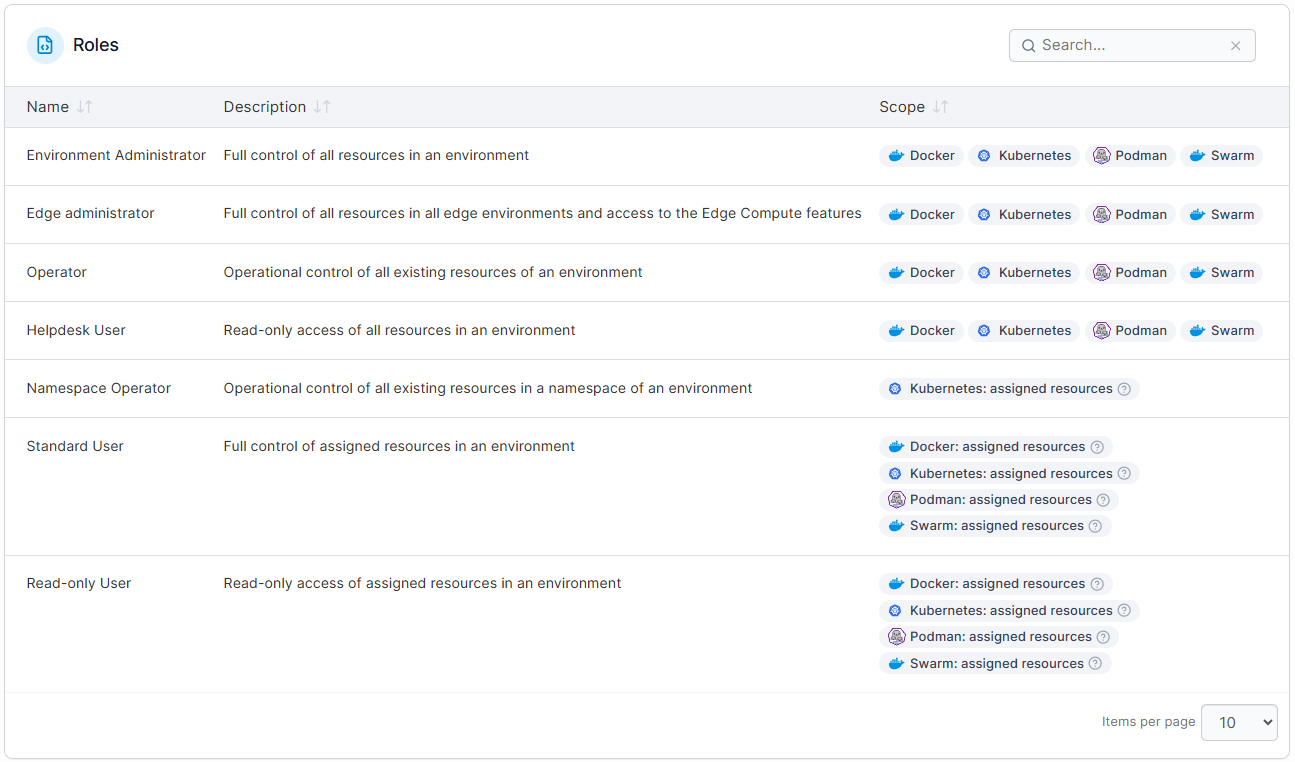
No total reliance on a handful of Kubernetes experts to manage permissions through CLI. Your enterprise gets structured visual control over “who” can do “what.”
Get a demo to test Portainer now!
Operational Visibility and Early Issue Detection
Kubernetes issues don’t escalate from the start. It surfaces them in bits: a pod restarts, a node runs hot, a deployment drifts from its expected state. Without clear visibility into workload health, these signals then spiral into production incidents.
While managed Kubernetes services maintain infrastructure uptime, internal teams still need insight and control over what’s happening inside their environments. Portainer combines both functions.
It strengthens your team by providing:
- Real-time workload and cluster health visibility
- Environment-scoped access aligned to roles and responsibilities
- Clear status indicators for deployments, services, and nodes
- Built-in log access and troubleshooting tools, without relying on raw CLI commands
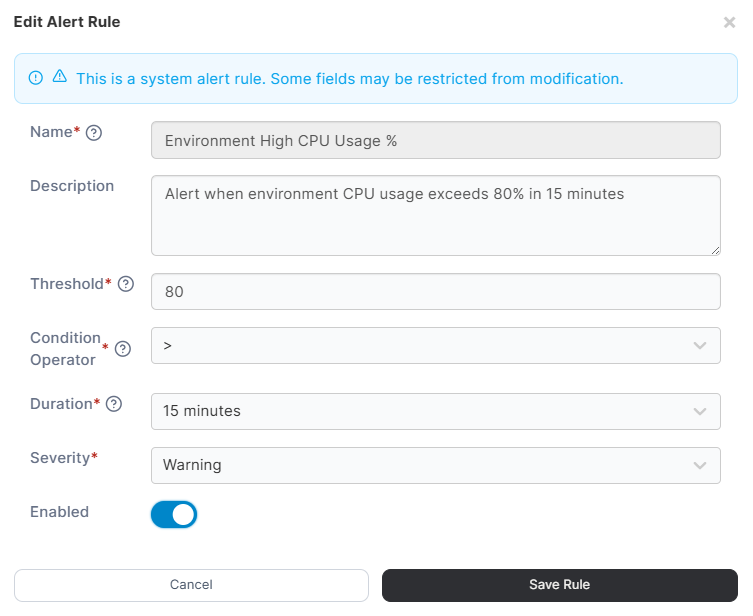
In short, Portainer keeps you one step ahead. With it, you don’t react to outages. Instead, you detect issues earlier and reduce operational risk.
Portainer: Kubernetes Support for Enterprise Teams
Kubernetes support does more than keep clusters running. It reduces operational risk and improves visibility. But enjoying the benefits depends on the type and tier you get.
So, stick to a support type that is ideal for your risk tolerance and in-house expertise. In any case, Portainer’s managed Kubernetes services are flexible.
Portainer combines centralized governance, RBAC, environment control, and managed service options. And organizations using it across industrial and enterprise IT environments are seeing results.
- Building materials manufacturer cut operational cost by $100K/year with 12.5% productivity savings
- Global energy company increased productivity by 15%, saving $1.7M in the process
If your team needs Kubernetes support that scales with you, without overwhelming complexity, Portainer can help.
Book a demo and see how Portainer supports enterprise Kubernetes operations!