Kubernetes Ingress Controller: Basics, Examples and Benefits

Struggling to expose Kubernetes apps without juggling LoadBalancers, services, and custom routing? A Kubernetes ingress controller can help.
It manages how external traffic enters your cluster. But what manages access and operations around it at scale?
In this guide, you’ll find all the answers. You’ll learn:
- What an ingress controller does
- How routing works
- How to manage ingress as your clusters scale
What is a Kubernetes ingress controller?
A Kubernetes ingress controller is the component that handles incoming traffic for your cluster. While an Ingress object defines routing rules (for example, which domain or URL path should reach which service), the ingress controller watches those rules and enforces them at runtime.
In practice, that looks like this:
The controller runs as a pod inside your cluster and acts as a smart entry point for HTTP and HTTPS traffic. When a request arrives, it evaluates the rules and forwards traffic to the correct service.
However, there are three key points to know:
- Ingress ≠ ingress controller: Ingress is the rule set; the controller does the work
- IngressClass tells Kubernetes which controller should handle a given Ingress.
- Capabilities such as rewrites, authentication, or rate limiting depend on the controller (e.g., NGINX, Traefik, HAProxy).
In short, without an ingress controller running, Ingress rules do nothing.
How Ingress Routing Works
Ingress routing looks simple on the surface. However, multiple Kubernetes components work together to turn routing rules into live traffic behavior. Below is how they work together, from request to routing.
Request flow: from client to pod
A client request (for example, https://app.example.com) first reaches a load balancer or NodePort that exposes the cluster. That sends traffic to the ingress controller. Thelatter inspects the request and compares it against routing rules defined in Ingress objects.
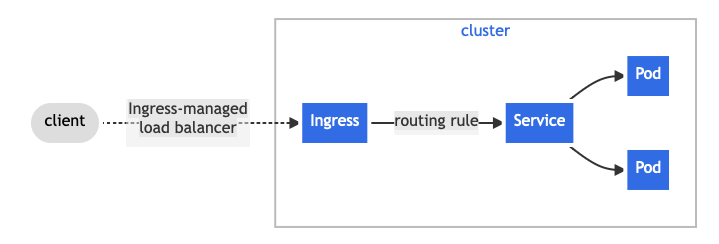
Single-service Ingress. Source.
If a rule matches, the controller forwards the request to the appropriate Kubernetes Service. Ultimately, the load-balances traffic across the target pods.
Intent vs. execution
Kubernetes splits ingress routing into two responsibilities:
- Desired state (intent): Routing rules live in Kubernetes API objects such as Ingress, Service, and IngressClass. These define what should happen.
- Runtime execution: The ingress controller’s data plane enforces those rules in real time. This decides where each request is sent.
This separation allows routing to be declarative while remaining flexible at runtime.
Common issues that break routing
Even when rules look correct, routing can fail due to:
- An IngressClass that doesn’t match the active controller
- Controller-specific annotations changing behavior.
- TLS, certificates, or DNS are not in sync with the routing rules.
Together, these components turn declarative Ingress rules into working traffic paths. But only when they’re in sync. If you are struggling to pinpoint why your traffic is dropping, a structured approach to Kubernetes troubleshooting can help resolve these cluster failures quickly.
Common use cases for Kubernetes ingress controllers
Ingress controllers solve a practical problem: exposing multiple services from a Kubernetes cluster. But there are distinct cases of that. We compile the top 3 below.
1. Consolidating traffic routing at the edge
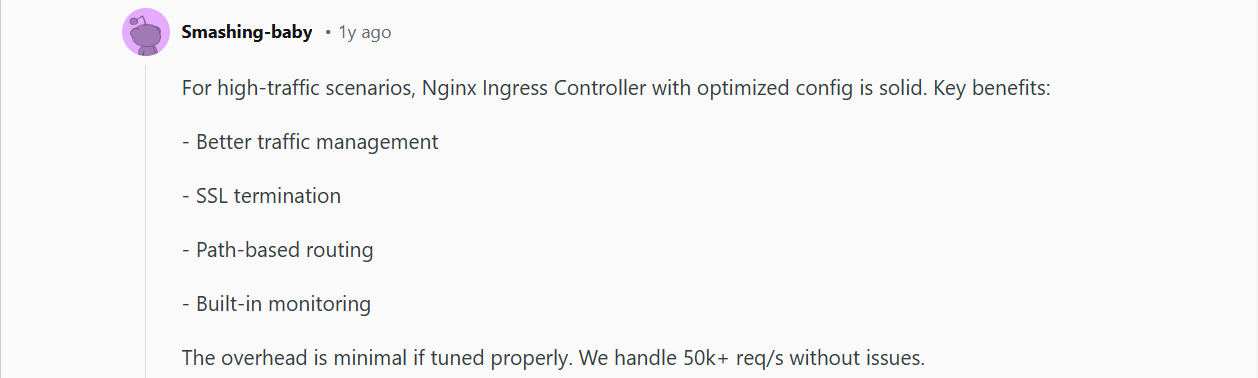
Teams running multiple services often want a single entry point instead of exposing each service separately. An ingress controller routes traffic based on hostnames or URL paths (for example, /api vs. /app) while keeping internal services private. This reduces operational sprawl and simplifies access to applications.
[Source.]
2. Standardizing TLS and external access
Managing HTTPS per service can become messy easily. Ingress controllers fix the mess. They centralize TLS termination, and help teams apply certificates, domains, and security settings in one place.

[Source.]
This way, there is consistent external access across environments. Eventually, there is a reduction in certificate misconfigurations. However, note that exact TLS capabilities vary by controller implementation.
3. Applying basic traffic and access policies
Ingress is often used to enforce simple traffic rules at the edge, such as redirects, request size limits, or basic authentication hooks. While advanced controls depend on the controller, ingress provides a consistent way to apply these policies without embedding logic into every application.
Pro Tip:
Most use cases are straightforward when you’re exposing a single service. But as clusters grow, ingress rules, certificates, and access controls can become fragmented and hard to manage.
This is where platforms like Portainer help.
Teams use Portainer to:
- Manage Kubernetes Ingress objects, TLS, and routing rules centrally & visually.
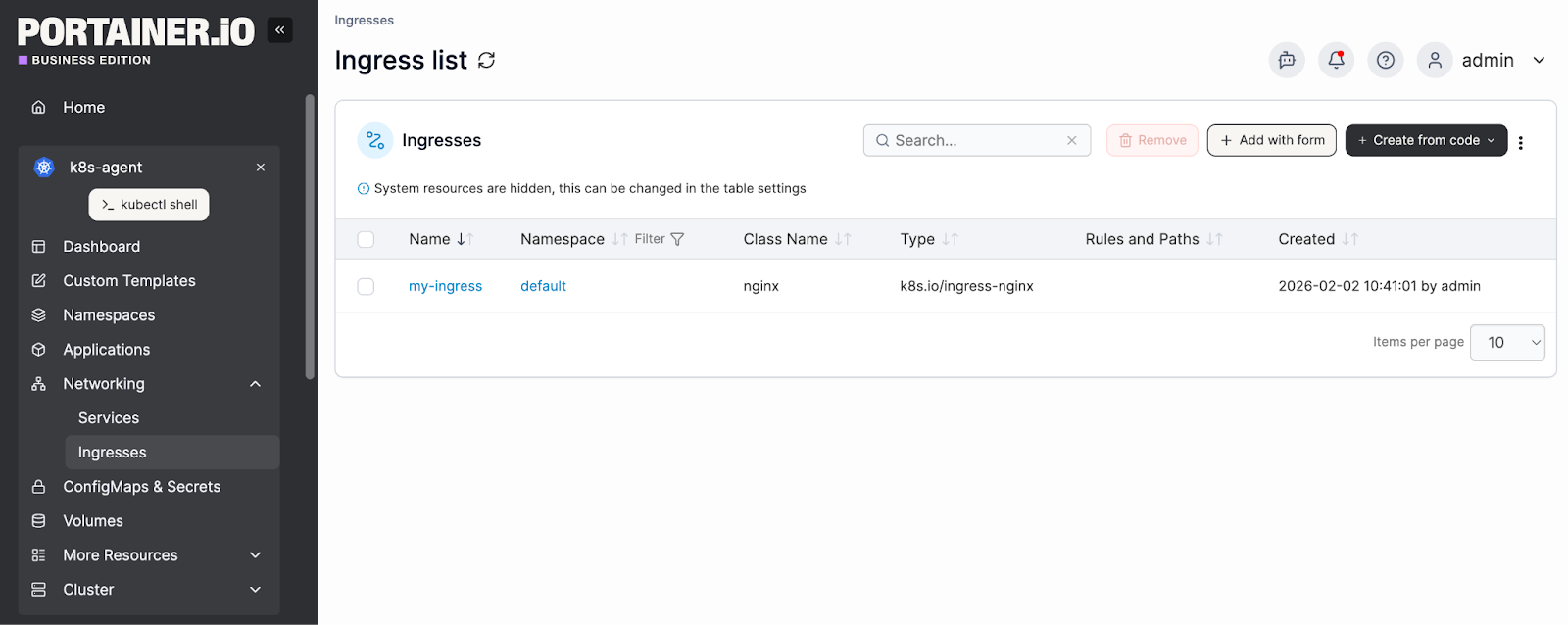
- Work with common controllers like NGINX, Traefik, HAProxy, or cloud-provider ingress.
- Control who can modify ingress resources using Kubernetes RBAC.
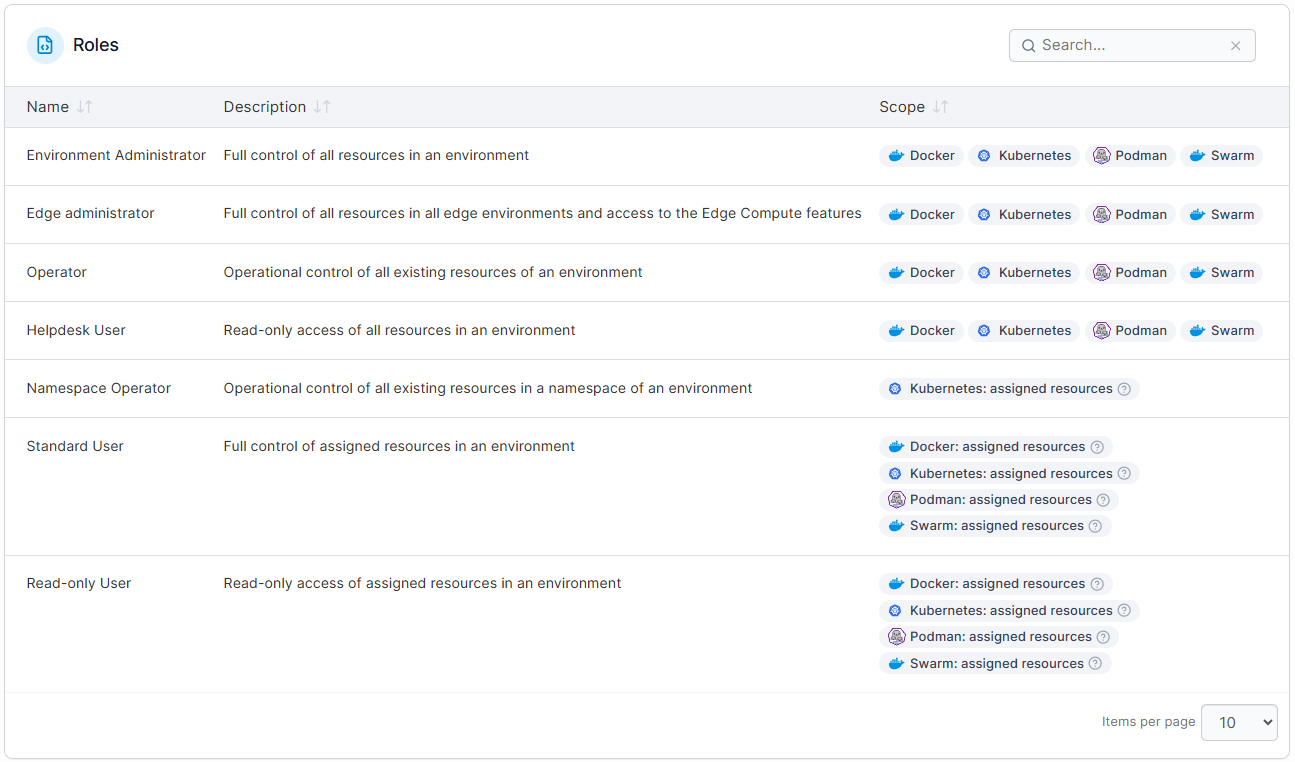
Bottomline: you bring the ingress controller; Portainer provides the visibility, access control, and day-to-day operational layer around it.
Try Portainer for free and simplify your Kubernetes management today.
Key benefits of using a Kubernetes Ingress Controller
TL;DR:
| Benefit | What improves | What to watch out for |
|---|---|---|
| Simplified traffic management | Centralized routing, TLS, and traffic policies; easier day-to-day operations | Depends on controller choice, documentation, and team workflows |
| Improved security posture | Consistent TLS, authentication, and IP restrictions; fewer gaps and misconfigurations | Effectiveness depends on controller configuration and updates |
| Consistent behavior across services | Uniform routing, retries, and error handling; predictable service behavior | Requires careful manifest management and controller alignment |
| Cost and efficiency gains | Fewer load balancers, reduced cloud networking complexity, and lower admin effort | Savings vary based on traffic patterns, controller, and cloud pricing |
| Scalability and ownership boundaries | Independent service scaling, clear team responsibilities, and reduced conflicts | Depends on controller configuration and defined team processes |
Below, we explained the benefits in detail.
Simplified traffic management and operations
A Kubernetes Ingress Controller centralizes HTTP(S) routing, TLS termination, and basic traffic policies. This means a reduced operational overhead. How?
Your team does not need to manage several cloud load balancers or per-service networking rules. They only need to declare routing behavior using Kubernetes-native resources. This makes changes easier to review, version, and roll back.
For example, to update path-based routing for many microservices, your team only needs to modify a single Ingress manifest.
The outcome?
You'll have:
- Clearer ownership
- Fewer moving parts, and
- More predictable day-to-day operations
Improved security posture
With the Controller, configuration for several microservices can be done simultaneously. This makes it easier to enforce TLS, IP whitelists, and authentication rules.
For example, a DevOps team can enable HTTPS and restrict access to internal APIs using a single Ingress manifest rather than updating every service individually.
Overall, the posture leads to a more predictable, auditable security, which benefits your team.
Consistent behavior across services
A Kubernetes Ingress Controller ensures uniform routing, retries, and error handling across clusters. This way, you experience minimal troubleshooting time (cluster-wide).
With the controller, your platform team can configure a uniform 503 retry policy across multiple APIs with a single Ingress resource. And the outcome is predictable application behavior and a smoother user experience.
Cost and efficiency gains
A Kubernetes Ingress Controller can reduce costs by:
- Consolidating load balancers
- Minimizing per-service networking configurations.
This helps teams spend less time managing individual routing setups and cloud resources.
For instance:
As a startup running several microservices, you can replace several cloud load balancers with one Kubernetes Ingress Controller. It will lower your monthly expenses and administrative effort. This means streamlined operations and potential savings for you.
Scalability and clear ownership boundaries
A Kubernetes Ingress Controller helps teams scale individual services while keeping traffic rules and responsibilities well-defined. It centralizes routing at the cluster edge for teams to focus on their microservices without interfering with others. This reduces coordination overhead and cross-team conflicts.
For example, your DevOps team can add a new service behind the existing Ingress. And they won’t even need to change other configurations.
Note
To fully enjoy the said benefits for your operations, you need to choose the right fit.
How to choose the right Kubernetes ingress controller
The right ingress controller is *contextual.*It depends on your environment, security requirements, and how much operational complexity your team can realistically support.
That said, the practical checklist will guide your decision.
Step #1: Define your routing and traffic requirements
Start with what you need right now. Ask simple, concrete questions:
Do you only need host and path-based routing? Or do you also require TLS termination, redirects, or basic authentication?
Instead of yes-or-no answers, separate requirements into must-haves and nice-to-haves. This keeps you from choosing a controller that’s powerful but unnecessarily complex.
Here is an example:
| Requirement | Priority | Notes |
|---|---|---|
| E.g., host & path-based routing | Must-have | Core ingress functionality |
| E.g., traffic rewrites | Nice-to-have | Varies by controller |
Step #2: Assess your environment and constraints
Next, ask: Where will the ingress controller run? Will it be cloud, on-prem, edge, or a mix of both environments?
From experience, environment fit often matters more than feature depth. For example, cloud-native ingress controllers are ideal when external load balancing is available, like in AWS, GCP, or Azure services. In contrast, lightweight controllers are perfect for edge or air-gapped setups.
So, let that guide your decision.
Step #3: Evaluate security and compliance needs
Ingress sits at the edge of your cluster, so security can’t be an afterthought. Evaluate how each controller handles TLS termination, certificate management, and integration with external certificate authorities.
For regulated or multi-tenant environments, look for controllers with well-documented security models, predictable upgrade paths, and active maintenance. Then, clear guidance on access controls, isolation, and vulnerability. This reduces compliance risk and operational surprises over time.
Step #4: Consider operational overhead
Ingress controllers require different handling. Some are lightweight, while others require regular tuning and deeper expertise.
So, consider your team's day-to-day tasks (e.g., upgrades, configuration changes, and troubleshooting) and the time available. If a controller runs your operations but is difficult to manage, discard it before traffic scales.
Step #5: Plan for growth and change
Finally, look beyond today’s needs. Ask: Will you support more clusters, teams, or traffic patterns in the future?
Before answering, consider project maturity, maintenance, and roadmap. Use the official Kubernetes, CNCF, or GitHub sources while at it.
Ultimately, choose a well-supported controller. This will reduce your workload now and future migration costs.
That said, let’s see some of the best controllers that tick the boxes discussed.
Top Kubernetes Ingress Controllers (2026 Comparison)
We picked the options based on operational fit, typical use cases, and practical limitations. So, choose what aligns with your environment rather than chasing features you may not need.
NGINX
NGINX is one of the most widely adopted ingress controllers in Kubernetes. It’s known for predictable performance, strong documentation, and broad community support. Teams often choose it for general-purpose routing in cloud and on-prem clusters. The tradeoff is complexity. Advanced features rely heavily on annotations, which can become hard to manage at scale.
Traefik
Traefik is popular for its dynamic configuration and Kubernetes-native discovery. It’s often used in development or smaller production environments where the priority is simplicity and fast iteration. While easy to start with, some teams find advanced traffic controls and enterprise-grade policies less mature compared to more established options.
HAProxy
HAProxy focuses on performance and fine-grained traffic control. It fits teams that already rely on HAProxy outside Kubernetes and want consistent behavior. The downside is a steeper learning curve. Operating it effectively often requires deep networking expertise and more hands-on tuning.
Kong
Kong extends ingress with API gateway capabilities, such as authentication and rate limiting. It’s well-suited for API-heavy platforms that need policy enforcement at the edge. However, many advanced features require additional components or paid tiers. That, unfortunately, increases operational overhead.
Contour
Contour, built around Envoy, is designed for simplicity and performance in Kubernetes environments. It works well for teams that want a clean separation between routing and application logic. Its narrower scope means fewer built-in features compared to more extensible ingress platforms.
Operational tip
Eventually, your ingress rules will grow across clusters and teams, so managing them becomes just as important as choosing the controller itself. With Portainer, you don’t have to worry. It visualizes ingress resources, controls access via RBAC, and helps manage routing changes—without requiring you to change the ingress controller you already use.
Book a demo to test it yourself!
Bring Order to Ingress, RBAC, and Multi-Cluster Ops with Portainer
As your Kubernetes environments scale (and they will), ingress rules and cluster sprawl will likely become harder to manage. To regain control, you need centralized management.
Portainer provides that. Teams use it to centralize resource management, enforce RBAC, and maintain visibility across clusters.
Ready to simplify day-to-day operations, too?
Book a demo now to see Portainer in action!