Kubernetes Secrets Types, Management, Best Practices & Solutions

Every app running inside a Kubernetes cluster needs sensitive information (e.g., passwords, API keys, access tokens) to do its job. If any of those “secrets” get exposed, you’re looking at anything from a leaked customer database to someone taking over your entire cloud account.
And it’s happening a lot. GitGuardian’s 2026 State of Secrets Sprawl report found nearly 29 million new hardcoded secrets on public GitHub in 2025 alone.
The problem is that Kubernetes makes handling those secrets look easy, but it’s not. The default settings aren’t as safe as they look, access to sensitive credentials can spread across clusters, and one wrong line in a config file can put a production password out in the open.
This guide walks you through what Kubernetes secrets are, the risks that come with managing them, and a step-by-step way to handle them properly. We’ll also show you how Portainer can help you keep track of secret access across every cluster from one place.
What Are Kubernetes Secrets?
A Kubernetes Secret is a built-in object type that stores small pieces of sensitive data (passwords, OAuth tokens, SSH keys, and similar credentials) separately from your application code and container images, inside a Kubernetes cluster.
The sensitive data is stored as a Secret so your application code remains generic, and the credentials themselves live just once in the cluster and are ready to be pulled in by any authorized workload at runtime.
Secrets are often compared with ConfigMaps, since they’re both Kubernetes objects that inject values into pods. The difference between them comes down to purpose.
ConfigMaps hold non-sensitive configuration such as feature flags and log levels, while Secrets hold anything that would cause serious damage if it got out. Both look similar in a YAML file, but Kubernetes treats them differently, and Secrets get extra handling behind the scenes.
Types of Kubernetes Secrets
Kubernetes provides several built-in Secret types, each formatted for a specific kind of credential. Here are the ones you’ll work with in practice:
| Secret type | Type value | Typical use case |
|---|---|---|
| Opaque | Opaque | Default. Arbitrary user-defined key-value data. |
| TLS | kubernetes.io/tls | TLS certificates and keys for HTTPS traffic. |
| Docker registry | kubernetes.io/dockerconfigjson | Credentials for pulling images from private registries. |
| Service account token | kubernetes.io/service-account-token | Tokens that identify a service account inside the cluster. |
| Basic auth | kubernetes.io/basic-auth | Username and password combinations. |
| SSH auth | kubernetes.io/ssh-auth | SSH private keys for authenticating to remote systems. |
1. Opaque Secrets
Opaque is the default Secret type and holds arbitrary user-defined data. If you don’t specify a type when creating a Secret, Kubernetes treats it as Opaque.
This is where teams put most of their day-to-day credentials: database passwords, API keys for third-party services, connection strings, and anything else that doesn’t fit one of the specialized formats.
Opaque is flexible because Kubernetes doesn’t validate the shape of the data, so it accepts any key-value pairs you provide.
2. TLS Secrets
A TLS Secret stores a certificate and its associated private key together in one object, typically used to terminate HTTPS traffic at an ingress controller or serve TLS from an application directly.
Kubernetes requires two specific keys in the Secret data: tls.crt for the certificate and tls.key for the private key. Any Secret using the kubernetes.io/tls type must contain both, which lets Kubernetes catch a malformed TLS Secret before it gets applied.
3. Docker Registry Secrets
Docker registry Secrets store the credentials Kubernetes uses to pull container images from a private registry such as Docker Hub, AWS ECR, Google Artifact Registry, or a self-hosted registry.
The modern type value is kubernetes.io/dockerconfigjson, and the Secret is referenced from a pod’s imagePullSecrets field so the kubelet knows which credentials to use when fetching the image.
4. Service Account Token Secrets
Service account token Secrets (kubernetes.io/service-account-token) hold the token a service account uses to authenticate to the Kubernetes API.
Since Kubernetes 1.24, pods receive short-lived projected tokens by default, so long-lived Secret objects of this type are only created when a team explicitly needs one, such as when an external system needs a stable token to call the cluster’s API.
5. Basic Auth Secrets
Basic auth Secrets (kubernetes.io/basic-auth) hold a username and password pair for applications that expect credentials in the classic HTTP Basic format.
This shows up most often with internal dashboards or older services that haven’t moved to token-based authentication.
6. SSH Authentication Secrets
SSH auth Secrets (kubernetes.io/ssh-auth) hold an ssh-privatekey for authenticating to Git repositories or remote servers over SSH.
Pods that need to clone a private Git repo during startup or connect to a legacy server typically consume one of these Secrets as a mounted file.
Common Security Risks When Managing Kubernetes Secrets
The most common mistakes with Kubernetes Secrets have less to do with Kubernetes itself and more to do with how teams handle sensitive data in day-to-day work. Four patterns account for the majority of real-world incidents:
1. Secrets Ending Up in Source Control
Secret manifests are just YAML files, and YAML files live in Git. Teams working with GitOps or CI/CD pipelines push their whole Kubernetes configuration to a repository, and the raw base64 values of live credentials go with it.
Once a Secret manifest is committed to Git, the value stays in the commit history for the life of the repo, even after the file gets deleted. If the repo is public, the credential is exposed the moment the commit gets pushed, and if the repo is private, every current and former contributor with access can read it, plus the credential gets copied into every backup, fork, and mirror the repo has ever spawned.
2. Treating Base64 as Security
Because kubectl get secret and the Kubernetes API return Secret values in their base64-encoded form, teams see the scrambled output and assume the value is protected.
But in reality, base64 offers no protection at all. For example, running echo "aGVsbG8=" | base64 --decode returns the plain text “hello” instantly, meaning any admin with kubectl or etcd access can read a Secret in one command.
3. No Rotation or Revocation Process
Kubernetes Secrets are usually created once, referenced by a workload, and then left alone. There’s no built-in rotation, and manually rotating a live credential means updating the Secret and restarting every workload that consumes it.
It’s a coordinated operation teams avoid unless something forces them to do it. In fact, a 2026 report found that 64% of valid secrets detected in 2022 were still active four years later. So, any credential exposed once has a long shelf life, which gives an attacker who gets hold of it years to use before it’s replaced.
4. Access Sprawl Across Clusters
Kubernetes RBAC starts strict, but loosens as teams take shortcuts to keep work moving.
For example, say a workload needs to read one Secret. An engineer grants a broader permission because it’s faster to write than a narrowly scoped one. Then a new team joins and needs cluster access, so their role gets copied from an existing team without anyone pruning what the old team no longer needs.
In multi-cluster environments, things get much worse because access has to be granted separately in each cluster, and the person managing it has no single view across all of them. So you end up with dozens of workloads and users holding permission to read Secrets they shouldn’t.
Kubernetes Secrets are one layer of a wider security picture. For a broader look at the tools that protect containerized workloads, see container security tools.
How to Handle Kubernetes Secrets Management Properly
To handle Kubernetes secrets management properly, you need to combine what Kubernetes gives you out of the box with a few extra layers it doesn’t. There are five things every production cluster should have in place:
- Encryption at rest. Configure Kubernetes to encrypt Secret values in etcd against a KMS provider (AWS KMS, GCP KMS, or Azure Key Vault) so they’re not stored as plain base64.
- A dedicated secret manager for high-value credentials. Tools like HashiCorp Vault, AWS Secrets Manager, or the External Secrets Operator hold the raw value outside the cluster, and Kubernetes pulls from them at runtime.
- Tight RBAC on Secret access. Only the workloads and people that need a specific Secret should be able to read it. A management layer like Portainer helps here, since scoping RBAC across multiple clusters by hand gets messy fast.
- Secret values kept out of Git. Use sealed secrets or a GitOps flow that references a secret manager, so the manifest in your repo points to a value stored elsewhere instead of holding the value itself.
- Scheduled rotation. Rotate credentials on a defined cadence, so a Secret that gets exposed has a short window of usefulness to whoever finds it.
None of these are optional for production. Handled together, they’re what makes the difference between a Kubernetes cluster that stores secrets and one that actually protects them.
Step-by-Step Guide to Create Kubernetes Secrets
If you’ve never created a Kubernetes Secret from scratch, here’s a step-by-step walkthrough of how it actually works. The examples use kubectl and standard YAML, and they run the same way regardless of which Kubernetes distribution you’re on.
Step 1: Pick the Right Secret Type
Before you touch a terminal, decide what type of credential you’re storing. Here are the three you’ll pick from most of the time:
- Opaque, for arbitrary passwords, API keys, or connection strings.
- kubernetes.io/tls, for TLS certificates paired with their private key.
- kubernetes.io/dockerconfigjson, for registry credentials used to pull private container images.
Your choice here lets Kubernetes validate the shape of your data at creation time and makes the Secret self-explanatory to whoever reviews it later.
Since Opaque covers most day-to-day credentials, we’ll walk through creating one that holds a database password for the rest of this guide.
Step 2: Create the Secret
There are two ways to create a Secret, and which one you pick depends on how your team works.
Option A: Create it with a kubectl command. This is the fastest way. Kubernetes handles the base64 encoding for you, and the Secret exists in the cluster the moment the command finishes.
kubectl create secret generic db-credentials \
  --from-literal=username=admin \
  --from-literal=password=s3cur3P@ssw0rd
The command creates a Secret named db-credentials in your current namespace with two keys: username and password.
Option B: Create it from a YAML manifest. This is what you’d use if you want the Secret defined in a file you can version, review, and apply through a pipeline.
Save this to db-credentials.yaml:
apiVersion: v1
kind: Secret
metadata:
  name: db-credentials
  namespace: default
type: Opaque
data:
  username: YWRtaW4=
  password: czNjdXIzUEBzc3cwcmQ=
Then apply it to the cluster with:
kubectl apply -f db-credentials.yaml
The data field values above are already base64-encoded. If you’d rather write plain strings and let Kubernetes handle the encoding, use stringData instead of data. Both fields do the same job; one just saves you a manual encoding step.
Step 3: Consume the Secret in a Pod
A Secret sitting in the cluster does nothing until a workload actually reads it. Kubernetes gives you two ways to hand a Secret to a pod, and which one you use depends on how the application expects to receive its credentials.
Option A: As environment variables. Most applications read config from environment variables, so this is the pattern you’ll use most often.
apiVersion: v1
kind: Pod
metadata:
  name: app-pod
spec:
  containers:
    - name: app
      image: my-app:latest
      env:
        - name: DB_USER
          valueFrom:
            secretKeyRef:
              name: db-credentials
              key: username
        - name: DB_PASSWORD
          valueFrom:
            secretKeyRef:
              name: db-credentials
              key: password
When the pod starts, it reads DB_USER and DB_PASSWORD as normal environment variables. The application code doesn’t need to know they came from a Secret.
Option B: As mounted files. Better for larger values like TLS certificates, or when you need the pod to pick up an updated value without restarting.
apiVersion: v1
kind: Pod
metadata:
  name: app-pod
spec:
  containers:
    - name: app
      image: my-app:latest
      volumeMounts:
        - name: db-creds
          mountPath: /etc/secrets
          readOnly: true
  volumes:
    - name: db-creds
      secret:
        secretName: db-credentials
The pod now sees two files at /etc/secrets/username and /etc/secrets/password, each holding the decoded value. Kubernetes updates the file contents automatically whenever the underlying Secret changes so that the application can reload the value without a restart.
Step 4: Enable Encryption at Rest
By default, the Secret you just created is stored in etcd as base64. To turn on real encryption, you configure the Kubernetes API server to encrypt Secret writes against a key or KMS provider.
You do this by creating an EncryptionConfiguration file and pointing the API server at it with the --encryption-provider-config flag when it starts. Here’s a minimal example:
apiVersion: apiserver.config.k8s.io/v1
kind: EncryptionConfiguration
resources:
  - resources:
      - secrets
    providers:
      - aescbc:
          keys:
            - name: key1
              secret: <base64-encoded-32-byte-key>
      - identity: {}
Once the API server restarts with this config in place, every new Secret gets encrypted before it’s written to etcd. To also encrypt any Secrets you created before enabling this, run:
kubectl get secrets --all-namespaces -o json | kubectl replace -f -
This command forces Kubernetes to rewrite every existing Secret, which triggers the encryption on the way in.
For anything running in production, don’t store the key locally. Point the config at AWS KMS, GCP KMS, Azure Key Vault, or a hardware security module through the KMS provider plugin, so the key itself lives outside the cluster.
Step 5: Verify and Inspect
Once your Secret is created and consumed, check that it exists and looks right:
kubectl get secret db-credentials -o yaml
You’ll see the base64-encoded values under the data field. If you want to decode a specific value for a spot check:
kubectl get secret db-credentials -o jsonpath='{.data.password}' | base64 --decode
For one cluster, that’s enough. But if you’re running Kubernetes across more than one cluster, checking Secrets by switching kubectl contexts one at a time gets old fast. Teams looking for kubectl alternatives usually turn to a management layer, which is where Portainer comes in.
See Portainer in Action: Simplify Multi-Cluster Governance and Centralize Access Control.
A management layer like Portainer gives you a single view across every cluster you manage.
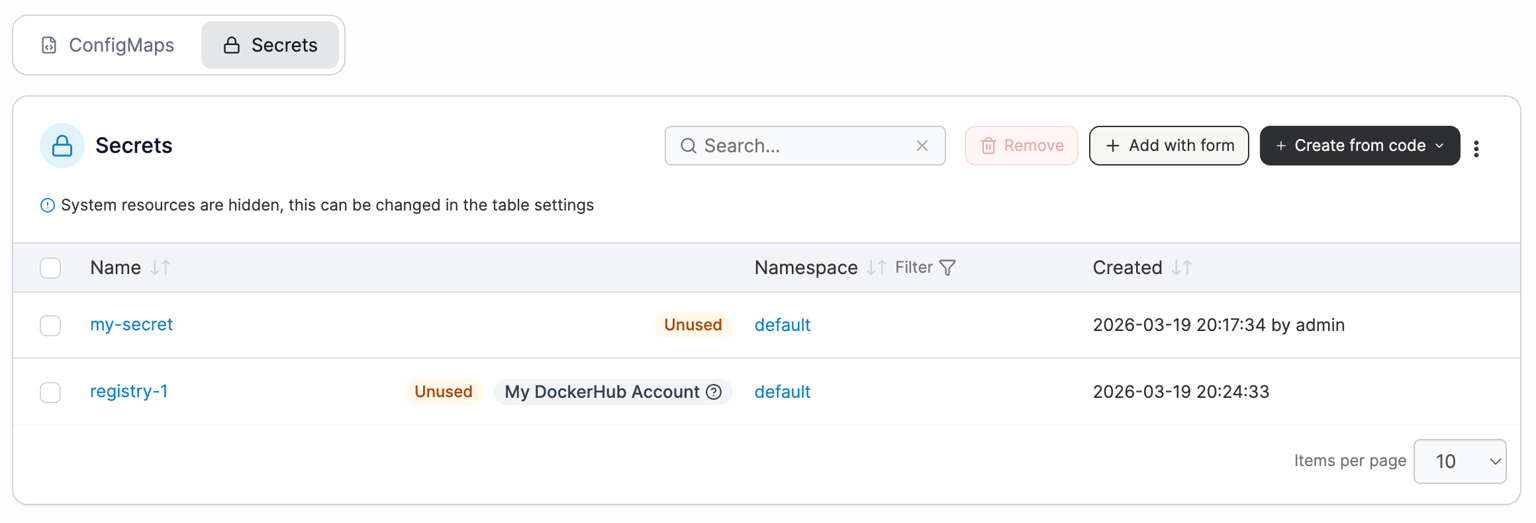
It lets you see which Secrets exist, which workloads reference them, and who has RBAC permission to read them, without switching contexts. What would take a full afternoon of kubectl audits across contexts becomes a five-minute check in one place.
Best Practices for Kubernetes Secrets Management
The technical setup keeps secrets secure at a point in time, but it’s the operational discipline that keeps them secure over months and years. Here are the practices mature teams rely on to stay in control:
1. Run Regular Secret Audits
Teams typically look at who has access to what after something goes wrong. By then, it’s a fire drill.
The best move is to set a recurring calendar reminder, either quarterly or monthly if you’re in a regulated industry, and use the time to ask yourself three things:
- Which Secrets are still sitting in the cluster that nobody remembers creating?
- Which users and workloads still have read access they don’t actually need anymore?
- Which service accounts are holding tokens for systems you retired months ago?
The earlier you catch the drift, the less it costs you.
2. Rotate Secrets When Team Members Leave
When someone leaves the team, revoking their user account is usually the first thing that gets done, and rotating any Secret they had access to is usually the last, if it happens at all.
Any credential that person could read while they were on the team should be treated as exposed the moment they walk out the door, so the fix is to bake Secret rotation into the offboarding checklist and run it the same day their access gets revoked.
3. Scope Secrets by Namespace First, RBAC Second
RBAC gets most of the attention as the access control for Secrets, and it should, but namespace design is what makes RBAC manageable in the first place.
If every team’s workloads live in a shared namespace, you’re stuck writing granular RBAC rules for every single Secret to keep access clean. In contrast, if each team owns their own namespace, you can write coarser rules at the namespace level and let isolation do the fine-grained work.
Namespace boundaries are cheaper to design and easier to audit than a tangled RBAC hierarchy.
4. Give Every Application Its Own Secret
When two applications need the same credential, the temptation is to point both of them at a single Secret and save yourself the maintenance work. Don’t.
If the credential gets compromised, you have to rotate it across both applications at once, and if either one fails to pick up the new value, you’re troubleshooting a production outage under time pressure.
Give each application its own Secret, even when the underlying credential is the same, so when it’s time to rotate, you can do one application at a time.
5. Have a Recovery Plan Before You Need One
Everything above assumes prevention, but at some point, a Secret will get exposed. Someone forgets to hand over an access token on their way out, a manifest gets pushed to a public repo, or a laptop with cluster credentials gets stolen.
Have a documented process for what happens next:
- Who gets notified, in what order?
- Which credentials get rotated first?
- How do you verify no lateral damage happened?
- How do you check whether the exposed Secret was actually used before you noticed?
Teams that plan for the fact that something will eventually go wrong are far better off than those that don’t.
For a broader look at the tooling that supports Kubernetes security beyond secrets, see Kubernetes security tools.
Portainer: Best Kubernetes Secrets Management Platform
Portainer is a container and Kubernetes management platform that sits above your cluster (or clusters). It gives platform teams a single interface to govern how Secrets are deployed, who can access them, and how that access changes over time.
It works alongside a dedicated secret manager like HashiCorp Vault or a cloud KMS, not as a replacement. Those tools handle the raw secret storage and encryption. Portainer handles the governance layer around them, so you can see which humans and workloads are pulling which credentials, from which clusters, and whether any of that access should still exist.
Here’s what Portainer specifically does for Kubernetes Secrets:
- Single interface for every cluster. Manage Secrets across every Kubernetes cluster you’ve connected to Portainer from a single login, without switching kubectl contexts or logging into separate tools.
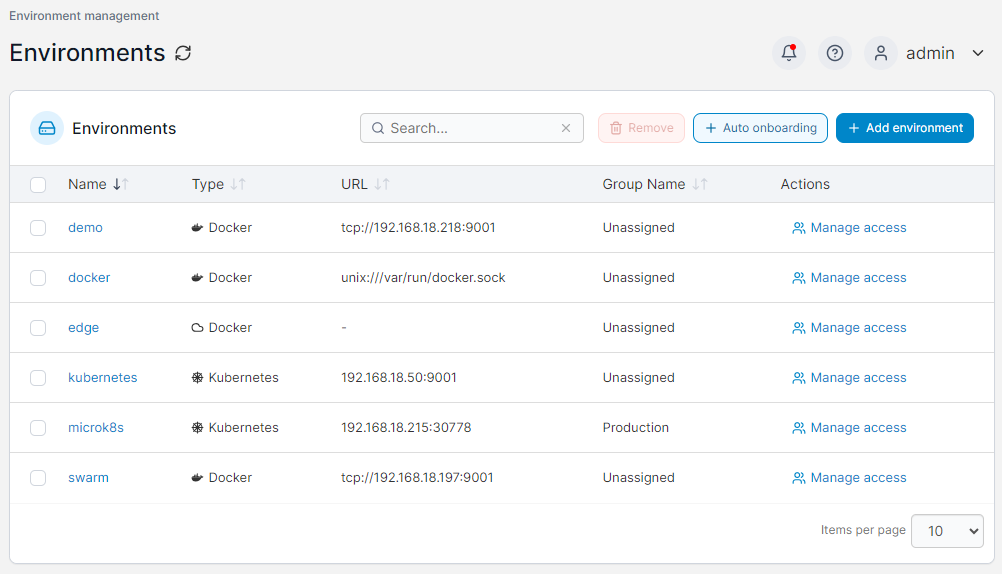
Standardized RBAC. Define access policies once and apply them consistently across every cluster, without rewriting YAML each time.
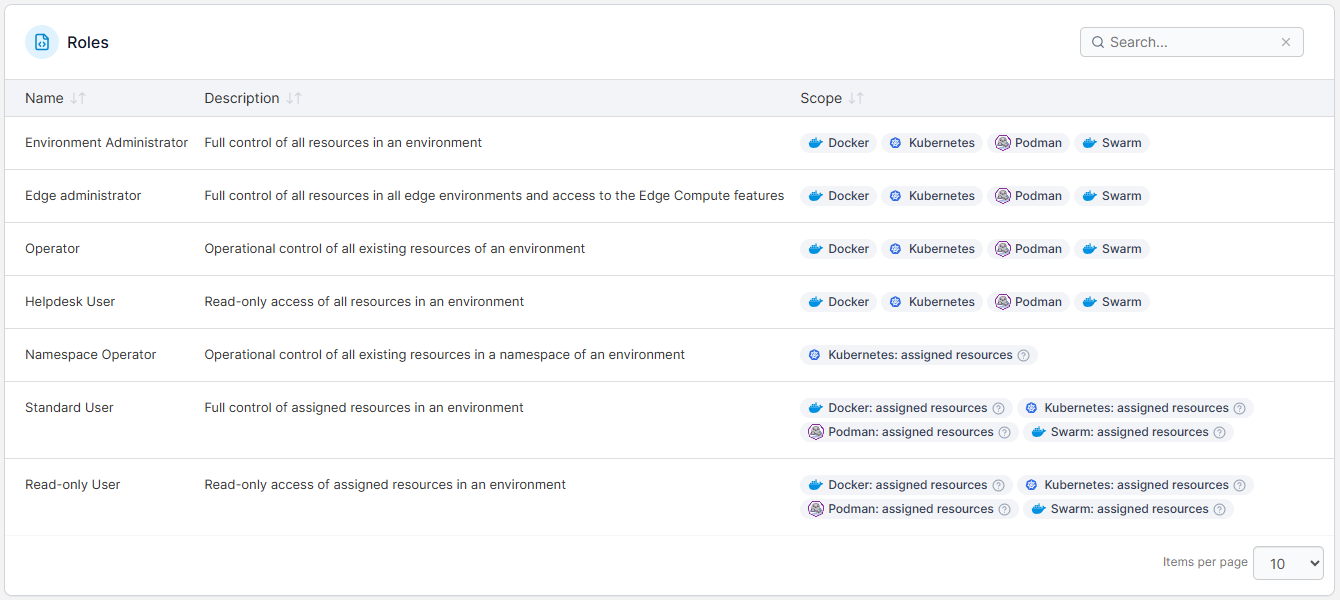
- Audit logs. Track every Secret action performed through Portainer, when, by whom, and from which cluster, with logs that can stream to your SIEM.
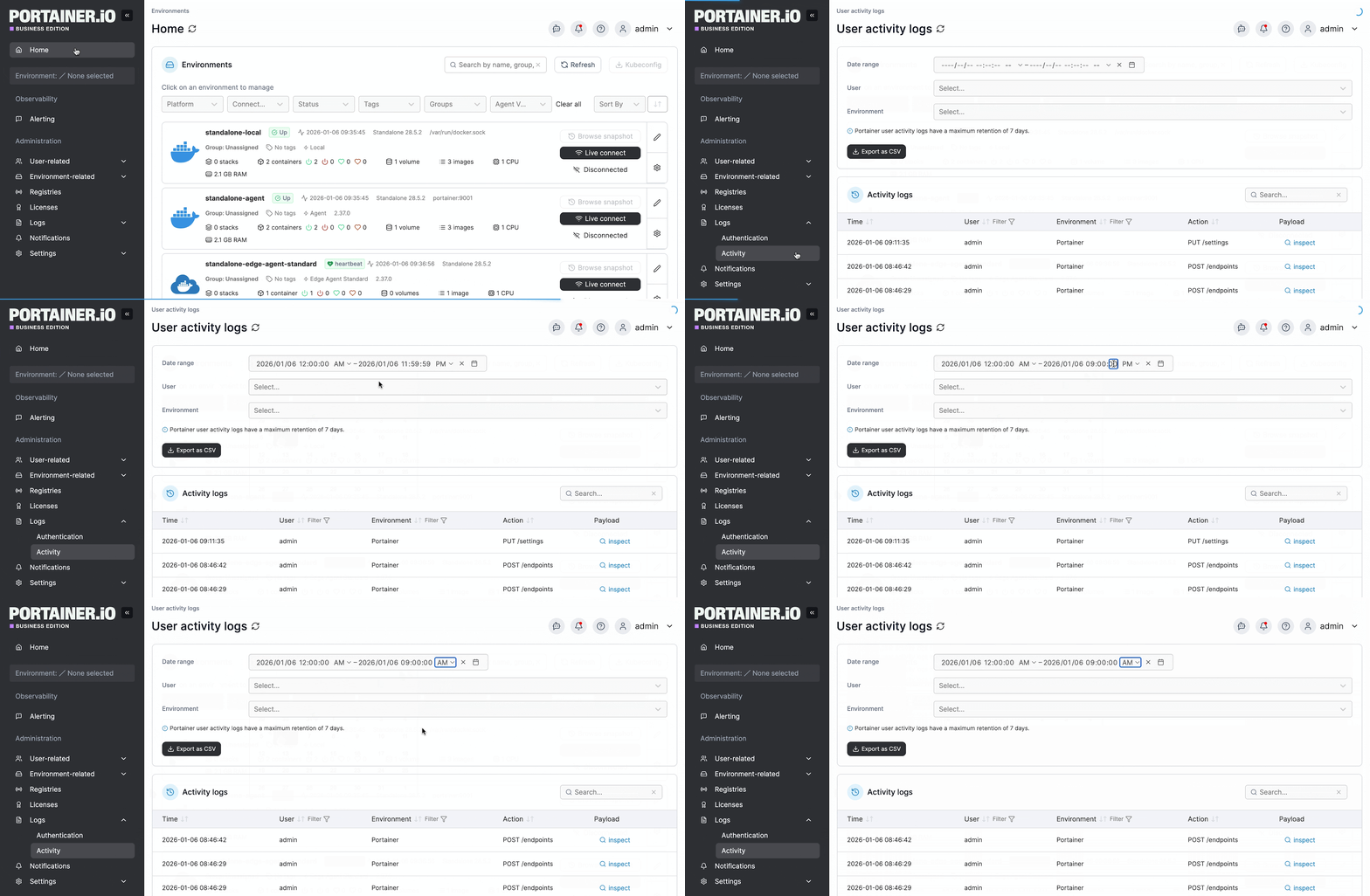
- GitOps deployment. Deploy Secrets from a Git manifest without exposing raw values in the repository, and let Portainer keep the cluster in sync with what’s in Git.
- Team-based access. Map Portainer teams to your corporate identity provider (Active Directory, LDAP, OAuth) so Secret access follows your org structure automatically.
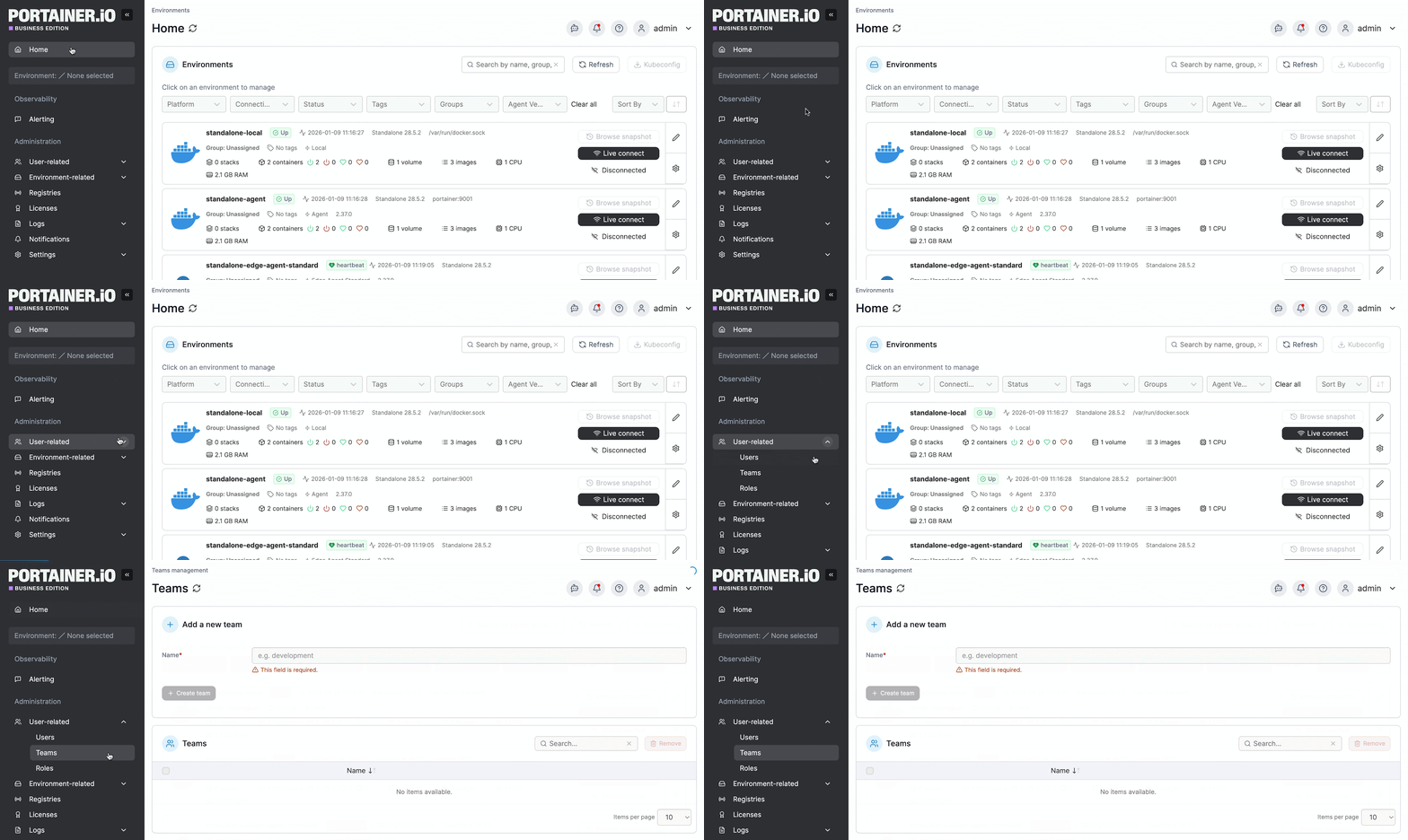
For platform teams running Kubernetes across more than a couple of clusters, this is where secrets management stops being a config exercise you set up once and becomes something you can actually govern day-to-day.
See Portainer in Action: Simplify Multi-Cluster Governance and Centralize Access Control.
Kubernetes Secrets Management Checklist
Run through the questions below against your current setup. Anything you can’t answer with a clear “yes” is worth revisiting.
Technical Setup
Is encryption at rest configured on your cluster’s API server, pointing at a KMS provider rather than a local key?
Are your highest-value credentials fetched from a dedicated secret manager (Vault, cloud KMS, External Secrets Operator) instead of stored as Kubernetes Secrets?
Are you certain no Secret with a raw value has ever been committed to Git?
Access Control
Do you know exactly which workloads and which users can read each Secret in production, without having to check by hand?
Are your namespaces designed so RBAC can be written at the namespace level?
Does every application have its own Secret, even when the credential is the same?
Operational Discipline
Do you have a rotation cadence for each Secret type, and does it happen on schedule?
Is Secret rotation part of your team’s offboarding checklist?
Have you audited who can access what in the last 90 days, outside of an incident?
Do you have a documented recovery plan for the day a Secret gets exposed?
The more of these you can answer with a clear yes, the closer your cluster is to being genuinely secure rather than looking like it.
Manage Kubernetes More Securely with Portainer
Kubernetes secrets management is one of the highest-stakes parts of running production infrastructure, and the default setup handles less of it than most teams realize.
Encryption at rest, external secret managers, RBAC discipline, keeping secrets out of Git, and scheduled rotation are all things you have to add on top of what Kubernetes gives you out of the box, and each one has to keep working as your clusters and teams grow.
Portainer is the layer that helps you keep that work under control across every cluster you manage. You still use Vault or a cloud KMS for the raw secret storage, and Kubernetes for the workloads that consume them, but Portainer handles the governance around it. It gives you a unified interface to see which Secrets exist, who has access to them, how they’re being deployed, and what changed and when.
If you want to see how it fits into your own setup, book a demo, and we’ll walk you through it against your actual environment.
FAQs
1. How do I handle secrets management in Kubernetes properly?
To handle Kubernetes secrets properly, you need to combine what Kubernetes gives you out of the box with a few extra layers it doesn’t. Enable encryption at rest against a KMS provider, use a dedicated secret manager, scope RBAC tightly so only the right workloads and users can read each Secret, keep raw values out of Git through sealed secrets or a GitOps flow, and rotate credentials on a defined schedule. A management platform like Portainer helps you keep RBAC and access consistent across every cluster you manage, which is where things usually break down at scale. Together, these are what actually make the setup secure.
2. Are Kubernetes Secrets encrypted by default?
No. Kubernetes stores Secrets in etcd as base64-encoded strings, which provides no security. To encrypt Secrets at rest, you have to configure the API server against a KMS provider like AWS KMS, GCP KMS, or Azure Key Vault.
3. What is the difference between a Secret and a ConfigMap?
A Secret holds sensitive data like passwords and API keys, while a ConfigMap holds non-sensitive configuration like feature flags and log levels. Both are Kubernetes objects that inject values into pods, and they look similar in a YAML file, but Kubernetes treats them differently under the hood. Secrets get extra handling around storage and access, and they’re the object type you should use for anything that would cause damage if it got out.
4. Can I create a Kubernetes Secret?
Yes, and Kubernetes gives you a few ways to do it. The fastest is a kubectl create secret command, which handles the base64 encoding for you and creates the Secret in your current namespace immediately. If you want the Secret defined in a file you can version and review, you write a YAML manifest and apply it with kubectl apply. Management platforms like Portainer also let you create Secrets through a UI, which is helpful when you’re managing Secrets across multiple clusters without switching contexts.
5. Should I use an external secret manager?
Yes, at least for your most sensitive credentials. Tools like HashiCorp Vault, AWS Secrets Manager, and the External Secrets Operator hold the raw value outside your cluster and let Kubernetes pull from them at runtime. This means a compromised etcd or a Secret manifest that accidentally ends up in Git doesn’t expose the actual credential. External secret managers also handle rotation, audit logging, and dynamic credential generation in ways Kubernetes Secrets alone can’t.
6. How often should I rotate secrets?
It depends on the sensitivity of the credential and any compliance requirements you’re operating under. A common baseline is every 90 days for high-value credentials like production database passwords or cloud access tokens, and annually for lower-risk ones. If a Secret is critical enough that rotating it manually would require a coordinated deployment, that’s a sign it belongs behind a secret manager that can handle rotation automatically without your team needing to intervene.