
Share this post
An industrial AI application is, at deployment time, a container. Getting that container running the same way across dozens or thousands of sites, each with its own hardware quirks, network realities, and operational rhythms, is where most fleet-scale AI programs spend their engineering budgets. Portainer's Industrial App Portal takes a different approach: an approved catalog of applications that operators can deploy across their fleet with a few clicks, without ever needing to see the underlying container architecture.
To make that concrete, take a two-site deployment of the SORBA.ai no-code industrial AI platform used for predictive maintenance, anomaly detection, process optimization, and decision support. This kind of AI application needsto run at every plant. The IAP is Portainer's deployment surface for approved, containerized applications like it, mapped to the ISA-95 site structure thatOT teams already work with.
Why traditional deployment tools miss the mark forindustrial AI
Data-center Kubernetes assumes abundant compute, uniform hardware, and reliable network connectivity between control-plane components. Very little of that holds at the edge. Traditional device management tools were built for static firmware images updated on quarterly cycles, not container workloads that change weekly and AI models that change with them. VPN-based remote access opens inbound ports on every device the moment it solves the connectivity problem, growing the fleet's attack surface site by site.
Each of these approaches was built for a different problem than the one industrial operators face today: deploying AI applications, keeping them current, and governing them across many geographically distributed facilities.
How industrial operators actually organize plants: ISA-95
OT teams organize plants using the ISA-95hierarchy (Enterprise, Site, Area, Work Center, Work), not clusters, namespaces, or pods. Any deployment surface that requires operators to translate their real-world site structure into container concepts introduces friction at every rollout. The IAP is built around the ISA-95 hierarchy so the deployment view aligns with how operators already think about the fleet.
Deploying SORBA.ai through the Industrial App Portal
The workflow below shows the IAP being used to deploy the SORBA.ai platform across two production sites. The no-code industrial AI platform that lets operators, engineers, and subject matter experts build predictive models, detect anomalies, and optimize processes without a data science team.
Step 1: The equipment hierarchy view
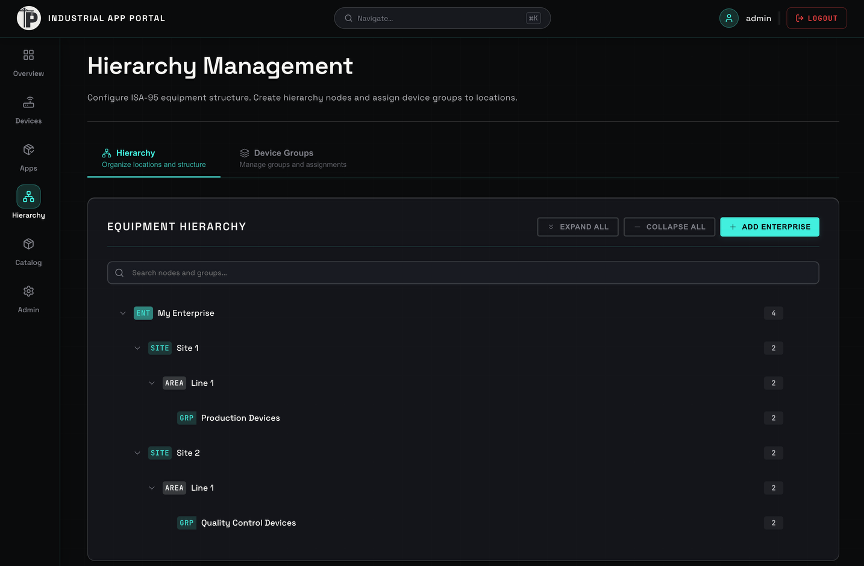
The IAP presents devices organized in the ISA-95 hierarchy the OT team already uses. Operators see a logical overview of where they're deploying applications: sites, areas, lines. Not container infrastructure.
Step 2: Selecting the application from the catalog
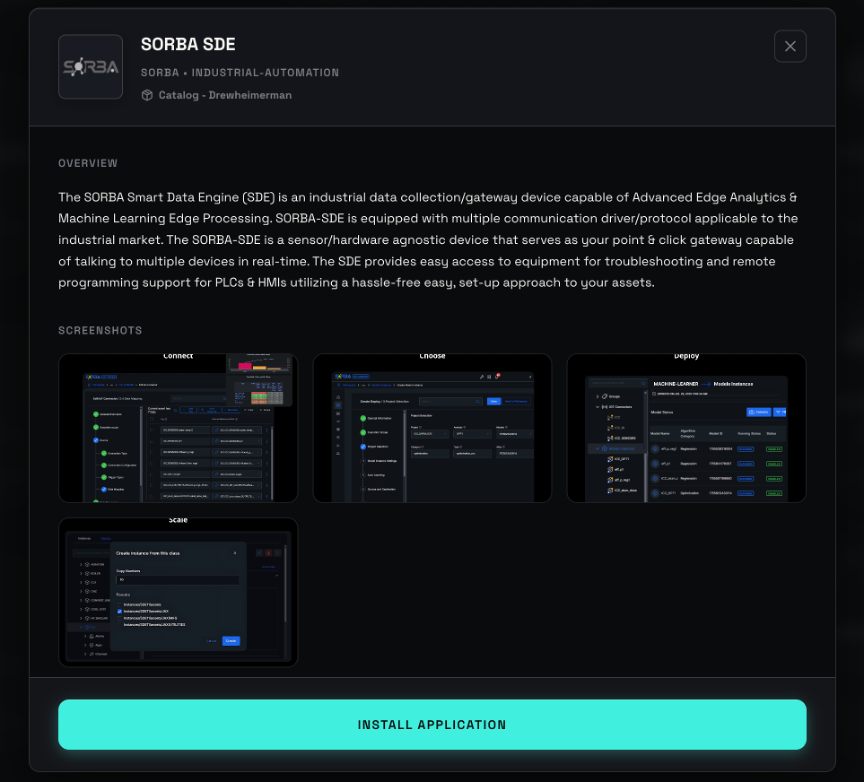
The Catalog tab lists available applications and their versions. SORBA appears alongside other approved industrial applications. Only applications that platform teams have vetted show up here.
Step 3: Reviewing application details

Each application entry shows a brief description, screenshots of the UI, available versions, and a link to documentation. A single "Install Application" button starts the deployment. The user doesn't need to know whether the deployment underneath isDocker- or Kubernetes-based.
Step 4: Choosing where to deploy
The wizard's first step is site selection.In this example, the operator picks two site lines to deploy to. The ISA-95 hierarchy is what the operator navigates, not a list of cluster IDs.
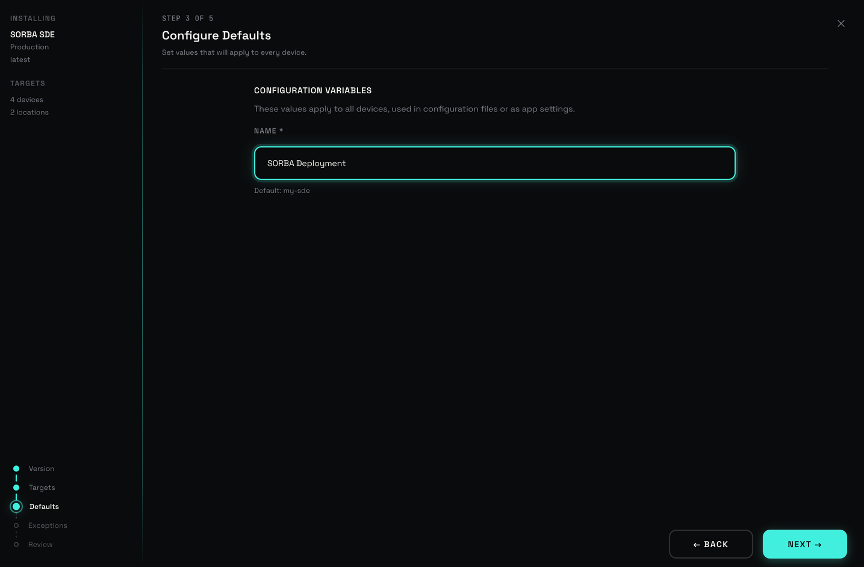
Step 5: Naming and configuring the deployment
The operator names the deployment and adjusts any application-specific configuration values here.
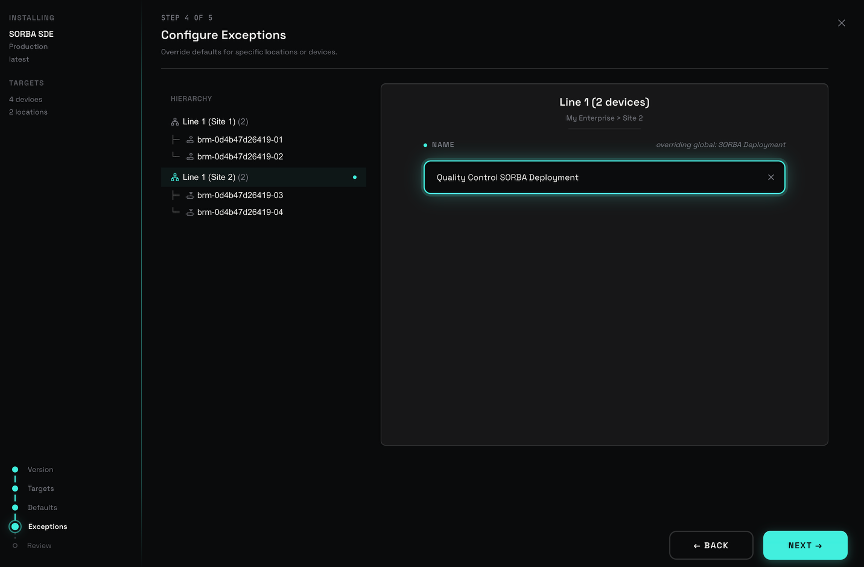
Step 6: Overriding configuration for select sites
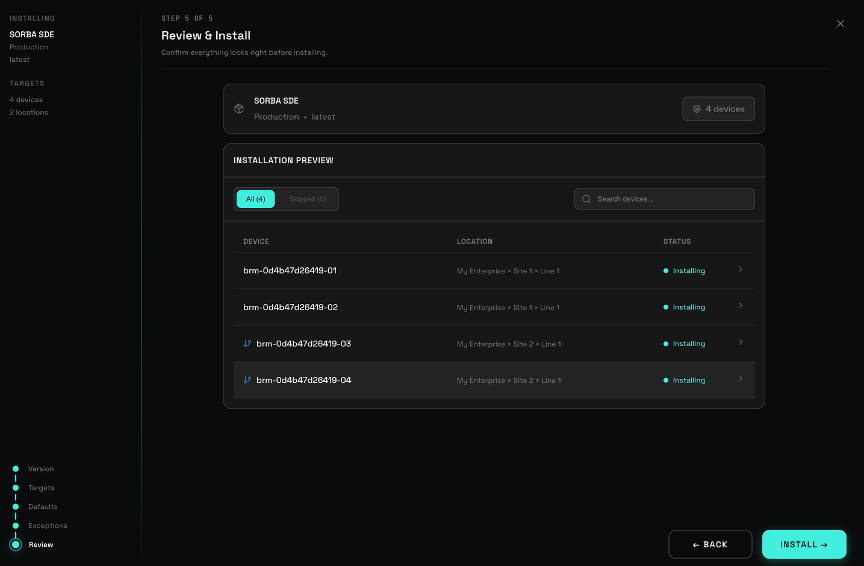
Site-level variance is normal. The IAP supports overriding configuration values for specific devices or groups. In this example, Line 1 at Site 2 has its deployment name changed to reflect a quality control focus. Devices with differing configuration show a branch icon in the review step to keep the differences visible.
Step 7: Review, install, and monitor
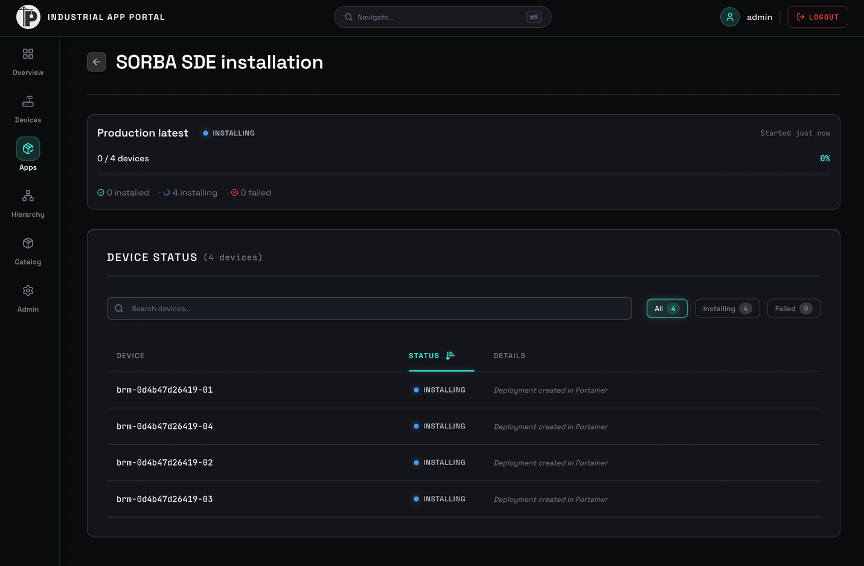
Before installing, the operator sees a review of what will deploy and where. After installation, deployment status is visible per device from the same view. If something fails, the operator sees which device and can respond without SSH-ing into machines or opening a separate dashboard.
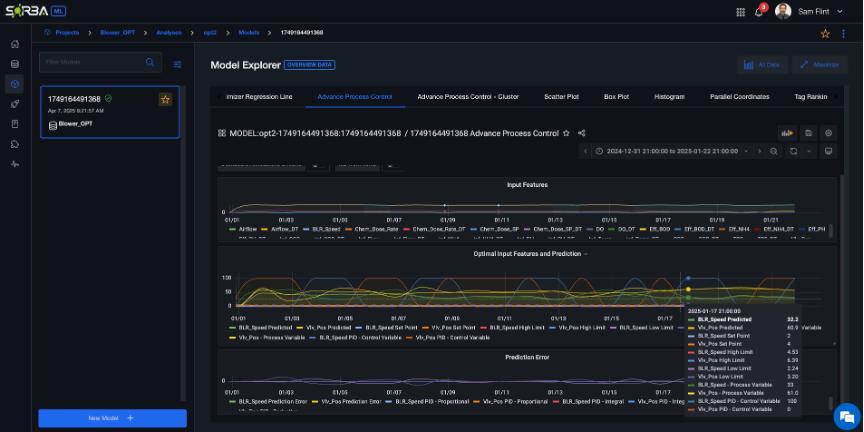
Once installed, SORBA runs its own interface on each site: ingesting operational data, running its models, and presenting results to the operator.
What changes when deployment isn't a bottleneck
With the deployment surface in place, industrial AI stops behaving like a project and starts behaving like infrastructure. Model updates ship through the same catalog path as the initial install. Site-level configuration variance stays inside the platform instead of forcing forks. OT teams don't wait for IT to schedule the rollout, and IT doesn't have to walk operators through Kubernetes to make it happen. Access control, audit, and lifecycle management follow the fleet by default, at the control plane rather than reinvented at each site.
None of this is about making container technology easier to explain. It's about not making operators explain container technology at all.
Security and governance sit inside the workflow, not next to it
For teams operating in regulated environments (pharma, energy, food and beverage, healthcare, defense) ,deployment tooling isn't just about speed. It's about audit trails, access control, and demonstrable compliance. The IAP is built on top of Portainer's broader edge architecture: centralized RBAC aligned to the ISA-95 hierarchy, self-hosted control plane, outbound-only connectivity for edge devices, and a full audit record of who deployed what, when, and where.
Compliance frameworks like IEC 62443 for industrial cybersecurity and NIS2 for essential-services operators are supported by the construction of the architecture itself, rather than retrofitted onto a deployment process that was never designed to think about them.

.png)

.png)